New Trade Zone
Trade Zone is now live
Use the new Trade Zone for auctions and instant-price trades so Pokemon and item offers are easy to find.
Leaderboard
-

Ultimategod360
Registered User3Points65Posts -

Hallowglow
Community Coordinator2Points412Posts -
Mrboston
Registered User1Points92Posts -
Venuzar
Registered User1Points46Posts




Popular Content
Showing content with the highest reputation on 11/04/26 in all areas
-
3 pointsGood Morning/Afternoon PRO community! I'd like to make a suggestion of the possibility of making Marshadow obtainable through a new Dungeon. Since PRO has already made dungeons where players can obtain some other mythical Pokémon such as Victini (Ruins Of Vale), Meloetta (Crux Of Melody), and Hoopa (Scattered Realm), I think Marshadow would be a nice addition to the current existing dungeon system. I also feel like Sinnoh would be a great place for something like this. Because the region could use some more activities, and having a new dungeon there would give players another reason to visit and explore it. Besides giving mythical collectors another Pokémon to work towards to to collect, I think this would also be something nice for the pve community. It would give players who mainly only enjoy pve content a new challenge and something to look forward to. and give PvP players another Pokémon to potentially add to their teams and experiment with. It could even boost competition between guilds to compete through rankings/leaderboard, giving players another reason to work/come together and strive for success! Of course, the final decision and implementation would be entirely up to the staff team. On how or if they want to add it in. I just thought it would be a fun addition to the game, and I'd love to hear what the community have in mind! Thank you for reading! ,♥️ Ultimategod3603 points
-
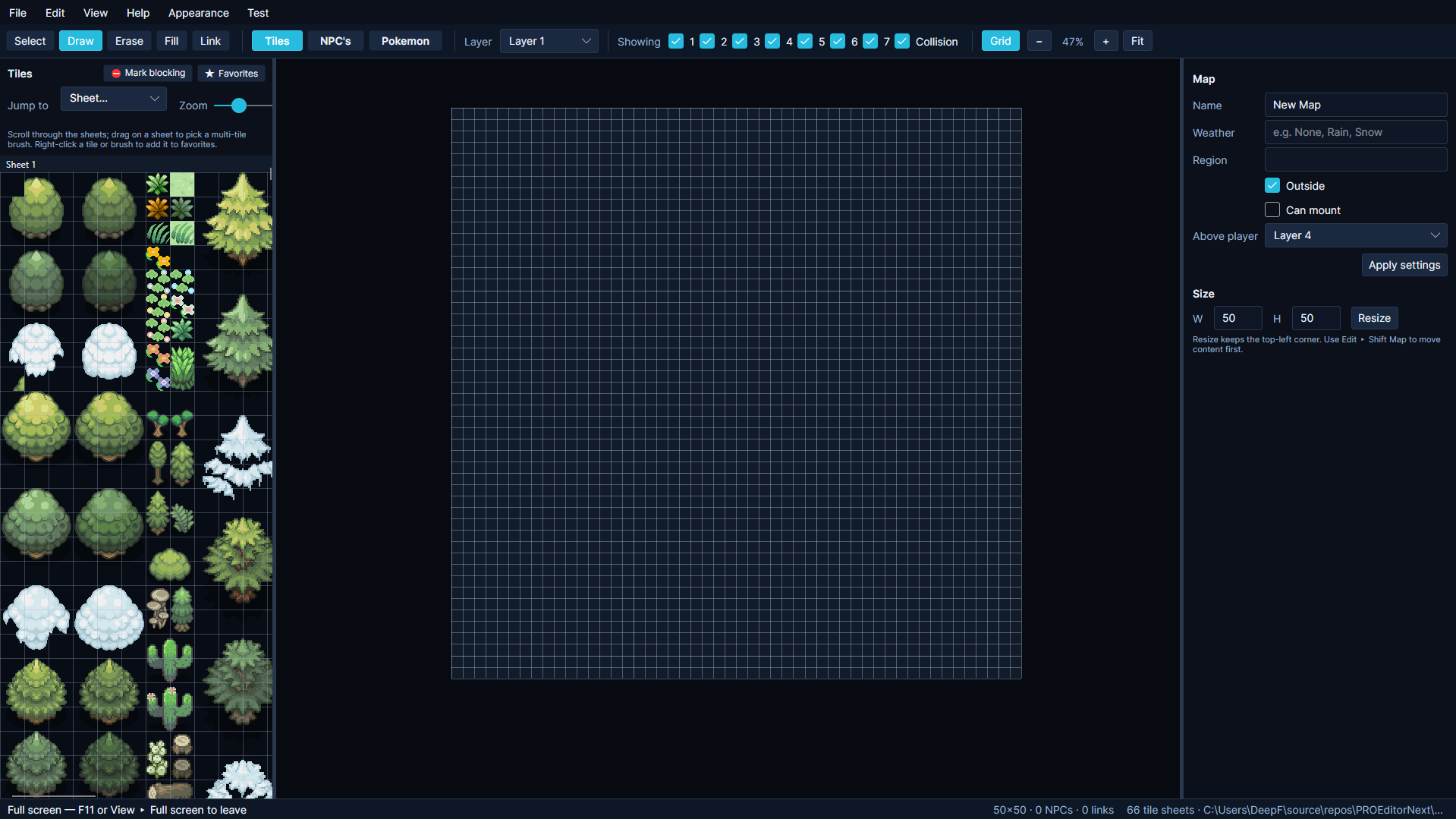
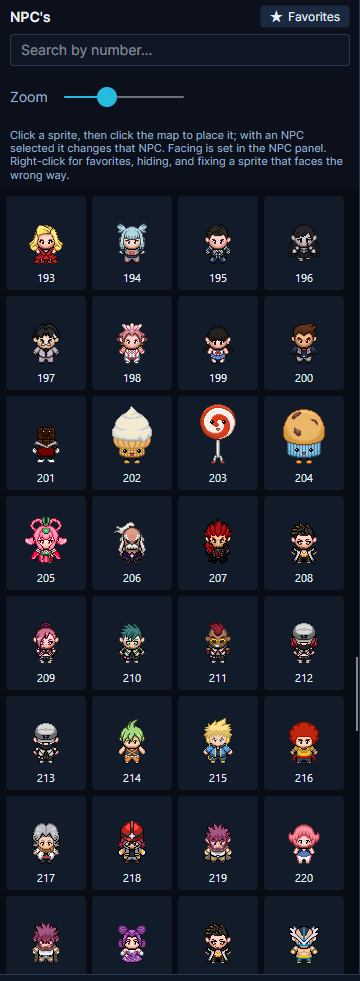
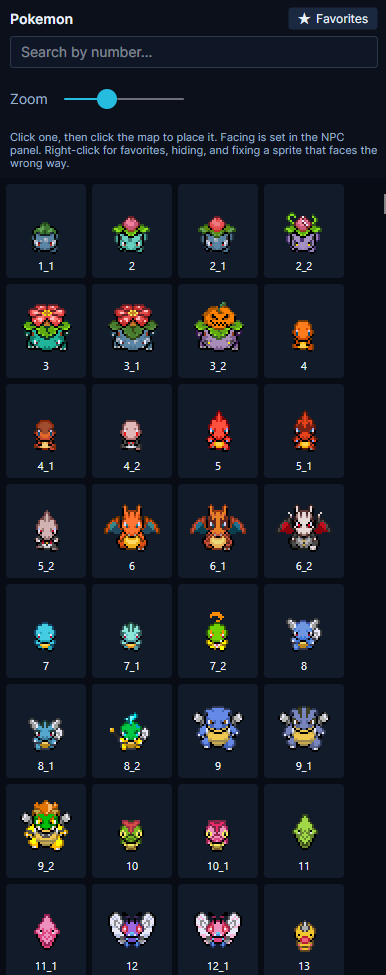
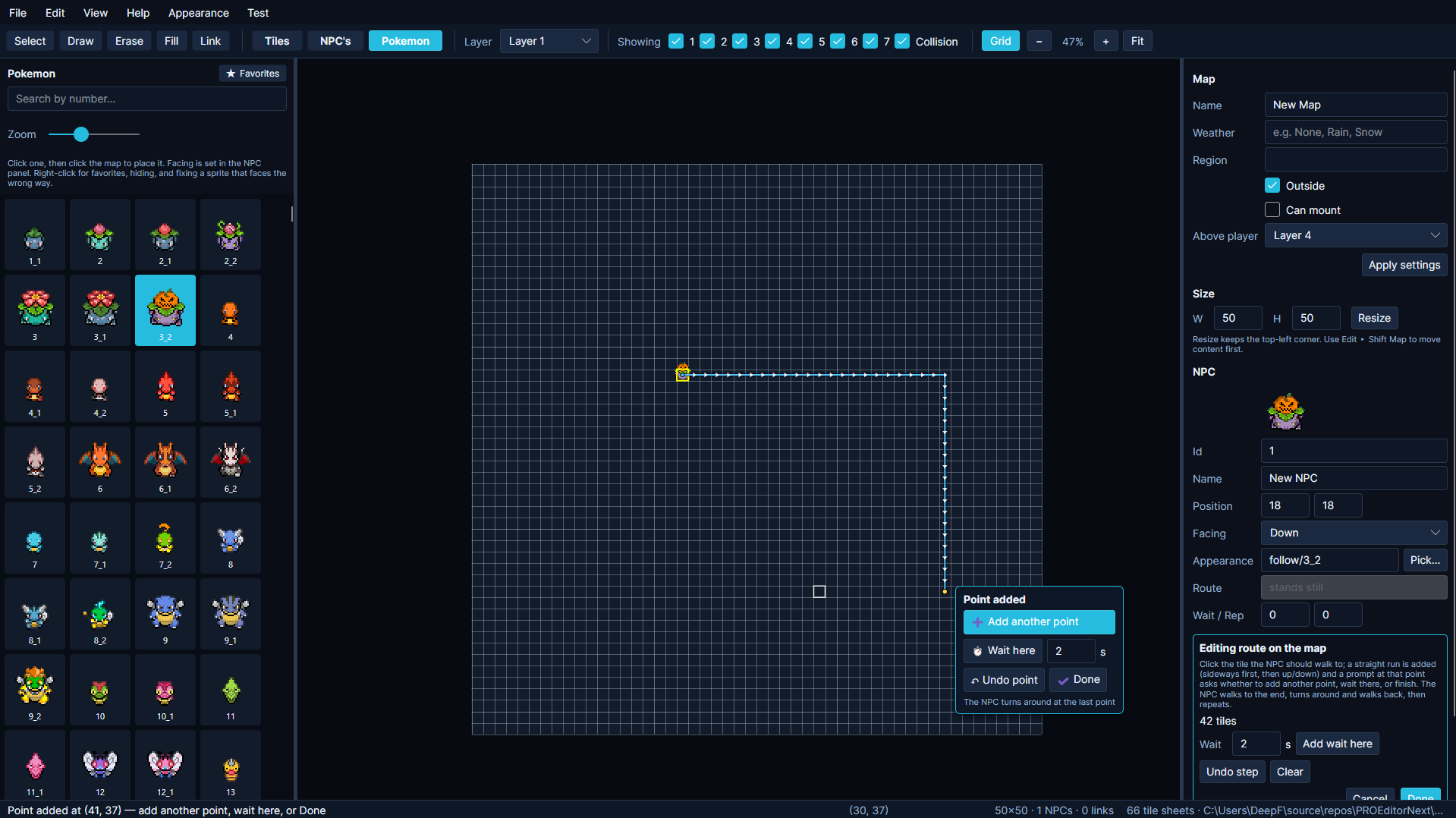
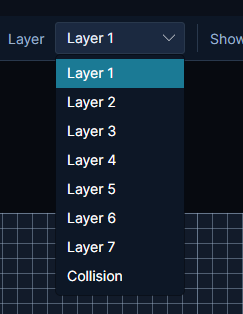
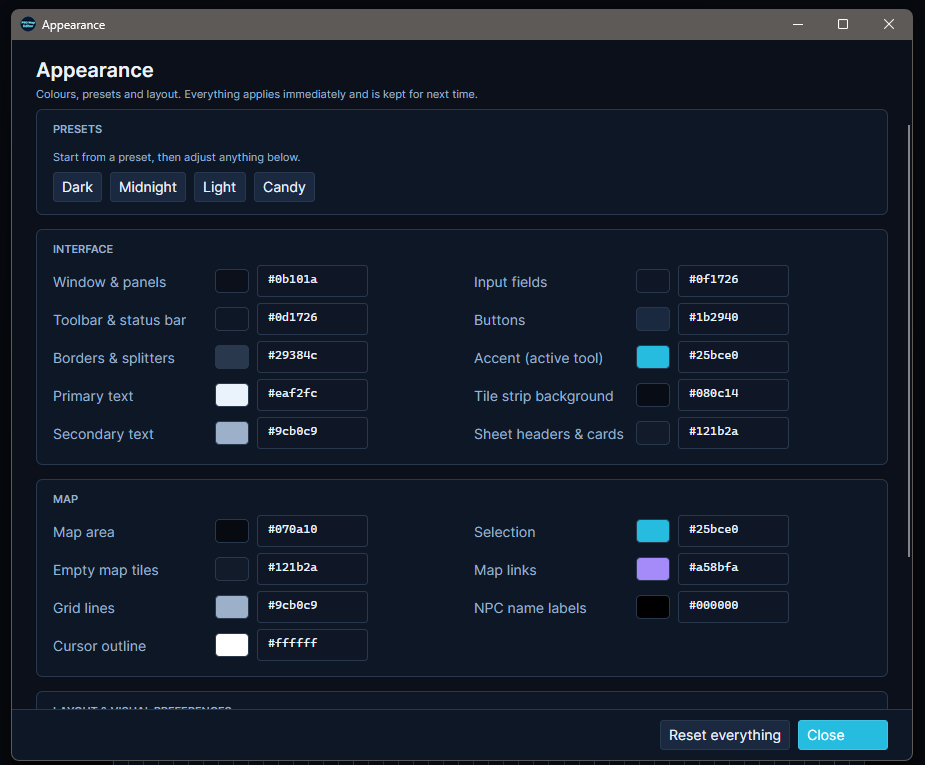
[Tool] PRO Map Editor v1.0.1 | Windows, macOS & LinuxHey everyone! I’ve rebuilt the map editor for Pokémon Revolution Online, and version 1.0 is now available for Windows, macOS, and Linux. The original editor focused on placing tiles. With this version, you can build across seven layers, populate your maps with NPCs and Pokémon, give them walking routes, and explore your own map directly in the editor. Download v1.0Windows https://dl.protrackerdb.com/mapeditor/stable/PROEditor-win-x64.zip macOS Intel Macs https://dl.protrackerdb.com/mapeditor/stable/PROEditor-osx-x64.zip Apple Silicon Macs (M1/M2/M3/M4) https://dl.protrackerdb.com/mapeditor/stable/PROEditor-osx-arm64.zip (Not sure which you have? Apple menu > About This Mac - if it says "Apple M1/M2/M3/M4" use the second link, if it says "Intel" use the first.) Linux Regular PCs (64-bit Intel/AMD - this is almost everyone) https://dl.protrackerdb.com/mapeditor/stable/PROEditor-linux-x64.zip ARM devices (Raspberry Pi 5 and similar) https://dl.protrackerdb.com/mapeditor/stable/PROEditor-linux-arm64.zip (Not sure? Run: uname -m in a terminal - "x86_64" means the first link, "aarch64" means the second.) 📋 Launching WindowsDownload. Extract the Pro Mapper files. Launch Pro Mapper. 📋 Launching Mac OSHow to start it (first time - about a minute): Unzip the download (double-click it). Open Terminal (Cmd+Space, type "terminal", press Enter). Type: cd followed by a space, then drag the unzipped folder into the Terminal window, and press Enter. Run this command: bash macos-start.sh 📋 Launching LinuxHow to start it (first time - a few minutes, it installs what it needs): Extract the zip. Open a terminal in the extracted folder. Run this command: bash linux-start.sh What’s new in 1.0?Seven map layers. The editor now has seven layers, up from four, giving you more room to separate terrain, buildings, and decorative details. You can toggle layers individually to see what you’re working on. NPC and Pokémon sprites. Browse the sprite panels and place characters or Pokémon directly on the map. Movement paths. Click points on the map to create routes for NPCs and Pokémon. You can add pauses along the way, whether you’re setting up a guard patrol or having a Pokémon wander through a village. Favorites. Right-click any tile or multi-tile brush to save it to Favorites so you can grab it again without searching through the sheets. Custom appearance. Start with a preset such as Dark, Midnight, Light, or Candy, then adjust the interface and map colors to your liking. Changes apply immediately and are saved for next time. Test your mapThe Test menu has two options: Walk around your map. Start on a random walkable tile and explore the map yourself. Try entrances, paths, and obstacle edges to see where the player can go. Run the Map Checker. See which mapping rules your map fails and catch details that are easy to miss, such as a missing corner tile on a tree. Before you do a walk test: The first five tile sheets have collision preset. For tiles from the remaining sheets, you decide which ones should block movement. Use Mark blocking, next to Favorites at the top of the Tiles panel, to set up the collision your map needs. Screenshots Feedback and map showcasesIf you make a route, village, or anything else with the editor, I’d love to see it. Feel free to share screenshots in this thread. If you run into a bug, please include your operating system, what you were doing when it happened, and a screenshot or error message if you have one. Suggestions for future versions are welcome too. Happy mapping!
 1 point
-
1 pointHello! I'm very glad I could help! Best of luck with your new legendary! Please remember that you can only choose one legendary, so if you want to obtain the others, you'll need to use Mysterious Tickets. Since everything has been resolved, I'll go ahead and close this thread. Kind regards. Hallowglow.1 point
-
1 pointHello! I'm very sorry for the inconvenience. The regional and online playtime requirements have been removed from all quests, so you should be able to complete them even if you have 0 hours of playtime. To start the Lake Trio quest, you need to be a Sinnoh Champion and have the caught data of all non-legendary Pokémon from Generation 4 in your Pokédex. From what I can see, you're only missing Bastiodon's caught data to complete the Pokédex requirement, which is why you can't start the quest yet. Kind regards. Hallowglow.1 point
-
Hello there, You can use the command /gkick <username> to remove any member, including Officers, whether they are online or not but if you want to demote officers, then they will have to be online only then you will be able to demote them by using /gdemote [username] or by clicking on thier username choosing from the options. Goodluck!1 point
-
hi, probably this will be denied but i have to trie anyways cuz is wath i wish a personal friend passed away this last weekend, and one of the few game he play was this, so i want to suggest you to put his name in a stone in lavender graveyard this dont help the community but i think my little and close group of friends we have in common will appreciate it. in case you could do this, his in game name was "Sevex" he is still in my friend list. thanks for your time.1 point
-
I'm certain that a situation like this will turn the economy upside down. For almost all players who do boss runs, time is the most important factor. By disabling Baton Pass, 20 boss fights that take 2 hours to complete could end up taking 5 to 6 hours, with heavy losses. For this reason, I want the current system to stay as it is, and I completely disagree with your opinion.1 point
-
1 point
-
+1 I know the egg slot is gone but a favorites tab in the backpack would be very useful1 point
-
0 points700 hours just started with pvp but have plaiyd it on other mmos, and im really experinced at pve0 points
-
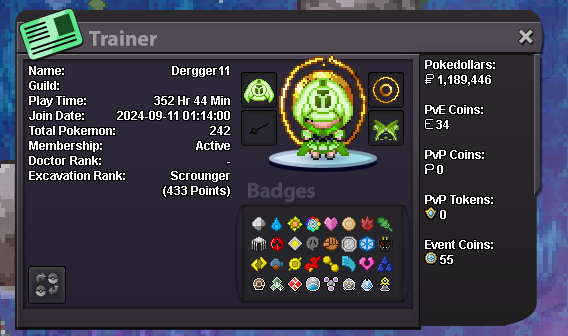
0 pointsWhat is your in-game name (IGN)? Dergger How many hours have you logged in PRO? 352 and 45 minutes(screenshot) Do you know any existing members? Paarth What is your previous guild, if any? i dont remember the name, but i was in a newly made one when i first played. i took a 2 year break and no one in that friend group plays anymore. What is your favorite Pokémon? Carnivine! Which event do you look forward to the most? Halloween!(current one if not halloween, theyre all fun) What are your main interests in PRO? (PvP, PvE, Hunting, etc.) hunting shiny/forms. What is your highest PvP rating? ive done zero pvp before that i know of. Do you have any dungeon experience? no, but i am willing to learn Are you comfortable using voice chat in English for dungeon runs? (needed for anyone interested in running dungeons) yes.
 0 points
-
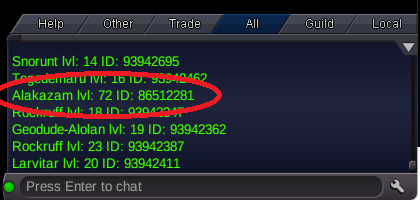
0 pointshi!, please restore my synch alakazam jolly, has epic ivs is one of my fav ID Screenshot: 56512291 Server: Gold
 0 points