




New Trade Zone
Trade Zone is now live
Use the new Trade Zone for auctions and instant-price trades so Pokemon and item offers are easy to find.

Everything posted by Igordhossegor
-
1m each (money on my main Rharomy on gold serv)
-
250k spinda (cash on main acc Rharomy on gold)
-
200k spinda (cash i on my main acc Rharomy on gold)
-
160k spinda (money on my main account Rharomy on gold serv)
-
100k spinda (money on my main account Rharomy on gold serv)
-
350k spoink 400k cacnea 300k dratini 201k wailmer
-
Ok no problem for tomorrow, let's talk by pm to coordinate
-
I offer 2,5m for 4 mons : cradily + the 3 farfetch. Let me know if interested (the cash is on gold server on my main account Rharomy)
-
7,5m here (cash is on my main account)
-
380k
-
4,5m
-
100k
-
365k
-
302k
-
110k
-
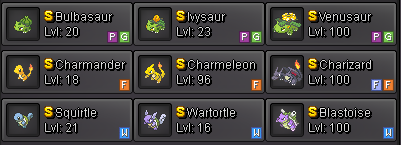
The best gen is the gen1 so obviously : - Charmander - Squirtle - Bulbasaur In shiny, it's better.
-
Last bump. I finished the gen1 starters. Enjoy.
-
17m (the cash in on gold server, main account Rharomy as usual)
-
350k ludicolo
-
50k crobat 600k sudo 600k cloyster
-
I bid on (the cash is on my main account Rharomy) : wooper unaware 150k ludicolo 300k shiny kricketune 75k sudowoodo 500k
-
7m
-
13,5m
-
Let's start this 10m, the cash in on my main account Rharomy on gold server (I transfert if I win)
-
Little update, bump

