




New Trade Zone
Trade Zone is now live
Use the new Trade Zone for auctions and instant-price trades so Pokemon and item offers are easy to find.


Shekhar786
Suspended
-
Joined
-
Last visited
Everything posted by Shekhar786
-
Start darmanitan bro
-
That's a great idea GP !! +1 mate
-
That's a nice char x Good luck, Man
-
Sturdy - impish and budget is 1m Thanks you
-
.
-
Thank you! @alfatrion1980s
-
y7ikkr698uh uhjky7rt
-
Username: Shekhar786 Server: Gold Timezone: +5:30Hey, i want to sell this volcarona having max speed and hp ice. Starting offer- 500k Minimum bid-50k 48 hours auction , Starting from first bid Mods of payment= Pokedollars, Rare Candies(8k ea.) CC-400k RR-750k Happy biddingBest Shop Ever On Forums Man !!Demm, so cool as always ! Thx a lot !!!LeviBuying this one. Please contact me on discord (Shekhu#0001)Best guild to join !! ❤️Ok thanks for replying , have a great day 😄Hi as you can see , the rain is going on and my manaphy's hydration not activated. please fix this bug.
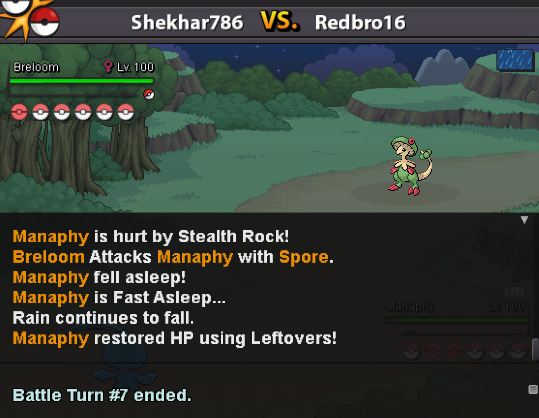 yo bro, i have to buy these two pokes. My ign is shekhar786(gold) and on discord is shekhu#2802 .yes, this feature should be added . +1oh wow thanks a lot sir for solving my problem 😄😄bumpummm thanks for replying me sir... Actually i dont know how i lost the stone ☹☹.I also think that i have done the quest(am not sure tho but i had a little memory that i have done the quest). Waiting for your speedy actioncan you jus ta char y stone in my bag since i have already done the quest but the stone is lost.

Account
Navigation
Search
Configure browser push notifications
Chrome (Android)
- Tap the lock icon next to the address bar.
- Tap Permissions → Notifications.
- Adjust your preference.
Chrome (Desktop)
- Click the padlock icon in the address bar.
- Select Site settings.
- Find Notifications and adjust your preference.
Safari (iOS 16.4+)
- Ensure the site is installed via Add to Home Screen.
- Open Settings App → Notifications.
- Find your app name and adjust your preference.
Safari (macOS)
- Go to Safari → Preferences.
- Click the Websites tab.
- Select Notifications in the sidebar.
- Find this website and adjust your preference.
Edge (Android)
- Tap the lock icon next to the address bar.
- Tap Permissions.
- Find Notifications and adjust your preference.
Edge (Desktop)
- Click the padlock icon in the address bar.
- Click Permissions for this site.
- Find Notifications and adjust your preference.
Firefox (Android)
- Go to Settings → Site permissions.
- Tap Notifications.
- Find this site in the list and adjust your preference.
Firefox (Desktop)
- Open Firefox Settings.
- Search for Notifications.
- Find this site in the list and adjust your preference.