




New Trade Zone
Trade Zone is now live
Use the new Trade Zone for auctions and instant-price trades so Pokemon and item offers are easy to find.
.jpeg.9513b29546545e7e4157820d5c938c5d.jpeg)

Sanidhya
Registered User
-
Joined
-
Last visited
Everything posted by Sanidhya
-
If that happens then all the mon who could 1 shot will prevent it and there will be no fun in playing then , focus slash was made to prevent that only And as you talking about stall games 90% of pro players don't know how to break it but there are some mons who could break it such as rain mons but it cannot be prevented This will be no fun as you thinking like that Thanks
-
1- Get rid of most one shot Are you serious about it? PvP makes a person to improve more and more With this suggestion no need to struggle to learn how to play If you want fun do randoms Thanks Sanidhya
-
200k on magby
-
Bump!
-
Bump!
-
Start
-
Start
-
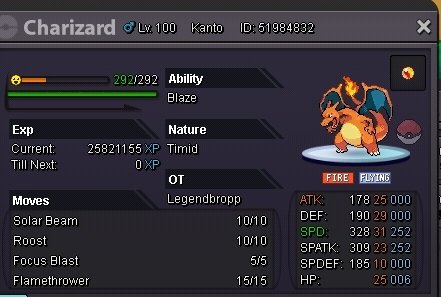
Auction C.O 800k Min bid 100k Insta 2m Ends After 2 days after the first bid Payment Accepted: Cc: 400k Rerolls: 700k Rare candy 7k Nature reroll: 350k Ty And Gl
-
-
Congrats Ign : Ninewings
-
Ok Please add more Shinys!
-
Buy linoone
-
Player name: Sanidhya Server: Gold Timezone : GMT+5 Rank on ladder : 16 (March)
-
-
Banned for Writing here
-
banned for correcting me
-
banned for taging me
-
ban for saying something which i didnt understood
-
-
-
210k
-
-
If i bid and win will you transfer to gold?
-
650k😌
-
550k

