New Trade Zone
Trade Zone is now live
Use the new Trade Zone for auctions and instant-price trades so Pokemon and item offers are easy to find.

Jettz
Registered User
-
Joined
-
Last visited
Everything posted by Jettz
-
bump
-
Bump, pls staff at least say something XD
-
Staff wake up, good suggestions here
-
-
I think they could just have some categories maybe if it's possible
-
Bump
-
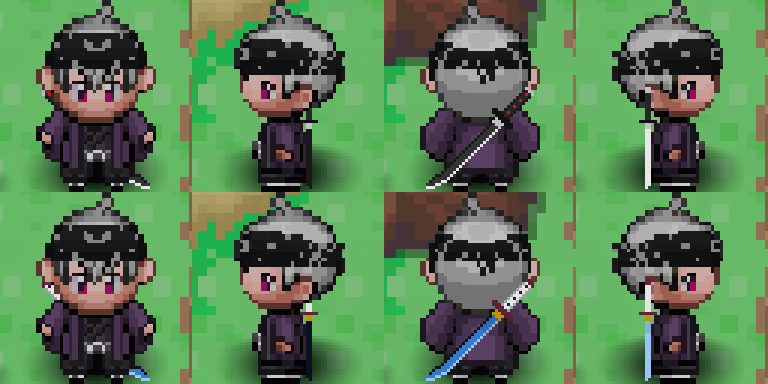
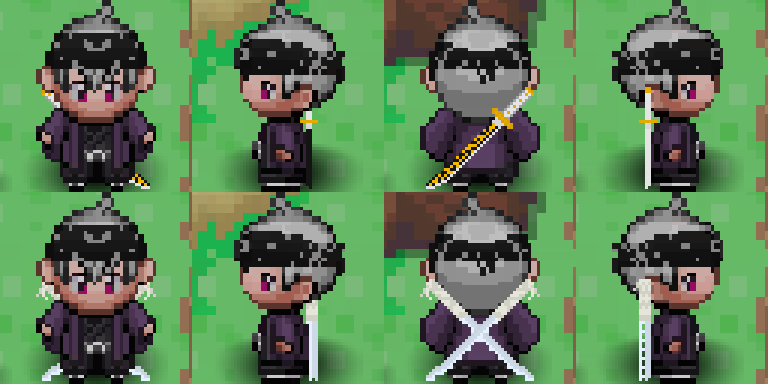
bump (Update: made the swords a lot better)
-
+1 Haven't had this problem cuz I only play on Gold but sounds like a good change, agreed
-
Added new cosmetic "Oni Mask"
-
I'm not against that but the thing is you can just click on your pokemon on the top left and hover over the move on that window to see what it does.
-
+1
-
+1
-
WELCOME TO MY NEW COSMETIC DESIGNS I like making cosmetics for the game and my goal is that the devs will see them and maybe add some of them if they think they are nice. I know that my art style is a little bit off compared to the game's but even if that's the case the devs can maybe change them a bit to make them fit. I will be updating this post every time I make a new cosmetic or I change an old one to make it look better. If you have a good idea share it and I might try it. THE DESIGNS: Agatsuma Zenitsu & Hashibira Inosuke Katana ------------------------------------------------------- Oni mask ----------- Kamado Tanjiro & Tomioka Giyuu Katana ------------------------------------------------ onimask.rar tanjirokatana.rar giyuukatana.rar inosukekatana.rar zenitsukatana.rar