New Trade Zone
Trade Zone is now live
Use the new Trade Zone for auctions and instant-price trades so Pokemon and item offers are easy to find.

Zinh
Registered User
-
Joined
-
Last visited
Everything posted by Zinh
-
why i can't evolve my bidoof form entei
-
-
-
-
start marowak
-
hi are you still playing game i want to buy slowpoke
-
-
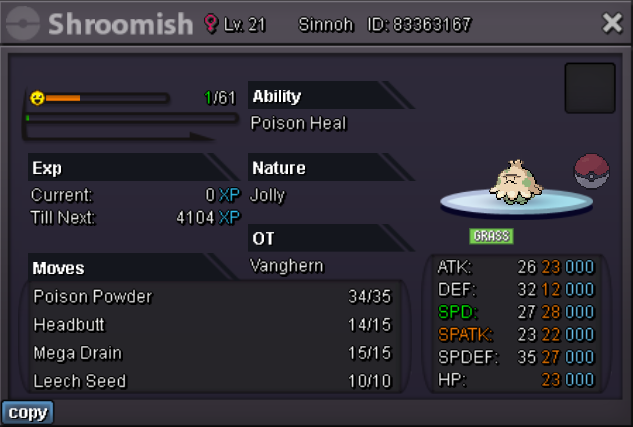
Want to buy this shroomish
-
-
350k
-
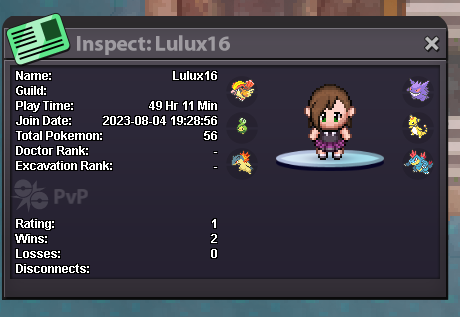
hello, i'm a player in Silver server, my ingame name is Zinh. Yesterday at 23:22 GMT 7+ i traded my pokemon named Clamperl to a player named Lulux16 at and forgot that Clamperl was caught in kanto and that player didn't finish the story in johto region so when the trade is done it is locked. can i get it back ? i need to train Clamperl to beat the boss. I have no proof of the trade or the conversation cause i didn't expect it would be locked to capture but i can provide proof that Clamperl is my pokemon and if you don't believe you can check my transactions in game this is Lulux16 player card and pic of my pokemon Clamperl it was caught on 15 15:57 pm GMT 7+ in the summer event map I had a hard time getting it. Can I get it back?
-
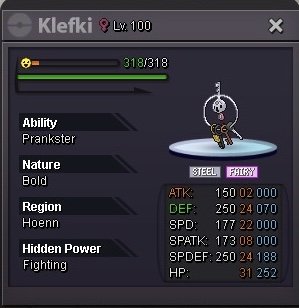
Hi can be accept trade my Klefki fully trained max hp for your Klefki ?
-
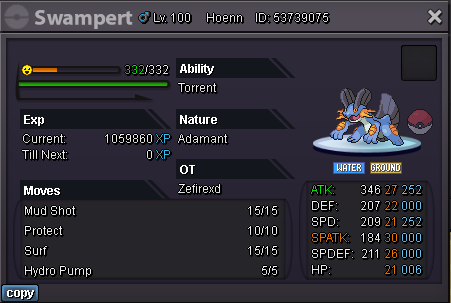
Buy this swampert 550k
-
410k
-
pm me when you online
-
900k
-
-
300k
-
want to buy breelom h.a 10 +
-
-
250k first Kingdra
-
150k for first Kingdra
-
can i bid from silver ?
-
Can a banned player claim an OT pokemon as a souvenir 🧐
-
328 lum 20 sitrus 15 leppa