




New Trade Zone
Trade Zone is now live
Use the new Trade Zone for auctions and instant-price trades so Pokemon and item offers are easy to find.

Popinsmoke
Registered User
-
Joined
-
Last visited
Everything posted by Popinsmoke
-
Hey mate, the title os a bit of a clickbait, gentle/lax are overall useless natures and people tend to only buy 31 speed gastly because it is way to common in pvp to not have max speed. Hope it helps good luck on your shop
-
Use common sense people, its not that hard. If you see the 2.6m start everyone with 2 braincells can know the insta is not 500k.
-
start price 2.6m, insta most likely 5mil and he missed a 0.
-
PLAYER CATEGORY Smartest: Teerav Friendliest: Waniardy Funniest: Squad Coolest: Squad Comeback Player of the Year: Natryu Most Talkative: Durenkan Most Trustworthy: Waniardy Most Helpful: Squad Most Missed: Grabarz23 Most Influential: Teerav Most Intriguing: Pipsi13 Most Experienced Player: Nero Best/Funniest Username: Matherfather13 Most Professional Guide Maker: Belzebel Most Professional Discord Moderator: Waleed STAFF CATEGORY Best Mapper: Tempa Best Artist: Sirmeowington Best Content Scripter: Alcedo Best Community Coordinator: Shinohara Best Moderator: Caged Best Trade Moderator: Tigerous Best Game Master: Logan Best Admin: Red Best Developer: Eaty Best Tester: Tangrowth Best Staff Username: Sirmeowington Most Professional Staff: Tigerous Most Dedicated Staff: Logan Funniest Staff: Salt Friendliest Staff: Senrosia Most Honorable Former Staff: Trolldaddy Most Missed Former Staff: Trolldaddy
-
In this game it evolves at lvl 35 if im correct
-
Nvm this ive read it wrong my bad.
-
How would it be good for the economy lol, it would ruin shiny prices. Unless you want a broken economy in that case i can see why you said its good.
-
Pokemon Sword and Shield for ezmode games, -1
-
Whats the start price, whats the insta, whats the time of thr auction, whats the minimum increase?
-
Traded, can be closed. 50k extra for a flame orb.

-
U win lemme know when u can log in
-
a bit more than 7 hours left, the winner will be contacted tomorrow when i wake up or can send me a pm on discord for me to reply on PopInSmoke#2431
-
Noted ur the b.o now.
-
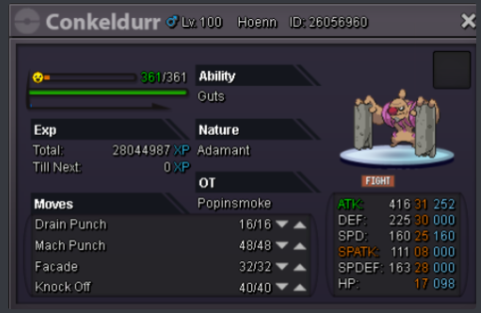
Hey all, I want to auction my Conkeldurr. The autcion will run 30 hours from the time this post is made. Rules: Offers only, trolling/fake offers will be reported. There is no Insta price, the auction will run out the timer. Minimum Increase is 100K Pokecash only, no trades or items. Current Offer: 2.4m by Keysle - End time 28-12 05:08 Gmt +1 (if im correct)
-
wtf how is it sold when you havent put an insta lol..
-
hm did u buy it for so we have a line on what to offer
-
You say ban the trollers and scammers, how easy do you think it becomes to troll and scam if you can make deals and freely back out of anything whenever you want?
-
-
Because the sites have tutors and fossil revive too. Cant close down a site just because you forget if you did one already.
-
Wauw your first usefull suggestion, +1
-
I think in several other posts they already announced it is on the planning.
-
Your suggestions where everything but great lol.
-
How would it make the game famous? "Come join this fun and easy game, do nothing besides a happy hour to get what u need"
-
Nah will rip up the ecobomy so much and with the current bossts its already good enough. -1
-
time to trash stuff then
