New Trade Zone
Trade Zone is now live
Use the new Trade Zone for auctions and instant-price trades so Pokemon and item offers are easy to find.
Leaderboard
-
.jpeg.be845f7196fd3a0df3b5fb479236a5f0.jpeg)
Gracee
Registered User4Points498Posts -
Username123456
Registered User4Points286Posts -
Allsmell
Registered User3Points2090Posts -
Lacomus
Registered User3Points9549Posts


Popular Content
Showing content with the highest reputation on 06/02/26 in all areas
-
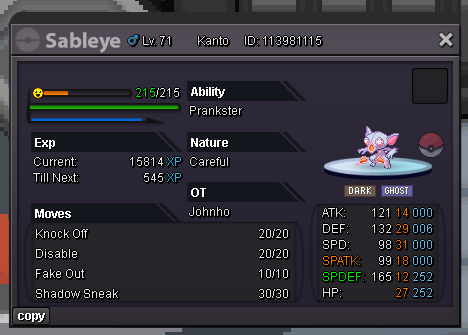
Alt Account: Sumocal (Silver Server) Auction Details: Start Price: 2m End Point: 48 hours (after start price is met) Insta Price: N/A Minimum Raise: 100k Accepted Payments: Pokedollars, Coin Capsules (x1 Coin Capsule = 480k), IV Reroll Tickets (x1 IV Reroll Ticket = 700k) Important Reminders: This is a Silver Server auction. If bidding from an alternative server, state that you will transfer upon winning. If you intend to purchase with an alt account, specify the account alongside your bid. If a bid is received in the final 15 minutes of the auction, the end point will be delayed by 15 minutes from that bid, and will be delayed by 15 minutes for each new bid thereafter, until the current offer has been held for a full 15 minutes. Happy Bidding!
 2 points
 -
2 points
-
2 points
-
2 points
-
2 points
-
2 points
-
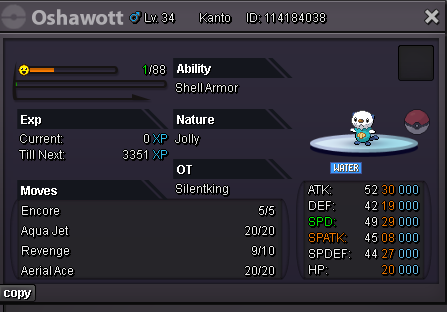
1 pointSTART price:750k min bid:50k no insta Acceptance : pokedollars Duration : 48hrs after starting
 1 point
 -
1 point
-
1 point
-
1 point
-
1 point
-
1 point
-
7m will transfer1 point
-
Sounds good. No problem discord: chaboy57521 point
-
2.5m1 point
-
2.3m1 point
-
1 point
-
Start 15m Min raise 400 k Insta 35m Accept cc 450 k Rr700k 48 hours after first bid
 1 point
 -
1 point1 point1 point1 pointIf i select intel graphics from bios and then force pro to use rtx 4070, it's working without lag and i'm able to start the game using nvidia graphics... this is more likely an hybrid mode because of the system using intel graphics, hags is disabled already and i just got the laptop from warranty (after changing the fan, they updated to win 11 25h2 and installed all drivers). I noticed another issue, if i edit the gui scale, in-game texts becoming a little bit buggy/shelled. I do not remember bugged texts before switching to win 25h2, so i'm planning a fresh installation using the original gigabyte system image (win 11 23h2) and then manually install latest drivers. Anyway, a fresh installation won't fix the startup issue (tried already for the other game)...1 point2.1m1 point1 point1 point1 point200k jango mankey1 point1 point@Sicksick It still tells me the issue is tied to the NVIDIA dGPU/Optimus path, not the game itself. Try a clean NVIDIA reinstall with DDU, then reinstall Intel iGPU and chipset drivers directly from the Gigabyte’s support page. Also, disable HAGS and test borderless/windowed mode. It could be an Optimus/MUX incompatibility with older DX9/OpenGL titles, than a raw performance issue, considering older FPS games are affected too as you said.1 point150k mankey1 point1 point1 point1 point1 point1 point1 point1 pointMulti Services -------------------------------------------------- ------------------------------------- Accepted Payments Pokedollar Coin Capsule = 480k Reroll Ticket = 700k Rare Candy = 5k -------------------------------------------------- ------------------------------------- Contact IGN: Sylrus2308 Discord: sylrus2308 -------------------------------------------------- ------------------------------------- Shop Rules (Please read the rules carefully) -------------------------------------------------- ------------------------------------- STORY SERVICE -------------------------------------------------- ------------------------------------- MEGASTONE -------------------------------------------------- ------------------------------------- LEGENDARY -------------------------------------------------- ------------------------------------- Customers are waiting for service Thanks for visiting the shop



















 1 pointStart Mankey1 point1 point1 point1 point28 spd for 150k. From madhanmadhan IGN1 point1 point1 point1 point1 point1 pointDisabled windowed and full screen optimizations and tested both iris xe and rtx 4070 graphics, still experiencing the same issue... Not sure it's worse in 165 hz, the game startup is lagging anyway but in 165 hz laptop is struggling a little bit more because of higher performances. I also had this issue while starting an old fps game, i have no clue... looks like an incompatibility issue or missing drivers/libraries. EDIT: If i change the switch from bios (PEG mode to SG mode) or switch graphics from gigabyte control center (nvidia to intel), it's working but i'm forced to use iris xe graphics, if i keep nvidia graphics it's lagging hard even if i set high performance (nvidia rtx 4070) in pro from normal control panel graphic settings. I also disabled nvidia overlay, is there something i'm missing ?1 point1 point1 point1 point1 point