




New Trade Zone
Trade Zone is now live
Use the new Trade Zone for auctions and instant-price trades so Pokemon and item offers are easy to find.

Xylos
Former Staff
-
Joined
-
Last visited
Everything posted by Xylos
-
Hey joseph101, Trace should work properly now as it got updated in the update in august. In this update was nothing done regarding this ability. You can see all updates in our Update Log. If you are aware of any bug regarding this Ability, feel free to report it in our Bug Resolution Center. Regards Xylos
-
Can you describe when the game crashes? Is it when you do something specific or is it completely random? Also, is there any crash message/log? Regards Xylos
-
Hey TRINCAXINHA, Im sorry for the inconvenience. A website with different languages is already in work. Updating to the newest PRO version is easy: Delete all previous PRO Versions to avoid any kind of bugs Download the newest version at out Download Page Unzip the data and play Let me know if everything is clarified. :) Regards Xylos
-
Hey S4mucaa3000, Im sorry for the inconvenience. Please try to delete all old PRO versions and re-download the newest PRO version on your device. PRO Downloads. Let me know if that works. Regards Xylos
-
Hey sTeVeCueloBelo, Im sorry for inconvenience. It seems that you haven't merged your account yet. The merge is needed in order to login on the silver server. What the merge is and how to merge properly, is noted in our Merge FAQ. Here a small quote out of it where is explained how to merge: Don't forget to select your right main server! (Red in your case). In case you have successfully merged but still can't login or have any other issues, please check out our Merge Issue FAQ. Kind regards Xylos
-
Hey Joguar, Im sorry for this inconvenience. Can you try to delete your current PRO version and all other old PRO versions and re-download the new client? PRO Downloads Let me know if that helps. Regards Xylos
-
Since I can see you online at the server, I assume the problem has been resolved? Regards Xylos
-
Hey BabyPika, 20 new pinkan forms has been added. That does not mean, that they currently have spawns. They will be added from time to time and we will let you know when and which. :) Regards Xylos
-
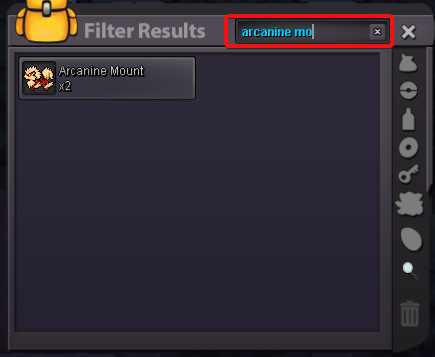
Hey devilmak, it seems that the Exp Boost is still in your inventory. Could you check it again? Feel free to use the new searching option which has been implemented since the latest update. Let me know if you have found it. Regards Xylos
-
Moved it in General Game talk as the intentional topic changed and it seems to be the proper forum.
-
Hey Zorall, Im sorry for this inconvenience. Anyway, the Dev team is working as hard as possible to make the game run again. Please stay patient. Regards Xylos
-
Hey yacoudz, Im sorry for this inconvenience. The server is currently under maintenance as its being worked on to fix several bugs. There is no ETA when the server is available again. Please stay patient. Also stated as forum message: Regards Xylos
-
Hey xXCrauceXx, dont worry, staff is working as hard as possible to make the game available for you. In meanwhile, please stay patient. Please do not spam, this wont help at all. Regards Xylos
-
Nice! Glad that the problem is solved. :) Enjoy the game! ^^ Since the problem is solved, I will lock this topic now. Kind regards Xylos
-
Hey fares4269, Im sorry for the inconvenience. May it possible that you left the Battle Tower before you tried to start the challenge? The challenge will stop when you left the tower and you have to wait till the cooldown expires. The same counts for when you had a dc and/or rollback, in this case we are sorry, but can not refund any lost progress or reset any cooldown. If nothing of that was the case, please wait till the cooldown expires and try again to start the battle tower quest. Let me know how it went. Sorry once again, but we can not reset the cooldown you currently have. Regards Xylos
-
Hey chemigoku, Im sorry for the inconvenience. You already have re-downloaded the game but could you do it one more time? Make sure to delete all old PRO files before you re-download the game. In case this does also not help, check out out troubleshoot: Let me know the outcome. Regards Xylos
-
Hey giitu, your account has been unmerged. Please make sure you select the right main server this time! (Blue in your case) Here again a quick guide how to merge: Let me know if it worked. :) Regards Xylos
-
The problem has been resolved ingame. Once again, Im sorry for the inconvenience. Have a nice day and enjoy Sinnoh! :) Regards Xylos
-
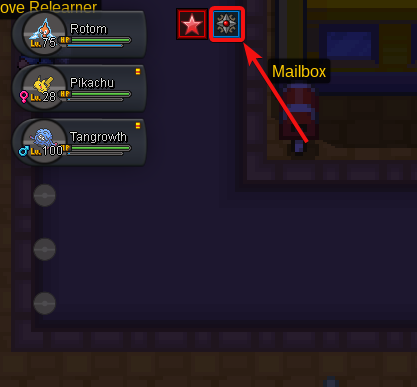
Hey ShinyCookie, Im sorry for inconvenience. Once you have bought a Black Medallion, you can activate it in your bag. If activated, you have a icon on the top left corner. If this icon appears, your Black Medallion is active and works. It increases the chance for the Hidden Ability of a Pokémon by 20%, that is right but it still is a random generated chance. You might be unlucky and get many Pokémon without Hidden Ability. If this is your issue, you are just unlucky. If you have a other issue regarding the Black MS, please let it me know by a reply at this topic. :) Kind regards Xylos
-
I will lock this topic as the problem has been resolved ingame. Once again, Im sorry for the inconvenience. Regards Xylos - Locked -
-
Exactly. Keep in mind that your accounts will be transferred, not merged. Means, your silver items and progress will be on the golden server and your gold progress and items will be on the silver server. When this transfer option is available again is not clear, it depends when the admin team decides to do it. Regards Xylos
-
Hey ArthoriasK how to merge and what the merge is, can be found out in our Merge FAQ. Here a quick quote how to merge your account: Anyway, it is not possible to merge an account to the Gold server as the server merge was done between the Blue and Red server which resulted in the Silver server. The Golden server (Before named Yellow) is standing alone for itself. In the past we already had options to transfer your account to a other server but those options are time limited and not always available, but that has nothing to do with the merge. We will let you know when this option is available again in our Announcements sub forum or in our official PRO Discord. Make sure to select the right main server! Do you have any further questions regarding this topic? Regards Xylos
-
Hey v2mr06, you are not allowed to sell your account for real money. As stated in our rules you have read and accepted: I will lock this topic now as the question has been answered. Regards Xylos
-
It is 1/16 each turn since this game is based on Gen7 mechanics. :) ~Xylos
-
Hey PokemonDzoto, firstly I moved your topic in our PvP section as this is a proper place for this topic. :) Regarding your questions: 1) The Attack stat wont be lowered for Pokémon with Guts ability, the attack will be increased with the same amount when it is Paralyzed or Poisoned. 2) Yes, it loses 1/16 of its maximum hp after every turn from its burn. 3) Yes, but it depends if its Badly Poisoned or just Poisoned. The difference is explained at Bulbapedia for example: here 4) Most players prefer the Flame Orb since the Toxic Orb causes a badly poison. Regards Xylos
