




New Trade Zone
Trade Zone is now live
Use the new Trade Zone for auctions and instant-price trades so Pokemon and item offers are easy to find.
.jpeg.283030a5dc3095a320a6874dd31702dd.jpeg)

Princekashyap
Registered User
-
Joined
-
Last visited
Everything posted by Princekashyap
-
287
-
Hello @LoneWarrior20 The same problem occurred to me in my PC last night, but it was solved by the method I told you already. Since there is macbook, I don't know further solutions, if I get any solution, I will mention you here or you can wait if other players can help you. Regards, Princekashyap
-
Hello @Pritamk130 Trade evolution can be done by trading pokemons at any level. Mysterious candy works only in a case where your pokemon need level up to evolve and your pokemon is at max level. Since, trade evolution does not require level up's, so mysterious candy doesn't works on these pokemons. Hope your doubts are cleared. Regards, Princekashyap
-
Hello @LoneWarrior20 Disable Discord integration from the client and enable it again.
-
Hello @Scarykittycat Have you tried with mysterious candy?
-
Bump
-
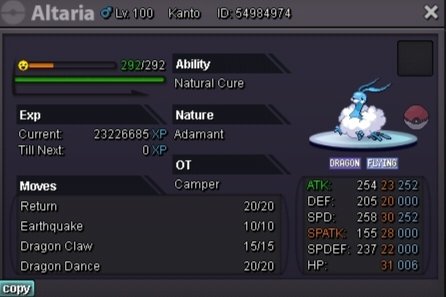
Start Offers: ------- Min. Raise: ------- No insta Other payment methods: Reroll Ticket (700K) Coin Capsule (400K) Ends in 48 Hours after the first bid. Note:-In Silver Server, players can pick up Pokémon after the auction is over. But Gold Server players will have to wait for my servers to transfer or can grab their pokemon in silver.
-
Cool
-
Auction Closed. Trade will be done and posted here once my transfer done.
-
20 Minutes Remaining
-
Bump 23 Hours remaining from now..
-
Yes, Locrito is right. -1.
-
Checkout this Video @Athul123
-
Hello @Athul123 There are many guides available on bosses in YouTube and Forum as well. You can search in YouTube or can checkout these: Ultimate Boss Guide , or Boss Guide 2
-
Hello @kimtan20082002 Try doing a friendly battle with someone (/battle) and either lose or surrender. Looking forward to your reply.
-
Hello @Iknowyou Can you put Folder of PRO in the whitelist of your Avast Antivirus. Try again now. Looking forward to your reply. Regards, Princekashyap
-
Hello @kimtan20082002 An answer has already made here.
-
Hello @kimtan20082002 You can see wild pokemons around you. Talk to them and they will start fighting to you, then log out and log in again, you will at a checkpoint after login. There will be an NPC names Exit Guide, talk to him and he will let you exit. Hope this solve your problem, I'm waiting forward to your reply. Regards, Princekashyap
-
Noted
-
Bump 4 days left
-
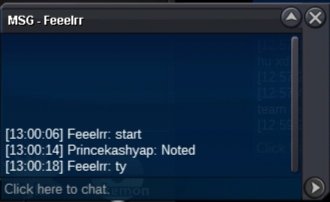
200K by @Feeelrr
-
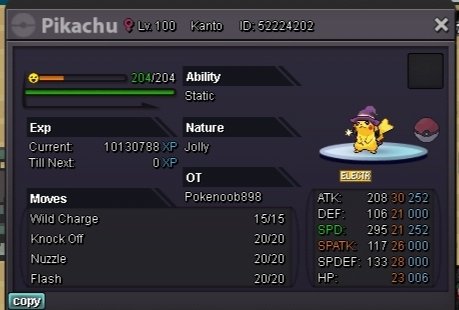
Current Offer: 300K by Ash77 Min. Bid: 100K No INSTA Other Payment Methods: Coin Capsule [400K] Reroll Ticket [700K] ENDS on 15 January 1:00 PM GMT +5:30
-
400K
-
200K M7
-
Hello @Akalaz I am sorry, the issue can't be solved by me, Please wait for an official reply from Staff.
