




New Trade Zone
Trade Zone is now live
Use the new Trade Zone for auctions and instant-price trades so Pokemon and item offers are easy to find.
.jpeg.dce22977450d77b967e27ef806a21749.jpeg)

Itzronin
Registered User
-
Joined
-
Last visited
Everything posted by Itzronin
-
130k
-
120k
-
Converted into Auction....
-
Trade completed 🙂

-
The Timebar has hit Zero and @Pizzaioloreturn has won the auction with the price of 1m Poke$. This concludes the end of the auction, I thank everyone for participating in the auction. we'll see you next time, Until then I'm OFF.
-
Can you suggest something for Suspicious Boss
-
4 hours left!!
-
7 Hours left only
-
-
New stuff added + Prices decreased for some items + New payment method added
-
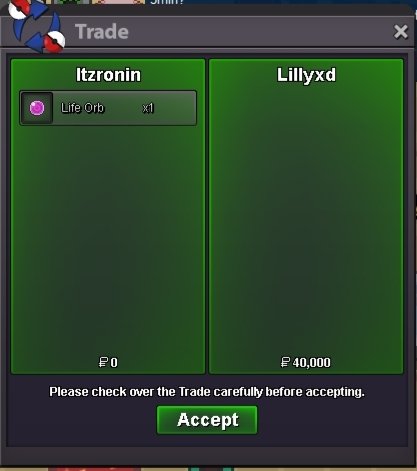
Life orb x1 sold!!!
-
Bump Around 20 hours left
-
You can buy tools in PRO's shop only using coins. You can buy from other players with pokedollars too.
-
-
-
-
-
110k
-
-
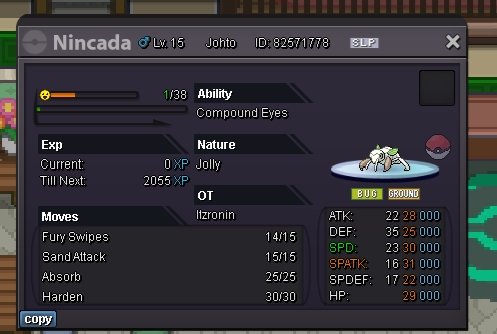
Jolly // Compound eyes Nincada Ot H.P Bug .......... Start bid :- 50k Min. Raise :- 5k Winner :- 1m Poke$ by @Pizzaioloreturn Timer Countdown :- Countdown Thank you!!!!
-
-
That would be against the law ig. This application only shows the encounter count nothing more from my pov ig
-
+1billion *n
-
+1
-
+1 I'm all yours when you mentioned money inflation in Pro...
