New Trade Zone
Trade Zone is now live
Use the new Trade Zone for auctions and instant-price trades so Pokemon and item offers are easy to find.

Prestigious
Registered User
-
Joined
-
Last visited
-
I completely agree, the pve aspect of the game is dwindling slowly along with my interest in the game. To me It seems like the game is all hunting of high tier Pokémon or pvp now a days. The boss changes make the game seem more meh as of late
-
It’s a no for me dawg
-
This one is specifically for the Artist, Devs, and Content Scripters. To get straight to the point, I think that the percentage of exclusive item drops from bosses should increase on consecutive wins and if you have Membership active when completing a boss. Currently the drop rate for exclusive items are 1%. I feel that is entirely too low considering the fact that upon completion a boss will go to cool down for 12 days.I suggest giving a 2 percent increase upon win streaks, making it 5 percent maximum at win number three. As for a Membership boost it could be around 5 percent, making a maximum 10 percent drop rate for exclusive items when it is a players third time completing it. As for the second part of this post I would also like to suggest to addition of PVP Shop items as boss drops. We all know that a big portion of this game's players aren't PVP oriented or just don't have the time for it. That being said, by adding these items as boss drops as well, you allow players to who don't play PVP an additional way to obtain these items. All while in correlation to the item drop percentages I listed above. I am not sure if you guys had other plans but I think this is a good suggestion and something that can be reasonably considered.
-
Ohh nicee Mantine :3
-
Nice guide necro! I really like it
-
Hi and welcome to the PRO Family
-
Welcome to PRO
-
Hi and welcome to PRO
-
I will miss you brother. The Discord family won't be the same without our PvP God. Hope all is well in everything to come, even though we may have not known each other the longest. Good Luck and Never give up. Sad we will never get to compete for the top spot on The Ladders. Forever PRO Family, Ryo
-
Amazing Job Sideline. Well, very well put together. One thing I would recommend adding is the rewards for the boss. But nonetheless great Guide. Can not wait to see more. Your Friend, Ryo
-
Hi, welcome to PRO and I am glad to have you here :) Your New Friend, Ryo
-
Hi Chronic And welcome to pro. Down below you will find a link to where you can find a guild. :) Nonetheless welcome to PRO https://pokemonrevolution.net/forum/index.php?forums/guilds.7/ Your New Friend, Ryo
-
Always glad to help. :)
-
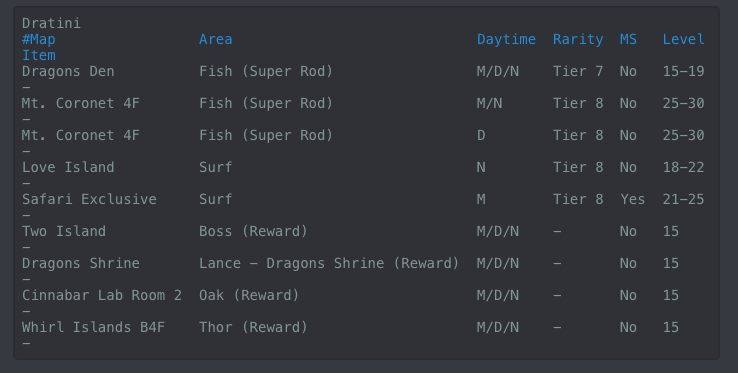
Hi, [uSER=2071394]haleluya7x[/uSER] To Answer your question, yes Xmas Dratini is available this year. Down below I have a picture list of all the places that Dratini can spawn, Please Note that there is a 1/1000 chance of any Dratini Spawns being the Xmas version. I also added a list of all available Xmas pokemon this year just in case you needed it. I hope this answer helps you. Have a great day! [spoiler=Dratini Spawns ] [spoiler=Xmas Pokemons ] Your Friend, Ryo

-
Farewell Strat. we've only known each other a little bit but nonetheless good luck on where your journey takes you. ~ Your Friend, Ryo