




New Trade Zone
Trade Zone is now live
Use the new Trade Zone for auctions and instant-price trades so Pokemon and item offers are easy to find.
All Activity
Past hour
-
1thangatonaodo joined the community
-
Good day @Gangstersus You can access the new Trade Zone here or by clicking the TRADE ZONE button in the ribbon as shown below Trade Zone Ribbon Location Once you enter the Trade Zone you will be able to see all active sales. To only view active auctions, you will need to apply a filter by selecting Auction in the Type section. You can see this below. Auction Filtering Location Once you click Auction, the populated sales will reflect. Be sure to check the other settings (e.g., Server) to ensure that you are viewing the content you desire. Does this information answer your question? If not, can you please elaborate further on the issue and provide screenshots if possible. I look forward to hearing from you. Regards, Bitterblade


-
Aotay joined the community
-
Lukaspulgas joined the community
-
Good day @Kingbilly As long as the art is fan art then that is perfectly fine. While I realize that you are asking about a specific guild logo, do remember that guild logos must be PG and appropriate. I hope this information finds you well and answers your question / concern. Regards, Bitterblade
-
Vvoid joined the community
Today
-
Thegoodman17 joined the community
-
Good day @Y1n As this thread has been addressed, I will be closing it. If you have further questions or concerns, do not hesitate to make a new one. Regards, Bitterblade
-
Good day @Ramzi2525 According to our database, you have successfully completed the quest and caught one of the Lake Trio. Congratulations! With that being said, I will be closing this thread now. If you have any further questions or concerns, do not hesitate to reach out. Regards, Bitterblade
-
Good day @Dadarkade I hope the aforementioned information found you well. Due to this thread not receiving a response in quite some time and the particular event related to this thread has concluded, I will be closing it. If the issue persist, please make a new thread. Regards, Bitterblade
-
Good day @3ttor3 Did the aforementioned information assist and is Wonderaliss still experiencing this issues? I look forward to hearing from you. Regards, Bitterblade
-
Good day @Rascalisme As this thread has not received a response in quite some time, I will be closing it. If the issue persist, please make a new thread. Regards, Bitterblade
-
Good day @Shashank555 I see that you were able to successfully transfer servers. With that being said, I will be closing this thread. If you have any further questions or concerns, do not hesitate to reach out. Regards, Bitterblade
-
Good day @Spaceviking90 As this thread has not received a response in quite some time, I will be closing it. If the issue persists, please make a new thread. Regards, Bitterblade
-
Good day @D4n1el97 As this thread has not received a response in quite some time, I will be closing it. If the issue persists, please make a new thread. Regards, Bitterblade
-
Gobii joined the community
-
Good day @Nippionion As this thread has not received a response in quite some time, I will be closing it. If the issue persists, please make a new thread. Regards, Bitterblade
-
Good day @Akisvapor47 As there has been no response in quite some time, I will be closing this thread. If the issue remains, please create a new one. Regards, Bitterblade
Yesterday
-
Icaroak joined the community
-
Sasafofa joined the community
-
After the new auction format thingy, where do i see all the auctions? I go to trade zone and i dont see there
-
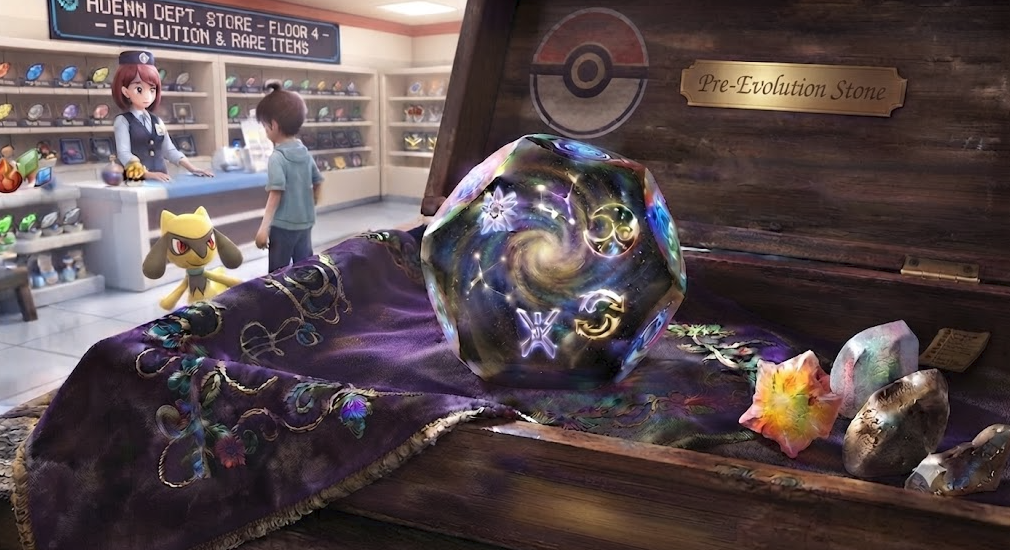
Hello! As there has been no further response, I will now proceed to close this thread. If you need any further assistance in the future, please don't hesitate to create a new thread. Kind regards. Hallowglow.Matt77767 joined the communityValira666 joined the communitybump@Zarachi ye i think that solved it thanksHi! @Minimalistic As it has been a while since my last response and i haven't received a reply from you i will be going ahead and closing this thread! If you are still having issues please feel free to reach out in a new topic and one of our staff will be happy to help you! Thanks, Satellar 🌟Hello everyone, sometimes people accidentally evolve their Pokemon into the wrong thing, for example like turning a Kirlia into a Gardevoir instead of a Gallade, or missing out on Hisui evolutions. Another issue is when you hand over your Pokemon over for a training service, and the other trainer evolves it without your permission, leaving you with no way to to fix it since we do not have a reversing evolution service. So I would like to suggest the introduction of the Devolution Stone. Item Description: A mysterious stone that fell from the cosmos. Its internal temporal distortion can revert an evolved Pokémon to its prior form. Useful for preparing for unique regional evolutions or correcting developmental paths. Shop: PvE Shop: 250 PvE Coins PvP Shop: 250 PvP Tokens/Coins Item Status: Untradeable Item Usage: Reverses the Pokemon to its first evolution stage. Rule/Infraction: If a service provider evolve someone's Pokemon without asking, they should be held responsible for providing the stone to fix it. Thanks in advance! Kind Regards, Lugario
 Hello @Gangstersus ! Apologies for the issue you are encountering. Can you please try to download the Legacy version instead? Can be found in Android download section. Once you have downloaded this one, be sure to disable the setting "Stream Music" from the sound setting. Let me know if it solve your issue. Very Respectfully, ZarachiCan you pm me ingame?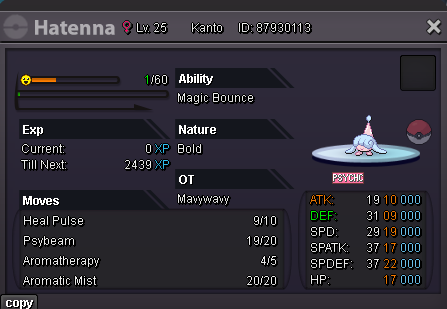











Account
Navigation
Search
Configure browser push notifications
Chrome (Android)
- Tap the lock icon next to the address bar.
- Tap Permissions → Notifications.
- Adjust your preference.
Chrome (Desktop)
- Click the padlock icon in the address bar.
- Select Site settings.
- Find Notifications and adjust your preference.
Safari (iOS 16.4+)
- Ensure the site is installed via Add to Home Screen.
- Open Settings App → Notifications.
- Find your app name and adjust your preference.
Safari (macOS)
- Go to Safari → Preferences.
- Click the Websites tab.
- Select Notifications in the sidebar.
- Find this website and adjust your preference.
Edge (Android)
- Tap the lock icon next to the address bar.
- Tap Permissions.
- Find Notifications and adjust your preference.
Edge (Desktop)
- Click the padlock icon in the address bar.
- Click Permissions for this site.
- Find Notifications and adjust your preference.
Firefox (Android)
- Go to Settings → Site permissions.
- Tap Notifications.
- Find this site in the list and adjust your preference.
Firefox (Desktop)
- Open Firefox Settings.
- Search for Notifications.
- Find this site in the list and adjust your preference.