New Trade Zone
Trade Zone is now live
Use the new Trade Zone for auctions and instant-price trades so Pokemon and item offers are easy to find.
Leaderboard
-

Immimo
Registered User2Points1075Posts -

Eaty
Developer2Points2711Posts -

Waleed1301
Suspended2Points711Posts -
Xtyku
Registered User1Points20Posts




Popular Content
Showing content with the highest reputation on 07/09/19 in all areas
-
2 points
-
1 pointRules When agreeing to buy please leave your contact information (Discord ID) or time you can be available online The Following pokemon are not for auction. First to meet a trade agreement with me gets the pokemon. Fake Buying will be Reported Available Payments I accept CC: 280k IV Reroll: 600k Nature Reroll: 300k Pokedollars 350k 600k 800k 10m




 1 point
 -
1 point
-
1 pointCan a status condition replace another condition? Pretty sure that's a bug1 point
-
1 pointpretty sure even though effect spore applies a status affect with a set chance, it still shouldn't overwrite a pre-existing status ailment ...1 point
-
1 pointHello @ArgSvamp. The mounts you mention are located in your Gold Server Inventory. On Silver Server you only own a Talonflame Mount.1 point
-
1 point
-
1 point
-
1 point
-
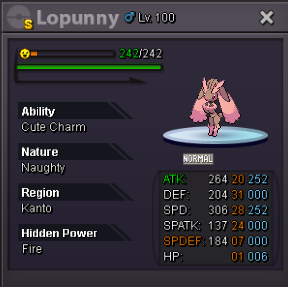
I Think its not hp fire but hp ground lol good luck ;)1 point
-
Heya, welcome. Thanks for applying to Phoenix. I will pm you in a bit. :)1 point
-
1 point
-
1 point
-
1 point
-
1 point
-
1 pointGreat Work Buddy . . . Fast and Cheap . . . Ev training + Lvl Up service . . . And 100% Trustworthy . . . . My Exp was really great . . . Various types of schemes and simple work without any advances. . . ! ! Enjoy PRO ! !1 point