




New Trade Zone
Trade Zone is now live
Use the new Trade Zone for auctions and instant-price trades so Pokemon and item offers are easy to find.

Ayroo
Community Coordinator
-
Joined
-
Last visited
Everything posted by Ayroo
-
That's great to hear! I'll go ahead and close your thread now, and I hope you have a nice day! Ayroo
-
Hello, Just confirming; Has your problem with coins been resolved?
-
Hey there, welcome! We have so many very helpful players ingame who can help you if you ever run into a snag - Make sure to ask in the Help chat channel if you ever need it!
-
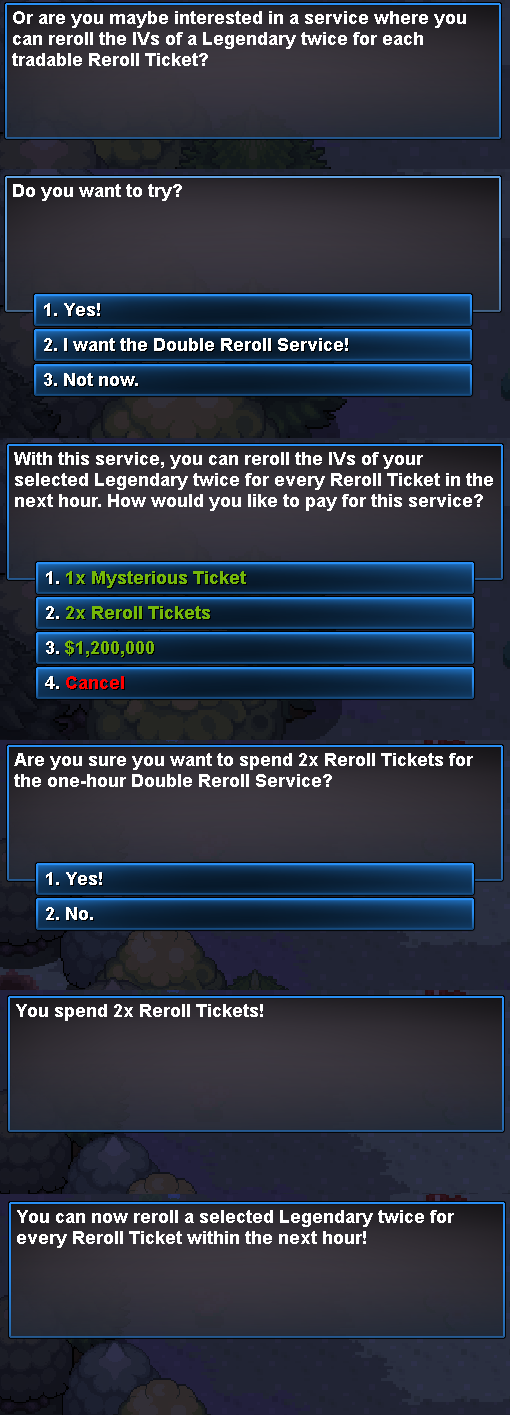
I apologize but unfortunately we have to deny your request for a refund. The NPC used to purchase the double reroll service displays the cost of the service before the transaction is completed. The transaction also requires navigating multiple dialogue windows, including confirmation prompts, before it can be completed. Posted below is that chain of dialogue: As a general reminder, we recommend carefully reviewing all information presented during a transaction before confirming it. I know this isn't the response you were looking for, and I apologize for that. I'll go ahead and close this thread now, and I truly hope you enjoy the Summer event.
-
Hey @Divinegold , I absolutely suggest you make a post about it in the bug resolution subforum here! For the purposes of this thread, I'll go ahead and close it since it's been resolved! I hope you have a wonderful Summer event!
-
Fair enough! I'll go ahead and close this thread now, but please make another if you ever have a question or believe you've encountered another bug.
-
I'll go ahead and close this thread then, and I hope you have a wonderful Summer event!
-
Due to inactivity, I'll go ahead and close this thread now. Please make another if you require further assistance!
-
I see you were able to fix your details, that's great! I'll go ahead and close this thread now. Please make another if you require further assistance!
-
Due to inactivity, I'll go ahead and close this thread now. Please make another if you require further assistance.
-
Due to inactivity, I'll go ahead and close this thread now. Please make another if you require further assistance.
-
Due to inactivity, I'll go ahead and close this thread now. Please make another if you require further assistance.
-
Due to inactivity, I'll go ahead and close this thread now. Please make another if you require further assistance.
-
Due to inactivity, I'll go ahead and close this thread now. Please make another if you require further assistance.
-
Due to inactivity, I'll go ahead and close this thread now. Please make another if you require further assistance.
-
Due to inactivity, I'll go ahead and close this thread now. Please make another if you require further assistance.
-
Hello, Unfortunately, we are unable to provide de-evolution services. If you are seeking this because you believe you missed teaching your pokemon a move that its pre-evo learns, don't worry! You can teach pre-evolution moves to a pokemon at the pre-evo tutor located inside daycares! Do you have any questions about the above, or would you like me to clarify anything?
-
Oh that's great to hear! I'll go ahead and close your thread now, but I hope you have a very nice day! Ayroo
-
Hey, There could be several things going on! Copy-Pasting Passwords: If you are copying your password from something like a notepad doc into the client's login bar, it's possible that you are accidentally copying an additional space character if you are copying more lines than just the line containing your password. Retyping the password by hand into the login screen would be one way to make absolutely certain this does not happen. If you are using auto-fill on your browser, it's possible that your auto-fill has the correct password while you have a different and incorrect password that you are typing into the game client. Double check your browser's auto-fill to see what you have saved! If you are already manually typing the username and password, make sure caps lock is not on. Double check to make sure you are not accidentally inputting the incorrect combination of username and password. For example, some users have essentially the same names for each of their accounts but just slightly different (eg Tim1, Tim2, Tim3, Tim4). If nothing suggested above works, try resetting your password! Then, try using the new password to access your account. Please let me know if you need further troubleshooting!
-
Hello, Don't worry, you have just been pretty unlucky! Spawns on the Pokedex are absolutely reliable! Cryogonal is not caught by fishing in this route, but by surfing! If a Pokemon is only catchable via fishing, it will appear with a fishing rod icon in the bottom right of its icon in the top right map spawnlist popout! To put my money where my mouth is, I personally went to this map just now and encountered a Cryogonal after hunting for 11 minutes! Do you have any questions about how the hunting system works, or about anything else to do with Cryogonal spawns?
-
Hey, Your Celebi has been restored! In the future, like @Divinegold said (thank you!), please make a request in that megathread if you ever need assistance in the future with an accidentally-deleted pokemon! Alternatively, you can also post in the PRO Discord server's #request-chat for the same thing! I'll go ahead and close this thread now, but please have a lovely day, Ayroo
-
Hello, Could you please confirm when you believe you used the reroll tickets on Heatran? Our system shows no rolls done for any pokemon besides Diancie and Victini on your account.
-
Recently, the requirements for starting the Heatran quest changed. Because access to Stark Mountain is tied to the requirements of the Heatran quest, it's very possible that you no longer have access to the mountain because the game expects you to have fulfilled the prereqs for the Heatran quest - regardless of the fact that you already have Heatran. The specific requirement I am talking about is that players are now required to have obtained all non-legendary caught data from Gen 4 (Sinnoh, 387-493). Please obtain the rest of Gen 4's caught data and then try to enter the mountain again!
-
Hey, You should be able to access Stark Mountain since you have obtained Heatran, is there an NPC preventing you from continuing? Providing a screenshot of what is blocking you would also be very helpful!
-
I'm glad to see your issue was resolved! In the future, please use the 2FA subforums to post anything related to account recovery, as that area is entirely public and safe from prying eyes! I hope you have a nice day, Ayroo
