




New Trade Zone
Trade Zone is now live
Use the new Trade Zone for auctions and instant-price trades so Pokemon and item offers are easy to find.

Ayroo
Suspended
-
Joined
-
Last visited
Everything posted by Ayroo
-
Hey, Your Celebi has been restored! In the future, like @Divinegold said (thank you!), please make a request in that megathread if you ever need assistance in the future with an accidentally-deleted pokemon! Alternatively, you can also post in the PRO Discord server's #request-chat for the same thing! I'll go ahead and close this thread now, but please have a lovely day, Ayroo
-
Hello, Could you please confirm when you believe you used the reroll tickets on Heatran? Our system shows no rolls done for any pokemon besides Diancie and Victini on your account.
-
Recently, the requirements for starting the Heatran quest changed. Because access to Stark Mountain is tied to the requirements of the Heatran quest, it's very possible that you no longer have access to the mountain because the game expects you to have fulfilled the prereqs for the Heatran quest - regardless of the fact that you already have Heatran. The specific requirement I am talking about is that players are now required to have obtained all non-legendary caught data from Gen 4 (Sinnoh, 387-493). Please obtain the rest of Gen 4's caught data and then try to enter the mountain again!
-
Hey, You should be able to access Stark Mountain since you have obtained Heatran, is there an NPC preventing you from continuing? Providing a screenshot of what is blocking you would also be very helpful!
-
I'm glad to see your issue was resolved! In the future, please use the 2FA subforums to post anything related to account recovery, as that area is entirely public and safe from prying eyes! I hope you have a nice day, Ayroo
-
Thank you very much for your patience! Could you next please try to faint the Shellos and then level it by directly fighting with it again? If the above doesn't work, please try to trade the Shellos back and forth with another character, and then try leveling it directly again. This is an infrequent bug but it does occasionally happen and is actively being worked on, thanks again for your cooperation!
-
That's all very useful information, thank you! Please try to evolve your Shellos by fighting directly with it in combat and obtaining enough experience to reach the next level. Let me know here if this helps!
-
Hey, I'm really sorry about the delay in getting back to you about this! Early on in the first few months after the box update was published, numerous players reported similar issues and bugs they encountered while using the brand new features. Since you've posted this bug report, there have been many patches pushed by the developers that have remedied these bugs, to the point where the same players now say that they no longer encounter these storage-related issues! Because many months have passed since you posted this, could I get confirmation whether or not you are still encountering these visual/storage bugs?
-
Hello, Thank you for the report on this issue! I'm very sorry for the delay in getting a response to your post. Before we proceed, can you confirm whether you are still encountering this bug? Other players who have encountered this same bug you've been dealing with have reported that the issue was patched sometime in the last several months.
-
No problem at all! I'll go ahead and close this thread now, but please make another if you encounter any other issues! Ayroo
-
I'm glad I was able to help! Good luck, and I'll go ahead and close your thread now, Ayroo
-
Could you tell me a bit more about how you've been leveling up your Shellos? If you have been feeding it rare candies to level up, please try gaining experience via battling to level it up instead!
-
Wonderful! I hope your holidays were nice! I'll go ahead and close your thread now, but please make another if you have any other problems you need help resolving, Ayroo
-
I'm very glad to hear that you were able to receive the email! Please make another post if you ever have any other issues, Ayroo
-
Hello, I was unable to replicate this. Are you still experiencing this issue? It's possible this is a problem with the Mac client, but I'm just double checking before I proceed since it's been so long since someone has gotten back to you about this!
-
Oh that's great! I'll go ahead and close your thread now, but please make another if you encounter any more strange issues, or if you have any other questions! Ayroo
-
Hey, I'm really sorry you're dealing with this! So there could be a couple things going on: Google Chrome Auto-fill: You may have an incorrect password saved in your browser. To fix this, you will have to access Google Chrome's password manager and emend the password attached to your account's Auto-Fill. Similarly, it's also possible that a browser extension is causing issues, so it's worth it to double check all extensions as well! Copy-Pasting Passwords: If you are copying your password from something like a notepad doc into the website's login bar, it's possible that you are accidentally copying an additional space character if you are copying more lines than just the line containing your password. Retyping the password by hand into the login screen would be one way to make absolutely certain this does not happen. If you have a second device, it'd be worth it to try logging into the website on that as well if the above doesn't work! Lastly, when you try logging into the website, does any message appear that looks unusual? You can include a screenshot here as well if you'd like, as long as the screenshot doesn't include any sensitive information!
-
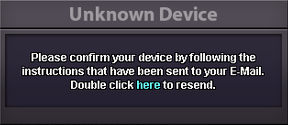
Hey, On your tablet, when you try to log into the game client, you should receive a popup to verify your device that looks exactly like this: Please double check that you are double clicking the blue word: here Once done, please check your email's inbox again!
-
Hey, I'm very sorry about the long response time! Several game updates have gone live since this thread was made - Are you still experiencing these crashes on Android?
-
Hey, I'm really sorry about the long response time! Do you have any other questions about trading, or do you need further clarification over this fundamental mechanic?
-
@Lacomus is absolutely correct! We are unable to "reset" accounts at this time, but you are free to make up to 4 total accounts to replay the game from the beginning. I apologize about how long it has taken to get a response back to you over this - Do you have any other questions about this, or would you like me to clarify anything about having multiple accounts?
-
Hello, Thank you @Y1n ! While Natural gift is attainable for many Pokemon either via the Move Relearner, this move is currently available for Petilil (and others) to learn via the egg move tutor, which you can gain access to in any of the 5 Daycares across PRO: Kanto - Route 5 Johto - Route 34 Hoenn - Route 117 Sinnoh - Solaceon Town Sevii Islands - Four Island Gaining access to Daycares in general is done by defeating Naero in Cerulean Cave B1F! Do you have any other questions, or would you like me to further clarify any of the above?
-
Hey, I see you've logged in many times since posting this thread - Are you still experiencing these crashes/freezes intermittently?
-
Hello, Please try to interact with the PC/Notebook in Professor Rowan's Lab (Sinnoh) to restore your legendary Pokemons' caught data!
-
Due to inactivity, I will now close this thread. Please make another if you would like further clarification over this mechanic.
