New Trade Zone
Trade Zone is now live
Use the new Trade Zone for auctions and instant-price trades so Pokemon and item offers are easy to find.
All Activity
Past hour
-
Iadyrias joined the community
-
Lenzky joined the community
-
Shiny Tracker for Android v2.2 is out! 🎉 No more calibration: start screen capture, walk into a wild battle, and the tracker finds the battle window by itself. If you drag the window somewhere else, it follows it, and it keeps what it has learned about sprites. Updates are easier too: tap Download and the app fetches the new version, checks it and opens the install screen, so no more digging through your Downloads folder. Update from the same link as before, and if anything looks off, send a report from the app and I'll take a look!
Today
-
Mawhns joined the community
-
Sabasyiaan joined the community
-
Notsotoxic joined the community
-
Ariannagrindr joined the community
-
Binsieuden joined the community
-
when will be receiving the reward codes?
-
Dix7 joined the community
-
Lillie02 joined the community
-
Lonewolftkf joined the community
-
-
I believe i had a little over 60 pve coins and probably spent thrn on something i just cant recall, so thats on me. However, based on what you mentioned, it soinds like the NPC Psychic is no longer functioning, and PvP content is now handled exclusively through chstes. Thank you for your time, and sorry for any inconvenience.
-
Hello! I'm glad I could be of help! Since everything has been resolved, I'll go ahead and close this thread. If you need anything else in the future, please feel free to create a new one. Kind regards. Hallowglow.
-
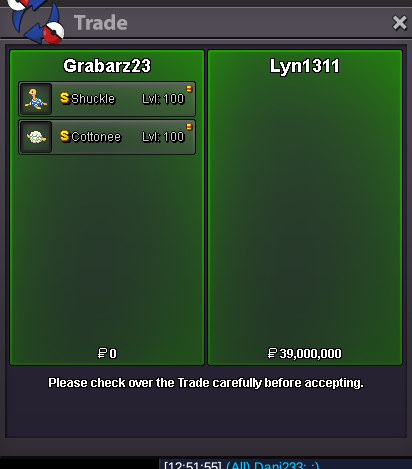
Shiny Shuckle and Shiny Cottonee sold
-
up
-
Update 15.11.26 Shiny Pokes Event Pokes
-
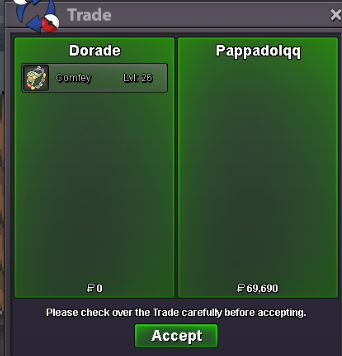
Thank you mate <3
-
-
Thank you so much, it worked! Have a great day!
-
Hello there, Use the link to join the discord and please book it from there, a provider will be assigned soon as possible Here is the link: Nova Kind Regards, Divinegold
-
Hello, I accidentally released the wrong Pokemon. Could you restore it please? Server : Silver / user name : jamesmh / pokemon : Smeargle lv 100 / ID : 98761564

-
-
I just finished the Darkrai quest in hlw event. Before i went to the dark realm i still had my macho brace. Now i can't find it anywhere. I have searched all my pokemon that i have on me and all the pokemon in the pc. Please help me because i don't know if it is a bug or not.
-
Wtb all halloween event service,
-
Hi, will the reward codes be given in-game or as a PM on forums?
Yesterday
-
Hello! Could you please provide me with more information about the PvE Coins you believe you've lost? Kind regards. Hallowglow.
-
Yes, im sorry, im playing on raupp10 on silver server...
-
bump!
-
Hello! It looks like you haven't obtained any PvE Coins yet, so there are no missing coins on your account. Regarding PvP, there are currently no PvP quests. Instead, you'll receive a PvP chest for your first daily win, whether in Random PvP or Normal PvP. After that, you'll receive another chest every two wins in Normal PvP or every four wins in Random PvP. Additionally, the top 25 players in PvP will receive a certain number of chests based on their ranking. You can find the possible rewards from PvP chests HERE. That being said, is it possible you're confusing this account with another one? Your coins might be on an alternative account. I hope this clears things up! Please let me know if you need anything else. Kind regards. Hallowglow.
-
Hello! I'm very sorry for the inconvenience. Could you please unequip the item from your Pokémon and try again? Please let me know if that works or if you need anything else. Kind regards. Hallowglow.
-
@Luizfm1997 cool, pm me or @Tutonazo
-
[Tool] Shiny Tracker Overlay — now on Windows, Linux and Mac (v3.13) Shiny Tracker Overlay is a free screen-reading companion for encounter and shiny hunting. It only looks at the small parts of the game window you choose during setup. It does not change the game, click anything, or play for you. It counts your encounters, shows your real spawn rates, alerts you when a target or shiny appears, keeps a list of your catches, adds up IVs for catch quests, works out catch chances, and makes a picture of your hunt to share. Beta warning: reading the screen is never perfect, and shiny detection isstill being improved. Always check the game yourself before you run from a valuable encounter. ## Download These links never change. They always download the newest version, so you can bookmark them or pass them on. Windows 10/11 (64-bit): https://github.com/KaizenMMO/shinytracker-builds/releases/latest/download/ShinyTrackerOverlay-Windows.zip Linux (64-bit, X11 or Wayland): https://github.com/KaizenMMO/shinytracker-builds/releases/latest/download/ShinyTrackerOverlay-Linux-x86_64.tar.gz Mac (Apple Silicon: M1 or newer, macOS 13 or later): https://github.com/KaizenMMO/shinytracker-builds/releases/latest/download/ShinyTrackerOverlay-Mac-AppleSilicon.dmg Release notes: https://github.com/KaizenMMO/shinytracker-builds/releases/latest Already using it? Go to Settings > UPDATES. There is a Copy link button for each computer type, so you can send a friend the right download. ## Getting started Windows: extract the ZIP into a normal folder (for example a new folder inDownloads) and run ShinyTrackerOverlay.exe. Keep the _internal folder next to it. Windows may show a SmartScreen warning because the app is not signed: choose More info > Run anyway if you trust the download. After this the app updates itself. Linux: extract the download and run ShinyTrackerOverlay from the new folder. It needs Tesseract (the text reader). If it is missing, the app shows the exact install command for your system with a Copy button. Works on Wayland too: the tracker reads the game window itself. The app tells you when a new version is out and gives you the download. Mac: open the DMG and drag the app into Applications. The first time, macOS blocks it because it is not registered with Apple. Go to **System Settings > Privacy & Security** and press Open Anyway (once only). The app helps you install Tesseract with Homebrew and asks for Screen Recording permission, which it needs to see the game. Intel Macs are not supported. Full instructions for Linux and Mac are in the README file inside each download. ## Quick setup (all computers) 1. Open the game in a window (or borderless) and go into a wild battle. 2. Open Settings in the tracker. 3. Name a client and press Calibrate zones. 4. Select at least Name + level. The other zones make it more accurate. 5. Turn on Track now for that client. 6. Go back to Hunt and press Start hunting. The built-in tour (in Settings) walks you through the rest. ## What's new lately - v3.13: copy a Windows, Linux or Mac download link from Settings to share. - v3.12: a proper Mac version; Linux works on Wayland (no more black screen). - v3.11: target tips name the ability to look for on the species you hunt. - v3.10: alerts play below 100% volume; covering the game no longer counts a battle twice; a shiny's "S" marker is read even if the picture is missed. The NEWS tab inside the app lists every change. ## Privacy and safety - Your hunts, settings and calibration stay on your computer. - No account, no subscription, no ads, and no automatic upload of your hunts. - The app fetches species data and pictures from PokeAPI, set advice from Smogon (via pkmn.cc), and checks GitHub for updates. - Screenshots, reports and diagnostic files are made on your computer. Look them over before sharing, as they can contain screen text. ## Feedback This is still a beta, and reports help a lot. The easiest way is the Send to developer button in Settings. Otherwise, please include the app version, your computer type (Windows/Linux/Mac), screen size and scaling, what you expected, and what happened. Please don't post private chat or account names publicly.
-
bump