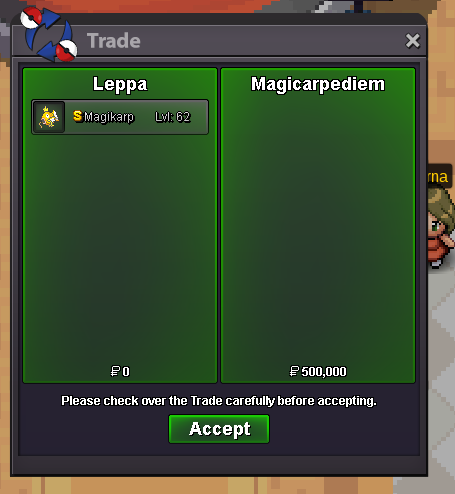
New Trade Zone
Trade Zone is now live
Use the new Trade Zone for auctions and instant-price trades so Pokemon and item offers are easy to find.
Leaderboard
-

Eaty
Developer14Points2720Posts -

Magicarpediem
Registered User10Points1446Posts -
Metanarchy
Registered User6Points303Posts -
Aless864
Registered User4Points8Posts




Popular Content
Showing content with the highest reputation on 12/25/23 in Posts
-
3 pointsHello there @Enes9696. I am Shinohara, one of the Administrator of the game. I'll keep this really short. The reason your accounts were banned were two: Macro Usage repeated times, on many accounts and for a long time. Advertising Macro tools on our official platforms. You have been found using macros several times during the past few years. Despite all the accounts you got banned for using them, you continued to create new accounts and keep using macros, which is really stupid. No one is being hostile against you, but you are violating our game rules (which you accept when registering) and just getting punished for doing it. There is actually a solution to this situation: stop to use Macros and your accounts won't get banned;. Locking this thread, have a good day.3 points
-
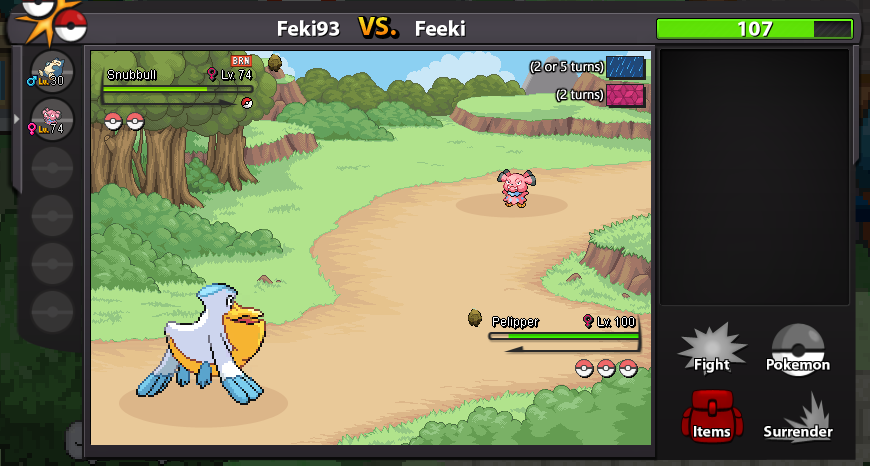
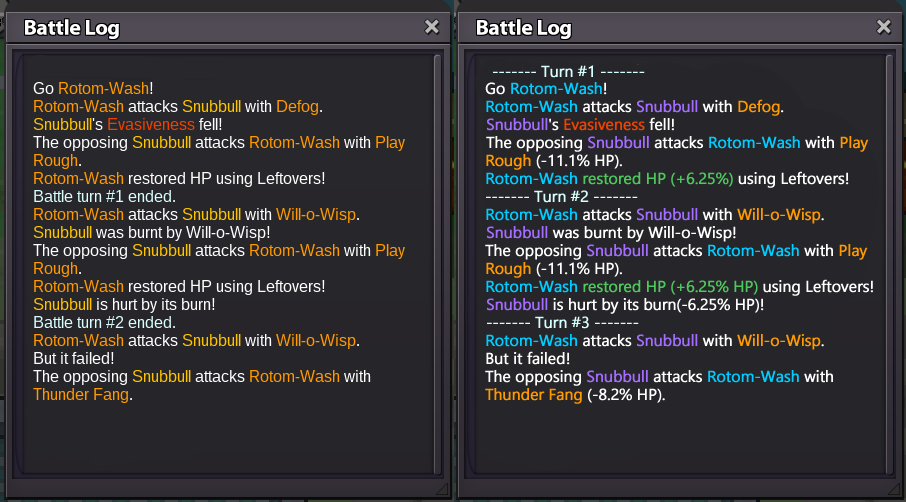
2 pointsDear staffs! Here are some ideas that could make the game's PvP aspect better: 1. Battle log: - Try to use different colors for our and the opponent's pokemon. The orange and that yellow is too similar. - Showing damage/healing percentages could help us tracking how much damage we do. 2. Battle window: - Stealth Rock/Spikes/Toxic Spikes should be visible always, not just when we hover over them. - Weather moves' remaining turnes should be next to their icons, so we don't need to memorize our turns. - We need a Trick Room icon too, with turns shown next to it.
 2 points
 -
2 points
-
2 points
-
2 pointsTo whom can I report Eon? You banned me from the discord forum. He has banned all my accounts. He is officially hostile towards me. It bans all accounts I have opened one by one. I'm sure if I talked to the owner of the game, I would find a solution. but some admins abuse their authority. they can be really malicious and toxic. I want to find a solution to this problem please report this message to the boss of the game.2 points
-
1 pointnot a goodbye post, or a rant, or asking for explanations, or even upset but as someone that spends a lot of time in game hunting, it pains me to say after constantly seeing how its very blatant that new accounts have much higher rates for forms and shiny than old accounts, and some accounts just having mega god luck to just touch grass anywhere and hit a rare form/shiny, ive decided to leave the game indefinitely. to my guild @new leaf, you guys can/should kick me whenever you want. you guys are awesome, keep the community alive to my friends, hit me on discord if anything to the pro trade team, i will not be logging in to game or forums so whatever pending trades i might have in the next few days, you will need to force it, or not, do whatever you seem fit.1 point
-
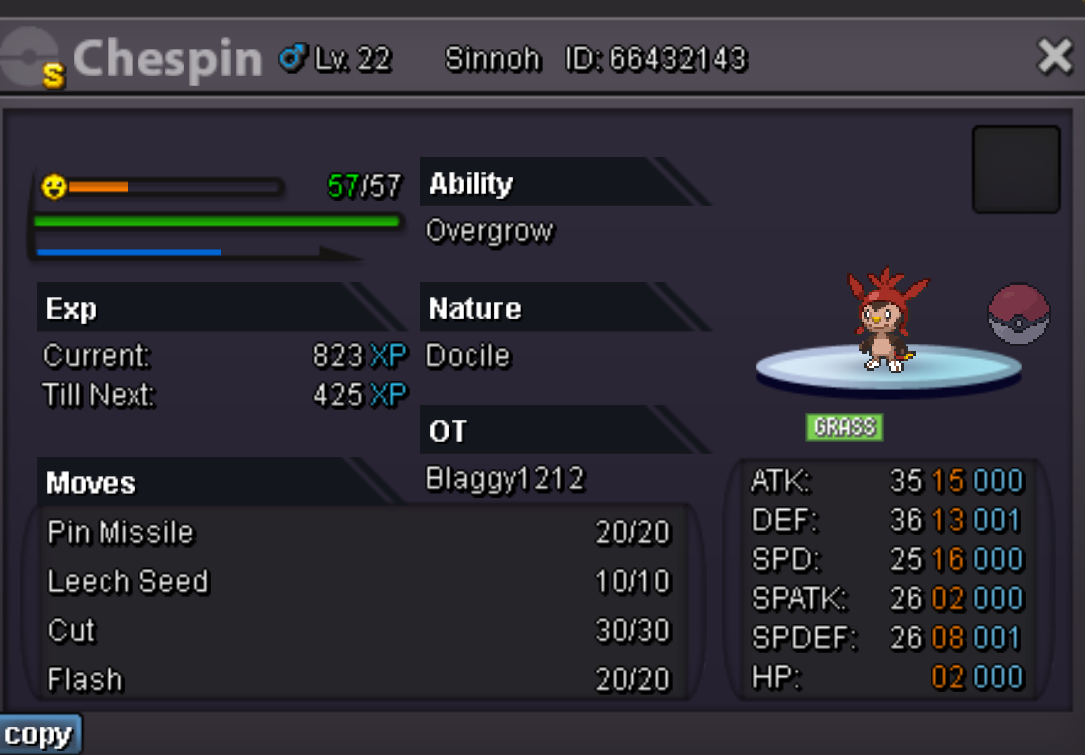
1 pointInsta Price: 7m Accepted payments Coin Capsule = 350k Reroll Ticket = 550k Contact Ingame: Norex Discord: norex1234
 1 point
 -
1 point
-
1 point
-
1 pointGreetings @Gal1leo After creating a thread, please wait for at least 24 hours before bumping it in the future. Have a happy Christmas!1 point
-
1 point
-
1 point
-
1 point
-
1 point
-
1 point
-
Hello all, The buyer is likely taking a break from the game, as he hasn't logged for some days, as such I have forced this trade. Kind Regards, * Zoruami *1 point
-
Hello all, @Renaciente You have been punished for False Offering/Bidding. With that said, @Lacomus @Magicarpediem has the C.O. Kind Regards, * Zoruami *1 point
-
1 point
-
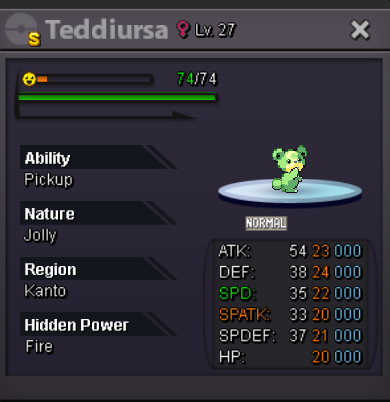
1 point1 point1 point1 point1 point1 point@Teemo3333 pm me in game u won . i am online atm and merry xmas1 point1 pointAuctioning for a friend Current offer 300k Memircea Min bid 100k No insta 48 hours after first bid Accepting cc (400k) Thank you and good luck ❤️
 1 point1 point1 point1 point1 point1 point1 point1 point1 point1 point1 point1 point@Magicarpediem you've won the auction. hmu ingame or here to complete the trade when possible.1 point74k pangoro1 point1 point1 pointHello @Isildurr2x I understand the frustration caused due to the bad RNG during your hunt. I'd like to clarify that newer players don't have any higher shiny or form rates than a player account with thousands of hours, it is just how RNG or luck works. An account with low hours of playtime might end up getting a really rare shiny but a player with 5k hours might not. The reason is that number of those new accounts is tremendously higher to those of higher playtime. RNG is same for all players but because newer or low playtime account are very very high in numbers, it looks like they have higher chances of encountering forms and shiny Pokemon. It indeed is very unfortunate that you choose to not want to continue playing this game anymore and are parting ways from us. If you find in your heart someday that you want to continue playing the game again, please do not hesitate to reach out and say hello, you're always welcome. Stay safe and take care of yourself. Enjoy these Holidays to the fullest with your family and friends. Wishing you a Merry Christmas and a Happy New Year in advance, Fus1onflare1 point1 point+ and add type of the pokemons near the name or hp!!! that will help alot1 point1 point@Th0maszz The value placed on an item within payment methods can be dictated, whether it be 350k, 360k, 370k, 400k, 450k, 69m. If your bid had been "1 Coin Capsule", your bid would then hold value of 69m (within this auction). Then, of course, someone would have to raise over 69m to beat you (which realistically wouldn't happen, and you would win with just 1 CC, valued at a fake number of 69m) It was a little humour, and to be honest, it wasn't that funny. I won't be doing it again, considering the confusion1 point1 pointCurrent Guildname: DeaD Never Rest New Guildname: White Wallkers Server: gold1 point1 point1 point1 point1 pointHello, you can only request a guild name change as guild leader. This account isn't in the guild you requested a guild name change for.1 point1 point@Mingrenpro Yeah, true. I do want to give people a fair deal, and for it to be easy enough. Its finding a balance...don't want people stomping their feet saying "HEYYYYYYYYY SER ITS TOOOOO HEEEEERD"1 point1 point1 point1 point[spoiler=New Bark Town]Welcome to New Bark Town! This is where your journey begins! Head to Elm’s lab in the top left of the map. Elm lets you pick a new starter Pokémon from the Johto region. Then head to the left after you have chosen your starter to proceed to Route 29! [spoiler=Route 29]Head left and navigate through the ledges to reach Cherrygrove city! You will have to fight a few trainers. [spoiler=Cherrygrove City] There is not much to do in Cherrygrove City. There is a Pokecenter and a Pokemart here. If you talk to the Old Man in front of the Pokecenter, he will give you 5 Pokeballs, 5 potions and $10,000! You can proceed to the top left to head to Route 30. [spoiler=Route 30 & 31]Head north on Route 30 to head to Route 31. There will be a few trainers in your way that you must defeat in order to progress. There is a free Counter TM here behind this trainer! Then head to the left on Route 31 to proceed to Violet City. There are a few trainers here to fight. There is also an entrance to the Dark Cave here, but I do not recommend exploring it until later, because you cannot progress through the cave from this side. [spoiler=Sprout Tower]Walking up to the poke center, you will notice a hiker. Talking with him if you have a Geodude (you can obtain one in the Dark Cave on Route 31), he will give you a smooth rock. The gym is blocked by a guard, so you should take the opportunity to challenge Sprout Tower first. If you head to the left after you first enter the tower, there is an abandoned Gastly that you can claim here. After claiming Gastly, proceed to go up the stairs to the next room. There will be a few trainers for you to fight ahead. Keep proceeding up the ladders until you get to the third floor. You will have a handful of trainers to fight, and then you will get to the Master of the Sages of Sprout tower. After defeating the master, he will tell the guard to move, and you will be allowed to challenge the Violet City gym. If you do not want to walk all the way down the tower, the pokeball to the right of the master contains an escape rope. [spoiler=Violet City Gym] Falkner, the Violet City Gym Leader, uses flying type Pokémon, so using rock or electric type pokemon would be a solid strategic choice. I recommend being around level 15 for this gym.Falkner's team: After beating Falkner you will obtain the Zephyr Badge. (By receiving the Zephyr Badge, you can now use Headbutt and Flash outside of battle if your Pokemon has 150 happiness or more.) The man by the exit will teach your Pokemon Tailwind for $10,000. [spoiler=Route 32] On route 32, you head south until you get to the Union Cave. There is not much to do here except fight trainers on your way to the cave. There is a pokecenter before the cave entrance however. [spoiler=Union Cave]In the Union Cave, for now just head to the south to Exit the cave. There is a few trainers for you to fight here. Later on you can come back and explore some of the other areas in the cave with surf. You can find a super potion here. And a great ball here! Once you have reached the exit, you can proceed to Route 33! [spoiler=Route 33]There is not much here except for a few trainers. Head left to Azalea Town! [spoiler=Slowpoke Well]Upon entering Azalea Town you will notice a Slowpoke blocking the Gym. Upon further investigation you realize that something is wrong at the Slowpoke’s Well, located near the entrance of the town. Upon entering the well, you notice that there are members of Team Rocket here that you must fight! At the end of the well you will have to fight Team Rocket Admin Christina! After defeating her, she will flee and the Slowpoke will go back to their well. You will now also be able to challenge the Azalea Town Gym! [spoiler=Azalea Town Gym] Heal your pokemon and head on over to the gym. You will notice that the Slowpoke has gone back to the well now : ) Bugsy uses bug type pokemon, so fire, flying, or rock type pokemon would be really effective vs her! I recommend being level 25 pokemon to defeat her with. Bugsy's team: After defeating her, you obtain the Hive badge! The guide in the front of the Gym will now sell you U-Turn tms. You can buy one for $2,500 or five for $10,000. Before you enter the Ilex Forest, Yellow will want to battle you quickly. After defeating her, head to the pokecenter and heal up. Then proceed to the Ilex Forest. :) [spoiler=Ilex Forest]Welcome to the Ilex Forest. I recommend catching a Caterpie or an Oddish while you are here. It will come in handy later ;) Also make sure to teach one of your pokemon cut. You will see a guy blocking a tree. After talking to him, he reveals that his Farfetch’d has ran away! Head to the maze to the right. You will find Farfetch’d and he will want to battle you. After defeating Farfetch’d head back to the man in front of the tree. He will thank you and move out of the way so that you can cut the tree to progress through the rest of the forest! After cutting the tree, you will run into the legendary pokemon Celebi. Celebi will flee, just like Mew did in Kanto. There will be a quest involving him after you beat the Johto Elite Four. There is also a headbutt tutor here incase you wish to teach it to one of your pokemon! After exiting the Ilex Forest, you will find yourself on Route 34! [spoiler=Route 34]There is nothing really here except for a gauntlet of trainers. Later on after you complete the Johto Story line and the quest to obtain Egg Moves, you may find the daycare useful. Head north to Goldenrod City! [spoiler=Radio Tower]There is a Biker here, south of the pokemon center that you can trade a drowzee for his machop. The machop will be holding a macho brace. After completing this trade, you can buy macho braces from him if you misplace yours. There’s a move buffett here by the game corner. You can relearn old moves here. In front of the Radio Tower you will notice that there is a police officer and Whitney the Goldenrod City Gym leader! Upon talking to them, you are informed that the Police Officer needs your help with an investigation. He needs you to go to the Goldenrod City Underground to find the Radio Station Manager. Whitney refuses to go back to her gym until this matter is solved. In the underground, there a few trainers to fight. As well as a few items laying around. Then talk to the Radio Station Manager. He won’t let you enter that room for some reason. After talking to the Radio Station Manager, head back to the officer and report your findings. Then he asks you to go speak to Michael the dept store manager at his house. Michael then gives you a key. He tells you to deliver a Fresh Water to the guard and have a Pokémon that knows sleep powder in order to knock the guard out in the Department Store basement. You can get Fresh Water from the vending machine at the top floor of the Goldenrod Dept Store. And as for Sleep Powder you can get an oddish or evolve a caterpie into a butterfree and train one of those two mons to learn it :) After acquiring both, you may now head to the basement to subdue the guard! Then proceed down to the warehouse. There are Pokemon trapped in the crates, and you must free them all! You must also avoid the Team Rocket Members or else you will have to restart the maze. After passing the maze you will come to a room with a lot of switches and doors. After figuring out the puzzle, you will meet the station manager at the end. After defeating the station manager, talk to the police officer and Whitney at the front of the radio tower and she will go back to her gym so you can challenge her! [spoiler=Goldenrod City Gym] Whitney uses normal type pokemon, so a fighting type pokemon would be really effective vs her! I recommend being level 35 pokemon. Whitney's team: You can also now learn covet for $10,000 from the guy by the gym entrance! [spoiler=Flower Shop] Make sure to visit the flower shop before you leave! You will obtain an essential item here that will help you out a lot later. [spoiler=Route 35]There’s a few trainers here as you head northward on route 35. At the top of the route two Police officers will tell you to deliver a mail to another officer for them. After you deliver the mail they will give you a Hp Up and let you keep the Spearow. Their friend is south of the Goldenrod City Bike Shop. Which is to the right of Pokecenter. (Just a note, you will not have an item for mail or the Spearow in your inventory. Just go talk to the guard anyways and you will be able to progress.) There is a shortcut here to the right of the guard house that you can take to go to route 36 by using cut. But I am going to cover the National Park in the next part incase you decide to go that way. [spoiler=National Park]As soon as you enter the National Park, you will see a lady named Tess taking her Persian for a walk. Talk to her and she will give you a quick claw! There's also quite a few trainers here. There’s a handful of trainers here and plenty of hidden items. The most notable ones are a Dig TM a Soothe Bell. You can refer to this Hidden Items guide for more information. After you collect the items, or not ( :P ), feel free to exit to Route 36. [spoiler=Route 36] Traveling along the route to the right you will encounter a rather curious looking tree. This is where the squirtbottle from earlier comes in handy! After using the squirtbottle it turns out that this bizarre tree is a pokemon named Sudowoodo and it wants to battle! Sudowoodo is a rock type pokemon. You have an option here to either capture or defeat this pokemon! After encountering Sudowoodo, you want to press north to continue the quest! [spoiler=Route 37] On route 37, head north to Ecruteak City! There are a few trainers along this route width=455pxhttps://i.imgur.com/y8FU4gv.png[/img] There's also a few Hidden Items as well, most notably a Sun Stone. [spoiler=Kimono House and Burned Tower]Welcome to Ecruteak City! Upon heading to the gym, the officer in front will tell you that there’s an issue in the Kimono house! After speaking with him, the guard infront of the Kimono house will let you in. Upon arrival at the Kimono House you will see that a Kimono Girl needs to be saved from team rocket! width=483pxhttps://i.imgur.com/hWy9G6k.png[/img] After defeating the villainous Team Rocket Grunt, head back to Gym. The officer will now tell you that the gym leader is at the Burnt Tower, which is to the north of the Gym. width=483pxhttps://i.imgur.com/Tbow4kU.png[/img] Upon entering the burnt tower, you will notice a familiar face. Yellow! She said she feels sad and wants you to battle her to cheer her up! width=482pxhttps://i.imgur.com/gzhASht.png[/img] After defeating her, head to the bottom floor. There you will find the leader of the Ecruteak City Gym Morty! He will talk to you about the three legendary dogs. Afterwards they will disappear and he will go to the gym so you can challenge him. [spoiler=Ecruteak City Gym] The Ecruteak City Gym is led by Morty who is a master of ghost type pokemon. Ghost, and dark type moves are super effective versus these types. Keep in mind that ghost type moves do not effect normal type pokemon, and normal type moves do not effect ghost type pokemon. Defeating him will grant you the Fog Badge! Morty's team: width=471pxhttps://i.imgur.com/mnY8Hu7.png[/img] After you defeat Morty, the man at the front of the gym will offer to tutor your pokemon Ominous Wind for $10,000. And you can now use surf outside of battle [spoiler=Route 38]After defeating Morty, head to the left and exit from that top house onto Route 38. There's a few trainers here that want to battle. width=476pxhttps://i.imgur.com/SwGbaBg.png[/img] Head left to Route 39! And don't forget aMax Potion on your way out! [spoiler=Route 39] Head south on this route to in order to proceed to Olivine City! There's three trainers you will need to defeat on this route. You can get a free moomoo milk here! width=475pxhttps://i.imgur.com/OEbzdae.png[/img] And in this house, the Rancher will have a quest for you. width=461pxhttps://i.imgur.com/XbHGtu6.png[/img] [spoiler=Lighthouse] Welcome to Olivine City! Upon talking to the guard in front of the gym, he will inform you that you must travel to the lighthouse to speak to the gym leader. The lighthouse is in the bottom right of the city.| width=466pxhttps://i.imgur.com/34YPZnw.png[/img] In the houses right before the lighthouse, you can buy the Super Rod here for 75k. Make sure you have the other rods first. You can find out how to get them in JollyOlNathan's Kanto Guide if you need help finding them. width=464pxhttps://i.imgur.com/rMiYjVU.png[/img] width=463pxhttps://media.giphy.com/media/2wZUiMUi7eXnbHzrfb/giphy.gif[/img] And if you have Membership activated this person will sell you some hats! width=460pxhttps://i.imgur.com/d8Y7dT6.png[/img] Just outside the lighthouse here, there is a sailor who will trade his voltorb for your krabby. If you agree to the trade, the voltorb will be holding a magnet! width=458pxhttps://i.imgur.com/lr9f3AL.png[/img] Inside the lighthouse, there is a gauntlet of trainers that you must defeat on your way to the top. width=460pxhttps://i.imgur.com/XluCKl7.png[/img] At the top of the lighthouse, you will meet the gym leader Jasmine. She asks that you go across the ocean to Cianwood city to get a secret potion for the lighthouses ampharos. width=458pxhttps://i.imgur.com/wcRqWO5.png[/img] She will not leave the lighthouse until you get the potion, so you have no choice but to venture to Cianwood city! [spoiler=Journey to Cianwood City]After exiting the lighthouse, head left from the Olivine Pokecenter and you will find yourself on Route 40. You will need a pokemon with surf in order to make this voyage so I recommend teaching it to a pokemon, if you have not already. width=453pxhttps://i.imgur.com/0vVwoIS.png[/img] Keep surfing south so you can reach route 41. After reaching route 41, head left. Don’t worry too much about exploring the Whirl Islands yet. Just keep pushing left to Cianwood City. width=452pxhttps://i.imgur.com/RMNPDWP.png[/img] [spoiler=Cianwood City]To the left of the Pokecenter, you can find the Cianwood Pharmacy. Inside of the Pharmacy, you can talk with the secret potion maker and she will give you one after hearing what happened in the lighthouse. width=453pxhttps://i.imgur.com/cadN33t.png[/img] While we are here, we might as well go challenge Chuck, the Cianwood city gym leader! There’s also a safari zone if you go to the cave, but I won’t cover that in this guide because it is focused on the story. Chuck is a Karate Master and he uses fighting type pokemon! I recommend using flying type and psychic type pokemon versus him because they are super effective. Chuck's team: width=449pxhttps://i.imgur.com/2zgH2GW.png[/img] Defeating Chuck nets you the storm badge! The guy in the front of the gym will now teach you Drain Punch for 10k if you desire! With the potion and badge in tow, head back to Olivine City! [spoiler=Olivine City Gym] Now that you are back in Olivine City, scale the lighthouse and give the SecretPotion to Jasmine! After Amphy is feeling better, Jasmine will head to the gym where you can challenge her! width=450pxhttps://i.imgur.com/kMiMbuA.png[/img] Now that Jasmine is back, you can challenge the gym! Since you have proven yourself worthy at the lighthouse, you will not have to fight the gym’s trainers. Jasmine is a steel type trainer. The steel type is weak to fire, fighting, and ground types. Jasmine's team: width=452pxhttps://i.imgur.com/trZCEEm.png[/img] Defeating her will net you the Mineral Badge! And the guy in the front of her gym will now tutor your pokemon the move iron head if you desire for 10k! Now head back to Ecruteak City! And get ready to travel through mt mortar! [spoiler=Mt. Mortar] Head right from the Ecruteak pokecenter through the rest house and it will bring you to Route 42. The entrance to my mortar is on this route. width=449pxhttps://i.imgur.com/y0K7j31.png[/img] Mt mortar is pretty simple to get through. On the BF1 floor there are some dig spots here. width=448pxhttps://i.imgur.com/BQ1nHBF.png[/img] Go through the cave hole in the top left, then head right in the hall. Until you find another exit hole. width=448pxhttps://i.imgur.com/M8cWuqK.png[/img] When you come out on the other side, you will notice that there is dig spots on this side too! You can proceed south to the exit. width=449pxhttps://i.imgur.com/93wJ4xb.png[/img] Exiting Mt. Mortar will put you on the other side of Route 42! Head right to go to Mahogany Town! width=446pxhttps://i.imgur.com/99o9dGT.png[/img] [spoiler=Lake of Rage] So you arrive at Mahogany Town to find out that the gym is blocked off again.... The guard in front of the gym says he will not move until the matter at the suspicious shop is over. Make sure you have a pokemon that knows cut and a pokemon that knows surf with you. width=453pxhttps://media.giphy.com/media/11BCKpLGfDqkHzb9om/giphy.gif[/img] There's nothing really weird here at the moment except for a defunct looking tree and everything seems normal in the shop. So you head north to Route 43. There's quite a bit of trainers on Route 43 for you to face. Keep trucking forward and head north towards the lake. width=453pxhttps://i.imgur.com/whl9Lq7.png[/img] Right before the lake there is a Ranger who refuses to let you go to the lake if you have a gyarados in your party. If you have don't have one in your party, proceed to the Lake. Once you reach the lake, stick to the right side of the lake. There's a spot to surf right past the cut tree. After surfing a bit towards the center of the lake, you see the legendary Chappy! width=451pxhttps://i.imgur.com/znyP17p.png[/img] After speaking with him, he will pull a favor so you can enter that suspicious shop in Mahogany Town. Head back there now! width=450pxhttps://media.giphy.com/media/3KY3SQSv1Igvlk0Q3z/giphy.gif[/img] [spoiler=Rocket Hideout] The guy in front of the stairs has now moved thanks to Chappy! Head down them to discover that this shop is actually one of Team Rocket's hideouts! width=453pxhttps://i.imgur.com/7DWkBak.png[/img] On the first floor (BF1) there are many team rocket members guarding the hideout. Make your way towards the bottom left of the map to proceed to the next floor. width=453pxhttps://i.imgur.com/vyq5NJD.png[/img] On the next floor, BF2, you will see Lance! width=451pxhttps://i.imgur.com/I3Wj3Hb.png[/img] Turns out there’s a bomb here! The computer that controls the bombs is guarded by their leader, Admin Christina, downstairs. To get past the guards in front of her you will need to send a message through the radios. To do that you will need to find to computers. One of them is on B2F and the other is in a room with 8 desks and the one you need to access has a picture of Admin Christina on the desk. After obtaining this information, head to the staircase to the bottom right. On the B3F floor, towards the middle of the room is a room with 8 computers and desks. You’ll need to find the computer with a picture of Admin Christina on it. That’s the computer you need to access the radio system. Each one of the members of team rocket here is looking for a battle. width=449pxhttps://i.imgur.com/QOD5Bow.png[/img] After you’ve found the correct pc, head to the stairs in the top right. width=448pxhttps://i.imgur.com/oxCdPkH.png[/img] You’ll then find yourself back on B2F. Battle with Jessie south of stairs so you can check her computer. width=447pxhttps://i.imgur.com/jM6vH0c.png[/img] After that, head down the hallway to the left of the stairs. There will be a few Team Rocket members there patrolling the hallway. If one of them catches you, you will have to restart that part from the beginning. This is probably one of the most frustrating things, but if you are pretty patient you can get by quickly. width=446pxhttps://i.imgur.com/5MtYVg7.png[/img] Once you reach the end, go down the stairs at the end of the hall. You will see stairs right next to those stairs, and go up those to reach James. width=446pxhttps://i.imgur.com/1JhxXmB.png[/img] width=446pxhttps://i.imgur.com/KMbhag2.png[/img] After being victorious and checking the computer, you will send a trick message over the radio to fool the guards in front of Admin Christina’s room. Head up the stairs and to the right! After defeating her she will exclaim “I’m done.” And vanish. Check the computer in the top left, and after doing so, go speak to lance on B2F. width=446pxhttps://i.imgur.com/WtH6tj0.png[/img] After speaking with him, he will ask you to defeat the three electrodes on the other side of the bomb. width=446pxhttps://i.imgur.com/yvPBRwn.png[/img] After defeating them, proceed to exit the room with the bomb. Lance thanks you and takes you to the pokemon center. He’ll thank you again at the pokecenter, and you are now free to challenge the Mahogany Town Gym! width=442pxhttps://i.imgur.com/O68Ox7Y.png[/img] [spoiler=Mahogany Town Gym] The leader of the Mahogany Town Gym is a man named Pryce. He is a master of ice type pokemon. The ice type is weak to fire, fighting, steel, and rock types. Pryce's team: width=442pxhttps://i.imgur.com/ETAFpBH.png[/img] After defeating him, he will give you the Glacier badge! The man in the front of the gym will now sell you Ice beam TMs. He will sell you one for 4k or five for 16k. [spoiler=Route 44] Head towards the right on Route 44 to proceed to Ice Path. There's a handful of trainers here, and don't forget to grab the masterball on your way out! :^) width=443pxhttps://i.imgur.com/07lNlY2.png[/img] [spoiler=Ice Path] The Ice Path connects Route 44 and Blackthorn City. As the name suggests there is a lot of ice here. width=444pxhttps://i.imgur.com/PhQF5Vt.png[/img] You can slide on the icy part of the floor in one direction. Parts of the cave are like a maze. On the first floor, you want to head towards the top right to proceed to the next floor. width=440pxhttps://i.imgur.com/S8uu5Zt.png[/img] On the next floor, you'll want to jump down one of the holes. width=443pxhttps://i.imgur.com/vjgNoNU.png[/img] It will lead to another floor covered in ice. The stairway to progress is in the middle of that room. width=442pxhttps://i.imgur.com/iJTQxYG.png[/img] After you reach that stairway, in the next room head towards the right to progress. width=437pxhttps://i.imgur.com/meWYvNs.png[/img] In the next room, head south to find the stairs. Then head left in the next room. You'll arrive at the first floor and there is a small maze before you reach the exit. width=440pxhttps://i.imgur.com/YU5gfcF.png[/img] After you pass the maze, take the exit and you will find yourself in Blackthorn City. [spoiler=Blackthorn City] Welcome to Blackthorn City! Home of the Dragons Den. The Dragons Den is a great area for helping to level your pokemon! I won't cover it in depth, but if you need a spot to train your pokemon before the Elite 4 it is one of the best spots available to you at the moment. width=436pxhttps://i.imgur.com/wku9Rdb.png[/img] The Blackthorn City Gym leader Claire is a master of dragon type pokemon! The dragon type is weak to dragon, ice, and fairy type pokemon. Claire's team: width=437pxhttps://i.imgur.com/8sDAbwX.png[/img] After defeating her you gain the Rising Badge! And also the guy in front of the gym will now teach your pokemon Dragon Pulse for 10k. You can now use your pokemon from Kanto and you can leave Johto if you wish. Whats next? Well, you can challenge the Johto Elite 4 to become the champion! [spoiler=Journey to the Elite 4] Turns out, the Johto Elite 4 is in Kanto at the Indigo Plateau. So first head from Blackthorn City to Goldenrod City. In Goldenrod City next to the Radio Station, there is a train station. At that train station, you can take the train to go from Johto to Kanto. width=435pxhttps://i.imgur.com/n3psq1h.png[/img] Taking this train will take you to Saffron City in Kanto. From there head south to Vermilion City. Make sure you have a pokemon that knows cut with you for the next part. Once you reach Vermilion City, head through Diglett's Cave to Route 2. width=434pxhttps://media.giphy.com/media/4PZHAJUO8DQCY08RbV/giphy.gif[/img] Head south on Route 2 and cut the tree. You will find yourself in Viridian City. From Viridian City, head left onto Route 22. This will bring you to the Pokemon League gate. Take the path to the north at the crossroads. You will then trek through Victory Road. JollyOlNathan's Kanto Walkthrough covers Victory Road pretty well in case you need a refresher. After exiting Victory Road, you reach the Indigo Plateau. The building on the left is the home of the Johto Elite 4. width=438pxhttps://i.imgur.com/IlXiBYG.png[/img] [spoiler=Will] There is a great guide on How to Beat the Johto Elite 4. I left a small summary of the Johto Elite 4 below in case you are interested. Will is the first member of the Elite 4. He specializes in psychic pokemon. Dark type pokemon will sweep his team with ease! Will's team: width=443pxhttps://i.imgur.com/1SC5aZ1.png[/img] After defeating him you can progress and battle the next member of the Elite Four! Continue to the room behind him where you will find your next opponent. [spoiler=Koga] Koga is a ninja and a master of poison pokemon. Ground and psychic types do really well versus his team. Koga's team: width=440pxhttps://i.imgur.com/lEqKPy1.png[/img] After defeating him, you will notice that the next member of the elite four is a familiar face. [spoiler=Bruno] Bruno is back for a rematch! The master of fighting pokemon is looking for a brawl! Flying or psychic types really knock his team out! Bruno's team: width=441pxhttps://i.imgur.com/ETA4BJ6.png[/img] After defeating him move on to the next room where another challenge awaits! [spoiler=Karen] Karen is who stands in the way between you and the champion. She uses dark type pokemon. Fighting types do really well versus her team. Karen's team: width=443pxhttps://i.imgur.com/rsMFttm.png[/img] Now all that stands between you and glory is the champion! [spoiler=Lance] It's Lance from the Mahogany Rocket Hideout!!!! He is a user of dragon pokemon. Fairy types and dragon types really tame his team. Lance's team: width=437pxhttps://i.imgur.com/W9DO7iL.png[/img] After defeating lance you have now become the Champion of the Johto region! This makes you the bi-regional champion! Talk to Elm to exit and he will send you to New Bark Town! width=436pxhttps://i.imgur.com/NRgLnvu.png[/img] [spoiler=Finishing Johto and starting Hoenn] In order to go to Hoenn, you must defeat the Youngster Joey boss, but there is a catch. In order to challenge Youngster Joey, you must possess a level 80 Rattata that has your OT (meaning, you must catch the Rattata yourself). Rattata Training Tips: Now, the highest level Rattata you can catch is in the Mt. Silver Expert Belt which is the same room you find the Karate Master in Mt. Silver. Since you've defeated the Johto E4 you can now travel there. After obtaining a Rattata you can train to level 80 it in Dragons Den. If you have Cerulean Cave unlocked that is a better spot to level the Rattata up, but if you do not have it unlocked Dragons Den is fine. Now once you have a level 80 Rattata you can challenge Youngster Joey! width=438pxhttps://i.imgur.com/bHohdfu.png[/img] Make sure you have your level 80 Rattata in your party or Joey will not battle you. Joey has a team of six level 120 top percentage Rattatas ready to brawl. If you lose to Joey, he has a cooldown of 2 hours before you can battle him again[/s] you can challenge him again instantly as the the cooldown for him was removed. Defeating Joey will allow you to speak to the Hoenn traveller. width=442pxhttps://i.imgur.com/6AcWTvJ.png[/img] After speaking to the Hoenn traveller you will be whisked away to Hoenn to start the next part of your adventure! So make sure to be prepared and wrap up anything you might be doing in Kanto or Johto before you leave! You can use this Complete Hoenn Walkthrough to help you on your new adventure! And that's it for my guide I hope it helps you! Below the post will be some links to other guides that contain useful information about different quests and stuff in the Johto region! Big shoutout to Olafkun for helping me get the lost screenshots back!!! I appreciate you soooo much Shoutout to Iriztha, MEBzerg and all of TeamMagma's member for being such an awesome bunch how will i get this masterball, i was searching for ways at least 5hrs now1 point