




New Trade Zone
Trade Zone is now live
Use the new Trade Zone for auctions and instant-price trades so Pokemon and item offers are easy to find.

Takanumi7
Registered User
-
Joined
-
Last visited
Everything posted by Takanumi7
-
It has Contrary. It all works as it should.
-
-1
-
I respect your point of view and understand the comment about checks and counters. However I personally think we would see more variety if Clefable was banned. Also i dont specifically plan for Clefable but you gotta have it covered you know. Of course Mega Scizor for example is more than a Clefable Counter I understand that.
-
Well tbh i have never had any major problems with greninja (playin against it) which is why i would want it back. You dont get the point. Its not about how good the pokemon is, it is about the amount of planning you have to take into account when teambuilding. You mention its counters but this exactly adds to my point that you gotta plan for clef in advance. So now you have to have some kind of clef counter in team for it not to become superdangerous. -1 spot in your team. Honestly i always hear the same stuff when this is discussed (not the first time someone posted this). And honestly I am okay with Clef not being banned but that doesnt mean that its not unhealthy for the variance of pokemon and teambuilding. It is as simple as that. So you can still say oh this counters it etc. But this is far away from the point the OP wanted to make.
-
Agree. Would open up the meta a lot imo. Not sayin that it isnt beatable but if i wouldnt need to solve the clef problem every time while team building this would open up a team slot for a more rarely used pokemon without getting completely annihalated from clef. Also there is a reason why its S-Tier in Pro-Meta. Bring Greninja back and ban clef.
-
-
-
+1
-
Dig spots, Excavations and Headbutt trees are currently diabled due to server issues regarding scripted spawns.
-
-
-1 just for getting rid of mega stones for the sake of newbies. I would much rather see something like UU implemented so you can play a little more of what you like than another OU without Megas
-
start scizor please
-
+1 from me overall. I think its all a bit too much tbh like your spawns are a bit too overpowered but in general very nice suggestions! My favorites are: reroll ticket obtainability, every 1000 points a reward, stat-modifying berries (way too hard to farm atm, i would raise the price for them though) and of course shiny rocks
-
Insane Toge! Good Luck
-
Hidden power for larvesta 1 and price for feebas please
-
insta umbreon 3 relaxed
-
I would maybe suggest (i dont know if it is possible) to just make the bcc prize room the last visited pokecenter in the exact moment you get into the contest. There has got to be a way to treat this room as a pseudo pokecenter.
-
+1 had the same issue today
-
Nice shop! I would like to buy Ambipom for 350k 🙂
-
You're welcome and a good day for you too!
-
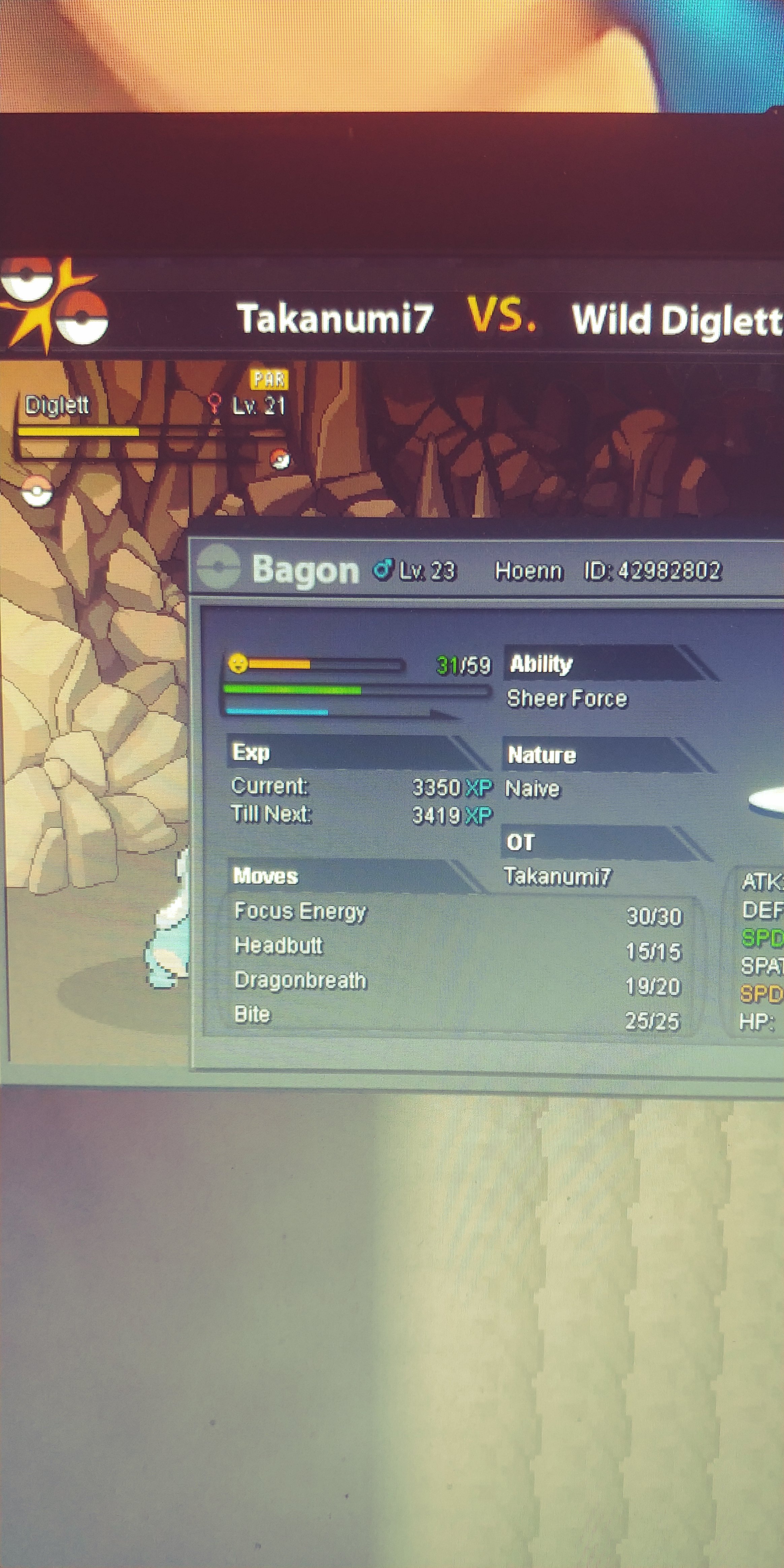
Hey i just had my bagon paralyze a diglett with dragonbreath. It has sheer force so that should not happen. I double checked and tried again but paralyzed a diglett again so its not just one tim it happened.
-
-
Hey! what is the hidden power?
-
Fixed it myself. Needed to delete old version of PRO on mobile. Can be closed.
-
Okay i got an email in my spam folder at least but still can't log in nor have i been asked to verify anything. It shows connection lost all the time but as proven by writing on here my internet connection works fine.
