




New Trade Zone
Trade Zone is now live
Use the new Trade Zone for auctions and instant-price trades so Pokemon and item offers are easy to find.

Adiuvo
Community Coordinator
-
Joined
-
Last visited
Everything posted by Adiuvo
-
Hello @Prinse, Sorry to hear you're having issues with the quest. To my knowledge, that part of the quest must be done during night time in game, 20:00 - 04:00 poke time. I suspect you may have started this portion of the quest during the night, but it became morning when you tried to re-enter the tree. Can you try again once it's night time in the server?
-
Hi @Zjamka, Yes, this is one of the files that Windows Defender takes issue with. However, PRO is obfuscated with Themida, which antivirus programs don't like. Thats why the file gets flagged, and why you are seeing it through VirusTotal. It's not due to an infection. You can read more about Themida here
-
Bummer. For the bypass method, make sure to restore the quarantined file. Once restored, delete all files out of the folder (and probably the trash can as well). To try to remove potential issues, create a new folder location for PRO, and apply the exclusion method previously explained above. Reboot your PC and again verify the new folder location is excluded from your anti-virus. Then download a fresh PRO Client from our website. Extract the files into that excluded folder, and then attempt to play the game. If that doesn't work, the only other method I can think of involves briefly turning off your anti-virus. Its a similar process to what you've been trying The steps are: Delete your current client. Deactivate your anti-virus program. Download the client again. Put the previously missing files in your antivirus whitelist. Activate your anti-virus program. Start your PROClient.exe. There's a similar method mentioned in the #support channel in the PRO Discord (with video) that might also be of help if these ones are not working I'll forward to the devs the issues with the 32-Bit client as well
-
Hi @Kurtistheword If you are unable to get the 32-bit version working (I recommend re-trying after you remove all PRO files and perform a reboot, just incase), there are a few potential work arounds There are a couple methods to bypass this issue 1) In windows security, click on the "Virus & threat protection". Here you can click on "protection history", which will show the threat that was quarantined. Clicking on it will probably bring up a Windows Security permission. Once accepted, you can click actions to restore. This restores the file, allowing the game to access it. Sometimes this doesn't solve the problem though. Now we'll apply an exception to your anti-virus, which is will force it to ignore files in a certain location. I would recommend removing your PRO files from your PRO folder. 2) In windows security, click on the "Virus & threat protection". Under "Virus & threat protection settings", click "Manage settings". Scroll down to the section for "Exclusions", and then click "Add or remove exclusions". After accepting the Windows Security request, you can click "+ Add an exclusion". You will then pick the folder that will contain your PRO game files. Now Windows Defender will ignore this folder when looking for security threats. At this point, I would recommend emptying your trash and performing a reboot. Next, download a fresh install of the PRO client (direct download from the PRO website), and place the files in your exclusion folder. You can now launch the game from this folder, and it should bypass the security restrictions and allow you to play PRO. If you are not comfortable doing this, it is then recommended to wait a few days. Per one of the developers yesterday, "I always upload the files to the most popular antivirus programs, and after some time, they stop getting flagged. The issue is worse right now because I had to release new clients. Normally, I build, upload the files, and release them later, but that process doesn't work as smoothly when I can to upload hotfixes....it should settle down once the file stops getting flagged, which usually takes about one to two days. Its often faster, but we have absolutely no control over that." If you attempt these steps, please let me know if they solve your issue or if it continues to persist.
-
Hello @Makiz, Sorry to hear you are having difficulties playing the game. At the moment, when some players attempt to update their client, Windows Defender labels one or two of the files as a Trojan virus. This is because some of PROs files are encrypted, which can trigger a false-positive. Windows Defender will then quarantine the file to protect your computer. Some players might get a pop up saying "Failed to load il2cpp", others have an issue when the patcher is extracting the files. If you are still having problems, we recommend downloading the 32-bit version of PRO instead of the 64-bit version. The 32-bit version doesn’t seem to cause issues with Windows Defender at the moment. There's no difference in game and barely any difference in performance. This also allows you to run with the game without attempting to bypass your systems defenses. Please let me know if you are able to play with the 32-bit version.
-
Excellent! @Juha As Sshate is referring to, if you are still having problems we recommend downloading the 32-bit version of PRO instead of the 64-bit version. The 32-bit version doesn’t seem to cause issues with Windows Defender at the moment. There's no difference in game and barely any difference in performance. This also allows you to run with the game without attempting to bypass your systems defenses.
-
Im glad you got it working! @Poppachav @Madnessxkiller Additionally, as per the latest announcement, if you are still having problems, we recommend downloading the 32-bit version of PRO instead of the 64-bit version. The 32-bit version doesn’t seem to cause issues with Windows Defender at the moment. There's no difference in game and barely any difference in performance. This also allows you to run with the game without attempting to bypass your systems defenses.
-
Additionally, as per the latest announcement, if you are still having problems, we recommend downloading the 32-bit version of PRO instead of the 64-bit version. The 32-bit version doesn’t seem to cause issues with Windows Defender at the moment. There's no difference in game and barely any difference in performance. This also allows you to run with the game without attempting to bypass your systems defenses.
-
Additionally, as per the latest announcement, if you are still having problems, we recommend downloading the 32-bit version of PRO instead of the 64-bit version. The 32-bit version doesn’t seem to cause issues with Windows Defender at the moment. There's no difference in game and barely any difference in performance. This also allows you to run with the game without attempting to bypass your systems defenses.
-
Glad you were able to find the spirit! I'll go ahead and close this thread as the topic has been resolved. If you have any issues in the future, please feel free to create a new thread. Have a great day!
-
Hello @Godlyd3mon, I will attempt to help you all out with this problem. At the moment, when some players attempt to update their client, Windows Defender labels one or two of the files as a Trojan virus. This is because some of PROs files are encrypted, which can trigger a false-positive. Windows Defender will then quarantine the file to protect your computer. Some players might get a pop up saying "Failed to load il2cpp", others have an issue when the patcher is extracting the files, like you've posted above. There are a couple methods to bypass this issue 1) In windows security, click on the "Virus & threat protection". Here you can click on "protection history", which will show the threat that was quarantined. Clicking on it will probably bring up a Windows Security permission. Once accepted, you can click actions to restore. This restores the file, allowing the game to access it. Sometimes this doesn't solve the problem though. Now we'll apply an exception to your anti-virus, which is will force it to ignore files in a certain location. I would recommend removing your PRO files from your PRO folder. 2) In windows security, click on the "Virus & threat protection". Under "Virus & threat protection settings", click "Manage settings". Scroll down to the section for "Exclusions", and then click "Add or remove exclusions". After accepting the Windows Security request, you can click "+ Add an exclusion". You will then pick the folder that will contain your PRO game files. Now Windows Defender will ignore this folder when looking for security threats. At this point, I would recommend emptying your trash and performing a reboot. Next, download a fresh install of the PRO client (direct download from the PRO website), and place the files in your exclusion folder. You can now launch the game from this folder, and it should bypass the security restrictions and allow you to play PRO. If you are not comfortable doing this, it is then recommended to wait a few days. Per one of the developers today, "I always upload the files to the most popular antivirus programs, and after some time, they stop getting flagged. The issue is worse right now because I had to release new clients. Normally, I build, upload the files, and release them later, but that process doesn't work as smoothly when I can to upload hotfixes....it should settle down once the file stops getting flagged, which usually takes about one to two days. Its often faster, but we have absolutely no control over that." If you attempt these steps, please let me know if they solve your issue or if it continues to persist.
-
Hello @Sshate and @Juha, I will attempt to help you all out with this problem. At the moment, when some players attempt to update their client, Windows Defender labels one or two of the files as a Trojan virus. This is because some of PROs files are encrypted, which can trigger a false-positive. Windows Defender will then quarantine the file to protect your computer. Some players might get a pop up saying "Failed to load il2cpp", others have an issue when the patcher is extracting the files. There are a couple methods to bypass this issue 1) In windows security, click on the "Virus & threat protection". Here you can click on "protection history", which will show the threat that was quarantined. Clicking on it will probably bring up a Windows Security permission. Once accepted, you can click actions to restore. This restores the file, allowing the game to access it. Sometimes this doesn't solve the problem though. Now we'll apply an exception to your anti-virus, which is will force it to ignore files in a certain location. I would recommend removing your PRO files from your PRO folder. 2) In windows security, click on the "Virus & threat protection". Under "Virus & threat protection settings", click "Manage settings". Scroll down to the section for "Exclusions", and then click "Add or remove exclusions". After accepting the Windows Security request, you can click "+ Add an exclusion". You will then pick the folder that will contain your PRO game files. Now Windows Defender will ignore this folder when looking for security threats. At this point, I would recommend emptying your trash and performing a reboot. Next, download a fresh install of the PRO client (direct download from the PRO website), and place the files in your exclusion folder. You can now launch the game from this folder, and it should bypass the security restrictions and allow you to play PRO. If you are not comfortable doing this, it is then recommended to wait a few days. Per one of the developers today, "I always upload the files to the most popular antivirus programs, and after some time, they stop getting flagged. The issue is worse right now because I had to release new clients. Normally, I build, upload the files, and release them later, but that process doesn't work as smoothly when I can to upload hotfixes....it should settle down once the file stops getting flagged, which usually takes about one to two days. Its often faster, but we have absolutely no control over that." If you attempt these steps, please let me know if they solve your issue or if it continues to persist.
-
Hello @Khanhswrath I will attempt to help you all out with this problem. At the moment, when some players attempt to update their client, Windows Defender labels one or two of the files as a Trojan virus. This is because some of PROs files are encrypted, which can trigger a false-positive. Windows Defender will then quarantine the file to protect your computer. Some players might get a pop up saying "Failed to load il2cpp", others have an issue when the patcher is extracting the files. There are a couple methods to bypass this issue 1) In windows security, click on the "Virus & threat protection". Here you can click on "protection history", which will show the threat that was quarantined. Clicking on it will probably bring up a Windows Security permission. Once accepted, you can click actions to restore. This restores the file, allowing the game to access it. Sometimes this doesn't solve the problem though. Now we'll apply an exception to your anti-virus, which is will force it to ignore files in a certain location. I would recommend removing your PRO files from your PRO folder. 2) In windows security, click on the "Virus & threat protection". Under "Virus & threat protection settings", click "Manage settings". Scroll down to the section for "Exclusions", and then click "Add or remove exclusions". After accepting the Windows Security request, you can click "+ Add an exclusion". You will then pick the folder that will contain your PRO game files. Now Windows Defender will ignore this folder when looking for security threats. At this point, I would recommend emptying your trash and performing a reboot. Next, download a fresh install of the PRO client (direct download from the PRO website), and place the files in your exclusion folder. You can now launch the game from this folder, and it should bypass the security restrictions and allow you to play PRO. If you are not comfortable doing this, it is then recommended to wait a few days. Per one of the developers today, "I always upload the files to the most popular antivirus programs, and after some time, they stop getting flagged. The issue is worse right now because I had to release new clients. Normally, I build, upload the files, and release them later, but that process doesn't work as smoothly when I can to upload hotfixes....it should settle down once the file stops getting flagged, which usually takes about one to two days. Its often faster, but we have absolutely no control over that." If you attempt these steps, please let me know if they solve your issue or if it continues to persist.
-
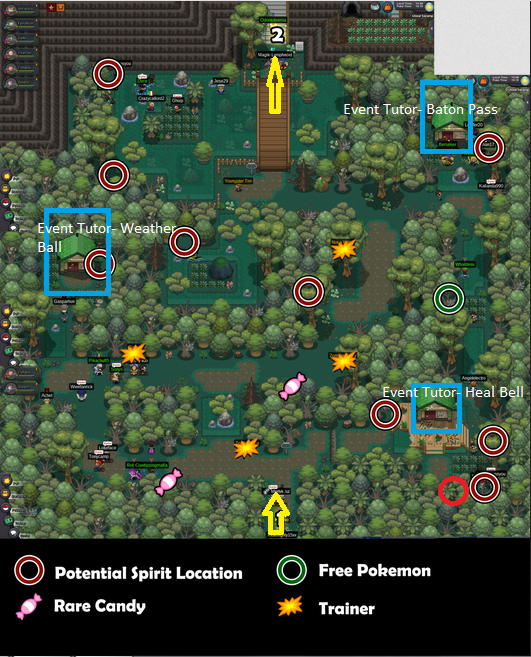
Hello @Sunrakuxemul Sorry to hear you're struggling with this quest. Please try searching at the spot circled in red in the image below (not the red/white circles). The blue pokeball might not be visible, but keep looking there. Try pressing the interact button against the trees in this location. This seems to be the one players have the most difficulty with. Please let me know if this solves your issue, or if it continues to persist.
-
Hello @Poppachav, @Madnessxkiller, and @Yumeko77 I will attempt to help you all out with this problem. At the moment, when some players attempt to update their client, Windows Defender labels one or two of the files as a Trojan virus. This is because some of PROs files are encrypted, which can trigger a false-positive. Windows Defender will then quarantine the file to protect your computer. Some players might get a pop up saying "Failed to load il2cpp", others have an issue when the patcher is extracting the files. There are a couple methods to bypass this issue 1) In windows security, click on the "Virus & threat protection". Here you can click on "protection history", which will show the threat that was quarantined. Clicking on it will probably bring up a Windows Security permission. Once accepted, you can click actions to restore. This restores the file, allowing the game to access it. Sometimes this doesn't solve the problem though. Now we'll apply an exception to your anti-virus, which is will force it to ignore files in a certain location. I would recommend removing your PRO files from your PRO folder. 2) In windows security, click on the "Virus & threat protection". Under "Virus & threat protection settings", click "Manage settings". Scroll down to the section for "Exclusions", and then click "Add or remove exclusions". After accepting the Windows Security request, you can click "+ Add an exclusion". You will then pick the folder that will contain your PRO game files. Now Windows Defender will ignore this folder when looking for security threats. At this point, I would recommend emptying your trash and performing a reboot. Next, download a fresh install of the PRO client (direct download from the PRO website), and place the files in your exclusion folder. You can now launch the game from this folder, and it should bypass the security restrictions and allow you to play PRO. If you are not comfortable doing this, it is then recommended to wait a few days. Per one of the developers today, "I always upload the files to the most popular antivirus programs, and after some time, they stop getting flagged. The issue is worse right now because I had to release new clients. Normally, I build, upload the files, and release them later, but that process doesn't work as smoothly when I can to upload hotfixes....it should settle down once the file stops getting flagged, which usually takes about one to two days. Its often faster, but we have absolutely no control over that." If you attempt these steps, please let me know if they solve your issue or if it continues to persist.
-
Hello @Technorookie, Welcome to PRO! The Party Exp Share is a server wide bonus that usually reserved for our large community events. The way it works is that it gives Exp and EV to all unfainted Pokemon in your party. This makes is great for training several Pokemon at once. However, now that the Summer Event is over, it has been removed. It will most likely return during the upcoming Halloween Event, our next big community event. In addition to the Party Exp Share, you can also obtain the item Exp. Share. When held by a Pokémon in your party, that Pokémon will earn the Exp and EVs without having to fight. As mentioned in the link though, you can only get one of these items. I hope you are enjoying the game!
-
Hello @Condepuff, At this time, a data has not yet been announced for the Halloween Event. Once a date is set, it will be announced on the PRO Discord. The Party Exp Share has been a bonus feature for most of our large community events, and like this years Summer Event, the past few Halloween Events have also seen the return of the Party Exp Share. Though it's not guaranteed, I would assume its return for this years event as well.
-
Hello @Jhinniels, The Party Exp Share is usually reserved for our large community events. Now that the Summer Event is over, you'll most likely see it again during the upcoming Halloween Event. If you haven't yet received one, you can also obtain the item Exp. Share. When held by a Pokémon in your party, that Pokémon will earn the Exp and EVs without having to fight. As mentioned in the link though, you can only get one of these items.
-
It's important that you set yourself up for the future, even if it requires some sacrifices. It sucks now, but you will truly be happier in the long run. PRO will be here when you are able to return. I wish you the best on your journey in life. May the stars watch over you
-
Hello @Trananhvu As per the Discord Announcement, the Summer Event is expected to end on October 1st.
-
Hello @Ajaponicus Im sorry to see you're having problems with the Hoenn Transporter Quest. Lets try to solve this. To start the quest, did you first talk to Watson inside the Mauville Pokecenter? That should trigger the ability to see the Aqua and Magma NPCs at New Mauville.
-
No problem, glad to have helped. As the matter has now been resolved, I will close this thread. Should you need any further help in the future, please feel free to create a new thread. Have a good day!
-
Hi @Phananpha Im sorry to see you're having problems with the Hoenn Transporter Quest. I will look into the issue. When you surfed on route 110 to New Mauville, do you encounter the NPC Watson before you head down the stairs? To start the quest, did you talk to Watson inside the Mauville Pokecenter?
-
Hi @Trananhvu No, the Party Exp Share is not permanent, its just something than happens during some of our large events. It will most likely end when the Summer Event ends. I hope you find this information helpful.
-
Hello @Intgmng I'm sorry to see you're experiencing difficulty in obtaining the Abomasite on Route 216. The location of the Abomasite is random for each player, with the interaction texts to help the player narrow down the location of the stone. As you can see in your images, its somewhere around the 1-5 numbered locations. It can be on the rocks, trees, grass, ground, etc. You just have to keep using your interact key (Space Bar). I understand the annoyance and time consumption of trying to find this stone, it took a while myself as well. It is there, you just have to carefully check each tile. I hope you can find it soon without too much more effort.

