New Trade Zone
Trade Zone is now live
Use the new Trade Zone for auctions and instant-price trades so Pokemon and item offers are easy to find.

Bitterblade
Community Coordinator
-
Joined
-
Last visited
Everything posted by Bitterblade
-
Good day @Kjumaster I apologize for this inconvenience. In the Darkrai quest, there are 2 times that you must fight Darkrai. In the first encounter, you are expected to lose. After which you end up in the Edge of Darkness where you are left with 2 choices (chosen by stepping on a tile of light). One choice takes you to the Dark Realm and the other back to the general world. Furthermore, trigger this fight you must have a Pokemon with the move Miracle Eye in your party to discover that Alucard Master of Deception is actually Darkrai in disguise. The second encounter is at the end of the quest where you must defeat Darkrai with a party of Pokemon acquired while in the Dark Realm. Afterwards you are able to catch Darkrai. Can you also confirm, to the best of your abilities, what key actions you have completed in the quest while inside the castle that you unable to enter? This information will assist me in trying to identify what part of the quest you are currently on. Finally, can you return the Shrine Interior at Unison Mountain South Summit and share with me a screenshot of what Spirit-Sealer Selina's dialogue when you interact with her. Note: More detailed information regarding this quest can be seen on the PRO Wiki if you want to read through it as I work with you on resolution this issue. I look forward to your response. Regards, Bitterblade
-
Good day @Narutofanboy I appreciate your patience. With the latest client release, the Mysterious Candy should now evolve your level 100 Golbat into Crobat (assuming it has the required happiness). I look forward to hearing of your success. Regards, Bitterblade
-
Good day @Niteshkuwal9 Thank you for your patience. With the latest client release, you should now be able to use Mysterious Candy to evolve your Togepi. I look forward to hearing of your success. Regards, Bitterblade
-
Good Day @Tlegenden This could have been a case of a visual bug in the PC. Our database shows that your Natu is still in your PC. Would you mind trying to use the filters to search for it again and let me know of the results? I look forward to hearing of your success. Regards, Bitterblade
-
Good day @Y1n This is intended behavior. When Mimikyu's disguise is busted, it restores it back to a Ghost and Fairy type. This is also the behavior that the ability exhibits in the main series games. With that being said, I will be locking this thread now. If you have any further questions or concerns do not hesitate to reach out. Regards, Bitterblade
-
Good day @Chandrianos Per one of the developers, " I always upload the files to the most popular antivirus programs, and after some time, they stop getting flagged. The issue is worse right now because I had to release new clients. Normally, I build, upload the files, and release them later, but that process doesn't work as smoothly when I can to upload hotfixes....it should settle down once the file stops getting flagged, which usually takes about one to two days. Its often faster, but we have absolutely no control over that." Regards, Bitterblade
-
Good day @Emvo999 I wanted to let you know that as of the newest client release, mysterious candy will now work with happiness evolution and you should now be able to evolve your Riolu. I look forward to hearing of your success. Regards, Bitterblade
-
Good day @Ahnnjhello22 I am glad that the issue has resolved itself. I will be locking this thread now. If you have any further questions or concerns do not hesitate to reach out. Regards, Bitterblade
-
Good day @Wonders I apologies for the inconvenience. At the moment, when some players attempt to update their client, Windows Defender labels one or two of the files as a Trojan virus. This is because some of PROs files are encrypted, which can trigger a false-positive. Windows Defender will then quarantine the file to protect your computer. Some players might get a pop up saying "Failed to load il2cpp", others have an issue when the patcher is extracting the files. There are a couple methods to bypass this issue: 1) In windows security, click on the "Virus & threat protection". Here you can click on "protection history", which will show the threat that was quarantined. Clicking on it will probably bring up a Windows Security permission. Once accepted, you can click actions to restore. This restores the file, allowing the game to access it. Sometimes this doesn't solve the problem though. Now we'll apply an exception to your anti-virus, which is will force it to ignore files in a certain location. I would recommend removing your PRO files from your PRO folder. 2) In windows security, click on the "Virus & threat protection". Under "Virus & threat protection settings", click "Manage settings". Scroll down to the section for "Exclusions", and then click "Add or remove exclusions". After accepting the Windows Security request, you can click "+ Add an exclusion". You will then pick the folder that will contain your PRO game files. Now Windows Defender will ignore this folder when looking for security threats. At this point, I would recommend emptying your trash and performing a reboot. Next, download a fresh install of the PRO client (direct download from the PRO website), and place the files in your exclusion folder. You can now launch the game from this folder, and it should bypass the security restrictions and allow you to play PRO. I hope this information finds you well and gets you back in game. Regards, Bitterblade
-
Good day @Giantonic and @Juliebee I apologies for the inconvenience. At the moment, when some players attempt to update their client, Windows Defender labels one or two of the files as a Trojan virus. This is because some of PROs files are encrypted, which can trigger a false-positive. Windows Defender will then quarantine the file to protect your computer. Some players might get a pop up saying "Failed to load il2cpp", others have an issue when the patcher is extracting the files. There are a couple methods to bypass this issue: 1) In windows security, click on the "Virus & threat protection". Here you can click on "protection history", which will show the threat that was quarantined. Clicking on it will probably bring up a Windows Security permission. Once accepted, you can click actions to restore. This restores the file, allowing the game to access it. Sometimes this doesn't solve the problem though. Now we'll apply an exception to your anti-virus, which is will force it to ignore files in a certain location. I would recommend removing your PRO files from your PRO folder. 2) In windows security, click on the "Virus & threat protection". Under "Virus & threat protection settings", click "Manage settings". Scroll down to the section for "Exclusions", and then click "Add or remove exclusions". After accepting the Windows Security request, you can click "+ Add an exclusion". You will then pick the folder that will contain your PRO game files. Now Windows Defender will ignore this folder when looking for security threats. At this point, I would recommend emptying your trash and performing a reboot. Next, download a fresh install of the PRO client (direct download from the PRO website), and place the files in your exclusion folder. You can now launch the game from this folder, and it should bypass the security restrictions and allow you to play PRO. I hope this information finds you well and gets you back in game. Regards, Bitterblade
-
Good day @Sayanesh I apologies for the inconvenience. At the moment, when some players attempt to update their client, Windows Defender labels one or two of the files as a Trojan virus. This is because some of PROs files are encrypted, which can trigger a false-positive. Windows Defender will then quarantine the file to protect your computer. Some players might get a pop up saying "Failed to load il2cpp", others have an issue when the patcher is extracting the files. There are a couple methods to bypass this issue: 1) In windows security, click on the "Virus & threat protection". Here you can click on "protection history", which will show the threat that was quarantined. Clicking on it will probably bring up a Windows Security permission. Once accepted, you can click actions to restore. This restores the file, allowing the game to access it. Sometimes this doesn't solve the problem though. Now we'll apply an exception to your anti-virus, which is will force it to ignore files in a certain location. I would recommend removing your PRO files from your PRO folder. 2) In windows security, click on the "Virus & threat protection". Under "Virus & threat protection settings", click "Manage settings". Scroll down to the section for "Exclusions", and then click "Add or remove exclusions". After accepting the Windows Security request, you can click "+ Add an exclusion". You will then pick the folder that will contain your PRO game files. Now Windows Defender will ignore this folder when looking for security threats. At this point, I would recommend emptying your trash and performing a reboot. Next, download a fresh install of the PRO client (direct download from the PRO website), and place the files in your exclusion folder. You can now launch the game from this folder, and it should bypass the security restrictions and allow you to play PRO. I hope this information finds you well and gets you back in game. Regards, Bitterblade
-
Good Day @Wotuon I apologies for the inconvenience. At the moment, when some players attempt to update their client, Windows Defender labels one or two of the files as a Trojan virus. This is because some of PROs files are encrypted, which can trigger a false-positive. Windows Defender will then quarantine the file to protect your computer. Some players might get a pop up saying "Failed to load il2cpp", others have an issue when the patcher is extracting the files. There are a couple methods to bypass this issue: 1) In windows security, click on the "Virus & threat protection". Here you can click on "protection history", which will show the threat that was quarantined. Clicking on it will probably bring up a Windows Security permission. Once accepted, you can click actions to restore. This restores the file, allowing the game to access it. Sometimes this doesn't solve the problem though. Now we'll apply an exception to your anti-virus, which is will force it to ignore files in a certain location. I would recommend removing your PRO files from your PRO folder. 2) In windows security, click on the "Virus & threat protection". Under "Virus & threat protection settings", click "Manage settings". Scroll down to the section for "Exclusions", and then click "Add or remove exclusions". After accepting the Windows Security request, you can click "+ Add an exclusion". You will then pick the folder that will contain your PRO game files. Now Windows Defender will ignore this folder when looking for security threats. At this point, I would recommend emptying your trash and performing a reboot. Next, download a fresh install of the PRO client (direct download from the PRO website), and place the files in your exclusion folder. You can now launch the game from this folder, and it should bypass the security restrictions and allow you to play PRO. I hope this information finds you well and gets you back in game. Regards, Bitterblade
-
Good day @Medu5a and @Kingcavalier At the moment, when some players attempt to update their client, Windows Defender labels one or two of the files as a Trojan virus. This is because some of PROs files are encrypted, which can trigger a false-positive. Windows Defender will then quarantine the file to protect your computer. Some players might get a pop up saying "Failed to load il2cpp", others have an issue when the patcher is extracting the files. There are a couple methods to bypass this issue: 1) In windows security, click on the "Virus & threat protection". Here you can click on "protection history", which will show the threat that was quarantined. Clicking on it will probably bring up a Windows Security permission. Once accepted, you can click actions to restore. This restores the file, allowing the game to access it. Sometimes this doesn't solve the problem though. Now we'll apply an exception to your anti-virus, which is will force it to ignore files in a certain location. I would recommend removing your PRO files from your PRO folder. 2) In windows security, click on the "Virus & threat protection". Under "Virus & threat protection settings", click "Manage settings". Scroll down to the section for "Exclusions", and then click "Add or remove exclusions". After accepting the Windows Security request, you can click "+ Add an exclusion". You will then pick the folder that will contain your PRO game files. Now Windows Defender will ignore this folder when looking for security threats. At this point, I would recommend emptying your trash and performing a reboot. Next, download a fresh install of the PRO client (direct download from the PRO website), and place the files in your exclusion folder. You can now launch the game from this folder, and it should bypass the security restrictions and allow you to play PRO. I hope this information finds you well and gets you back in game. Regards, Bitterblade
-
Good Day @Huynhchau From what I can deduce, it appears that you attempted to use the Pomeg berry on Cloyster or Kadabra (which failed assuming they have 0 HP EVs). Then you successfully used a Pomeg Berry on Zapdos two times, reducing Zapdos's HP EVs by 20. Finally you used a HP UP on Zapdos to increase the HP EV by 10. Yielding in a net loss of 10 HP EV. It was likely at 110 HP EV at the beginning of the sequence then dropped to 90 EV and finally ended at 100 after using the HP UP. With that being said, it does not appear that there is a bug with the information you have provided and I will now be locking this thread. Thank you for bring a potential bug to our attention and if you have have any further questions or concerns do not hesitate to reach out. Regards, Bitterblade
-
Good Day @Kingcavalier I apologies for this issue. The "Failed to load il2cpp" Fatal error occurs when core files for the game are being blocked by your antivirus. To address this you will need to add an exception to the rules in your antivirus for PRO. @Medu5a If you are running into the same issue regarding the "Failed to load il2cpp" then you will want to do the same as instructed. If your issue is not the exact same, please make a new thread detailing the issues you are experiencing. I look forward to hearing of success from you both. Regards, Bitterblade
-
Good Day @Ahnnjhello22 I apologies for this issue. As with any game update, there is likely to be bugs that made it through the cracks. To best assist you with this can you provide me with the following information: What client are you playing on? Do you recall the steps the led to this, if so can you provide them? When did this happen? As an initial step into resolving this bug, can you see if restarting the client completely and then logging back in fixes this? I look forward to your response. Regards, Bitterblade
-
Good Day @Emvo999 I apologize for the inconvenience. Currently, happiness evolution requires 160+ happiness and a level up. Unfortunately, the Mysterious Candy does not trigger happiness evolution. This is being addressed in the next update when the happiness evolution mechanics are moved to Gen 9 mechanics. When that happens, the Mysterious Candy should work to evolve your Riolu. I will be sure to check in with you when that time comes. Regards, Bitterblade
-
Good day @Baltmort I apologize for the inconvenience. In order to progress you will need to battle all of the Aqua and Magma Grunts that you have access to. Once they have been defeated you will need to locate a key (the location of which is hinted via the grunt's dialogue). After getting the key, another barrier will drop, allowing your progression. I hope this information helps and I look forward to hearing from you on your successful progression. Regards, Bitterblade
-
Good day @Mafiadourada I apologize for this inconvenience. The ticket for the S. S. Anne is not an item that appears in your inventory. Once you finish assisting Bill you will need to make your way to Vermillion City. Once you arrive in Vermillion City, make your way to the pier and go to the very end. There will be a pair of sailors who will allow access to the S.S. Anne. I hope this information helps and I look forward to hearing of your successful progression. Regards, Bitterblade
-
Good day @Begreat It appears that you have resolved your initial concern of this thread, well done. With that being said, I will be locking this thread now. If you have any further questions or concerns do not hesitate to reach out. Regards, Bitterblade
-
Good day @Thaohuynha10 You are welcome. I am glad I was able to get your issues sorted out. With that being said, I will be closing this thread now. If you have any future questions or concerns do not hesitate to reach out. Regards, Bitterblade
-
Good Day @Tuyenhuynh2k3 | @Thaohuynha10 The data required for the Prize Giver is seen data, not caught data; but yes, those are the mons that you need seen data of. I look forward to hearing of your progression. Regards, Bitterblade
-
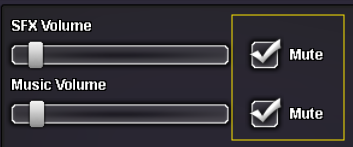
Good day @Thiagote I apologize for the issues you are currently experiencing. Can you check to see if the "Mute" boxes are checked in your sound settings in-game? You can navigate here by going to the Menu (button to the left of your Pokedollars) the selecting Options. From there you can either scroll down to find the sound settings or simply click the Sound button to quickly navigate. If your boxes are not checked then you will need to check (muting your game). This is required due to a known bug that should be fixed soon. I look forward to your response. Regards, Bitterblade
-
Good day @Tuyenhuynh2k3 I apologies for the issues you are experiencing. Addressing the first issue of the Prize Giver. At the time of checking, it appears that you now have 147 seen. The Pokemon that you have yet to get the seen data for are the following: Omanyte Kabuto Zapdos Dratini Now the address the issue you are having with the Teleporter Quest. As you continue through New Mauville you will defeat the Aqua and Magma Grunts. Once you retrieve the remote-control key (location revealed by a grunt) then you will be able to continue progressing. Further information on the Teleporter Quest can be found here. Regards, Bitterblade
-
Good Day @Rohan2kl The requirements for the Heatran Quest changed in June of this year. The requirements are now that you need to have all non-legendary caught data for Sinnoh, be the Sinnoh Champion, and have 1 level 60 or lower Pokemon in your party. In your case, it appears that you are missing the majority of the Sinnoh Pokedex caught data. Once you get your non-legendary Sinnoh caught data you should be able to begin the quest. I look forward to hearing of your success with the Heatran Quest. Regards, Bitterblade