




New Trade Zone
Trade Zone is now live
Use the new Trade Zone for auctions and instant-price trades so Pokemon and item offers are easy to find.


Desumi
Suspended
-
Joined
-
Last visited
Everything posted by Desumi
-
-
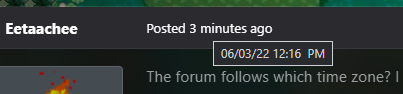
Eternatus faints from Regice's Ice BeamBanned for spamming and not being made a meme out of by the community for it7/10 since anime related.Hmm I see. Perhaps @Shinohara can elaborate a bit more on this as they are more familiar with the innerworkings of the forums.Yup.Both on PC and on my phone it says at 09:41 AM, which is the correct timestamp following my set local time being GMT+2. I'll send a quick SS to confirm this. I am just speculating with this, but it could be that the forums can't properly convert it to your local time in IST, and perhaps is just showing GMT+0 as a default value, not that I can confirm or prove this fact.

 If it helps, I know that PRO tends to follow GMT+0 timezone for any events or schedueled maintenance/backups for any in-game activity, don't know if this relates to how they do on the forums. But, as I am based in GMT+2 (summertime) and the forum dates are actually displayed and also converted into the correct timestamp, I find it hard to believe that its not based on the local system format on the device used while viewing the forums.Pretty sure the forums follow the MM/DD/YY as showcased in the image above while hovering over a timestamp. As for the time/timezone? It should follow whatever is local time set on your PC/Device as far as the Invision Community forum platform handles dates/timestamps, unless PRO has customized it differently which I don't think they have? And you can't change it, as its not a profile setting, not that I can find.
 You can also try to connect the manual way, by opening the command console (press F2 on keyboard) at the login screen and enter the following: connect 45.9.150.75 800 for Silver OR connect 45.9.150.75 801 for the Gold server, whichever you want to connect to.


Account
Navigation
Search
Configure browser push notifications
Chrome (Android)
- Tap the lock icon next to the address bar.
- Tap Permissions → Notifications.
- Adjust your preference.
Chrome (Desktop)
- Click the padlock icon in the address bar.
- Select Site settings.
- Find Notifications and adjust your preference.
Safari (iOS 16.4+)
- Ensure the site is installed via Add to Home Screen.
- Open Settings App → Notifications.
- Find your app name and adjust your preference.
Safari (macOS)
- Go to Safari → Preferences.
- Click the Websites tab.
- Select Notifications in the sidebar.
- Find this website and adjust your preference.
Edge (Android)
- Tap the lock icon next to the address bar.
- Tap Permissions.
- Find Notifications and adjust your preference.
Edge (Desktop)
- Click the padlock icon in the address bar.
- Click Permissions for this site.
- Find Notifications and adjust your preference.
Firefox (Android)
- Go to Settings → Site permissions.
- Tap Notifications.
- Find this site in the list and adjust your preference.
Firefox (Desktop)
- Open Firefox Settings.
- Search for Notifications.
- Find this site in the list and adjust your preference.