New Trade Zone
Trade Zone is now live
Use the new Trade Zone for auctions and instant-price trades so Pokemon and item offers are easy to find.
Leaderboard
-

Norex
Discord Moderator3Points6837Posts -

Thanhtd2919
Registered User3Points98Posts -
Raaah
Registered User2Points441Posts -

Kauaxblack
Registered User2Points255Posts




Popular Content
Showing content with the highest reputation on 04/28/24 in all areas
-
2 points
-
1 pointHello there I just realized that there are a lot of cool names which is already been taken and those are not even played this game and who are played got leas than 100hrs and left this game from years . Same with banned accounts many good names taken and they done scam and gon offline . So I have a suggestion why not you guy terminate their accounts who had not login for more than 1 years or 2 years ? Or those whose acc is banned from more than 1 year or 2 years ? This will allow players to choose more variety of names like Ghost, Blue, etc The player with user name Blue is banned and not logined from more than 5 years and same with the user name Ghost .1 point
-
1 point
-
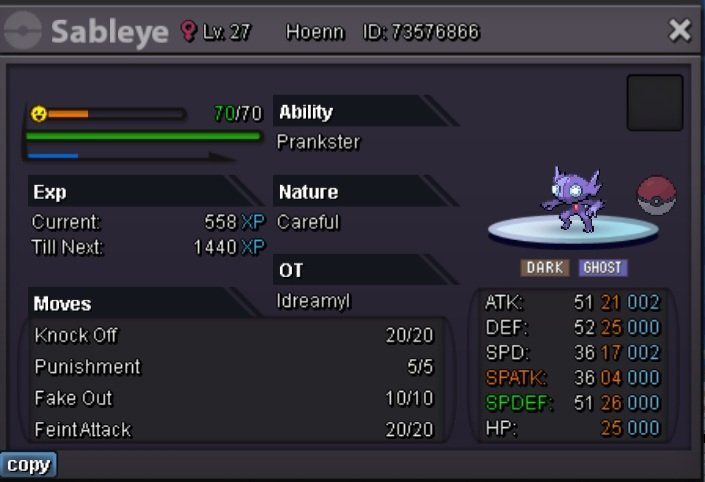
1 pointStart: 500k Ins: 3m5 mid bid: 50k, Time: 48h from the 1st bid ( 10 a.m 30/4/2024 UTC+7 ) Accept: CC= 410k Rr ivs= 500k Rr nature= 250k
 1 point
 -
1 point
-
1 point
-
1 point
-
1 point
-
1 point
-
1 point
-
1 point
-
1 point
-
1 point
-
1 point
-
1 point
-
1 point
-
1 point
-
1 point
-
1 point
-
1 point
-
1 point
-
1 point
-
1 point
-
1 point
-
1 point
-
1 point
-
0 points
-
0 points
-
0 points
-
0 points
-
0 points
-
0 points
-
0 points