New Trade Zone
Trade Zone is now live
Use the new Trade Zone for auctions and instant-price trades so Pokemon and item offers are easy to find.
Leaderboard
-

Sidkagenou
Registered User5Points243Posts -
Lamquynh257
Suspended5Points44Posts -
Dfoxy110088
Registered User4Points123Posts -

Youngmucker
Registered User3Points203Posts




Popular Content
Showing content with the highest reputation on 06/08/25 in all areas
-
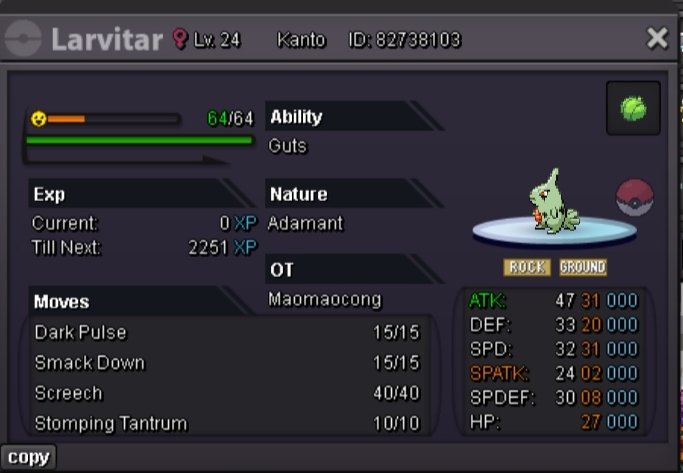
2 pointsSold to Shekhar786 No insta Time - 24 hours after first bid Accept only cash
 2 points
-
1 pointIF A TRADE MODERATOR HAVE TO FORCE A TRADE , ALL POKEMON WAS ON SHOPORABANE ACCOUNT Total Pokemon for sale : 102 ⚠️ What you need to know ⚠️ First of all (Pokemon Lv 100 shop part) I capture, I do the Ev's and I level these to level 100. Then I sell them. Thanks to not complaining about some mooveset not done. 📚 Pokemon Shop Rules 📚 - Cross Server only if u come on SILVER. - Fake offers --> Instantly Reported. - No auction here. - First buyer who confirms the purchase will have the pokemon, even if someone intends to buy it more expensive. - Purchase can mixing Item and money, do the difference. - Only accept items on list 💰 Payment available 💰 - Capsule coin : 480.000$ each - Nature Rerol Ticket :340.000$ each - Iv's Rerol Ticket : 680.000$ each - Pokedollars - Rare candy : 6.000$ each - PP Up : 2.000$ each - PP Max : 6.000$ each Contact me here My information ingame Step 1 - PM this account ingame 🔻🔻 Step 2 - Join my storage account in Vermilion City 🔻🔻 Step 3 - Let's Trade POKEMON SHOP


 1 point
-
1 point3 Day(72 Hours) Auction Starting the bidding at 1.5m, min bid increase 100k Auction Rules Fake offers will be reported. This is a Silver Server Pokemon Auction, so if you are on Gold server, you’re welcome to bid here but do note that you will need to transfer over to Silver server to make your purchase. Once an offer has been set, it cannot be retracted. If a bid is received in the final 15 minutes of the auction, the end point will be delayed by 15 minutes for each new bid thereafter, until the current offer has been held for a full 15 minutes. (must be accurate to the minute that the auction is set) Auction begins when the starting bid is placed. Payment Methods Pokedollars Coin Capsule (CCs) - 500k IV Reroll Tickets - 700k Nature Reroll Tickets - 300k Rare Candies - 6k If the winner would like it leveled to 100 I can do it for separate fee of 75k.
 1 point
-
1 pointso 1m min raise 100k no insta 72 hr from start bid accepted payment: cash only. timer
 1 point
-
1 point
-
1 pointStarting Price : 500K Min. Bid : 100k cc = 450k iv rr = 600k auction will end 72h after fist bid, if someone bids in the last 15 minutes, we will add 15 minutes more to the timer accordingly to auction rules, Thank you and happy biding
 1 point
-
1 point
-
1 point
-
1 point
-
s.o 200k min raise 50k insta 2m accepting cc's at 470k and pokedollars auction will start when s.o is met and will last 1 hour.
 1 point
-
1 point
-
1 point
-
1 pointGonna be online in about 2-3 hours, gonna talk to you via messages1 point
-
1 point
-
1 point
-
1 point
-
1 point
-
1 point
-
1 point
-
1 point
-
1 point
-
1.3m bunnelby 700k mudkip1 point
-
1 point
-
1 point
-
1 point
-
1 point
-
1 point@Schaar You're absolutely right, the same will be true for my Dodrio auction. Please note that your bid has been ignored from my end. However, I'll still try to contact a trade moderator to make sure I know exactly how to proceed.1 point
-
1 point
-
1 point
-
1 point
-
1 point
-
1 point
-
1 point
-
1 point
-
1 point
-
1 point
-
1 point
-
1 point
-
1 point
-
1 point
-
1 point
-
1 point
-
1 point
-
1 point
-
1 point
-
1 point
-
1 point
-
1 point
-
Hi, Hieubii sent me a Alomomola for my ev service but i didn't unlocked the right region, i want to sent him back his pokemon. Server : Gold Region : Johto My pseudo : Rs6decoiffeur Pseudo of the trader : Hieubii Screenshots : EDIT: Pokemon recovered. Kimew

 1 point
-
1 point