




New Trade Zone
Trade Zone is now live
Use the new Trade Zone for auctions and instant-price trades so Pokemon and item offers are easy to find.


Exotyc
Former Staff
-
Joined
-
Last visited
Everything posted by Exotyc
-
Hi there! We do not delete any posts except if they were double posted in different areas. Those threads will be hidden for the players. Most times we only move them to the appropriate area (such as reports, complaints etc.) Kind regards, Exotyc
-
Hi there! I'm sorry for the inconvenience and the late reply. Were you able to get back? Exotyc
-
Hi there! I'm sorry for the inconvenience. Are you still facing this issue? If so, please avoid using mobile data as the game has issues with it. You're able to play again atfer connecting to WIFI or a VPN.
-
I'll lock this thread as it was resolved here. Have a nice day!
-
I'll lock this as resolved. Have a nice day!
-
Hi there! I'm sorry for the inconvenience. Here is a guide to find the HM Surf in the house. Kind regards, Exotyc
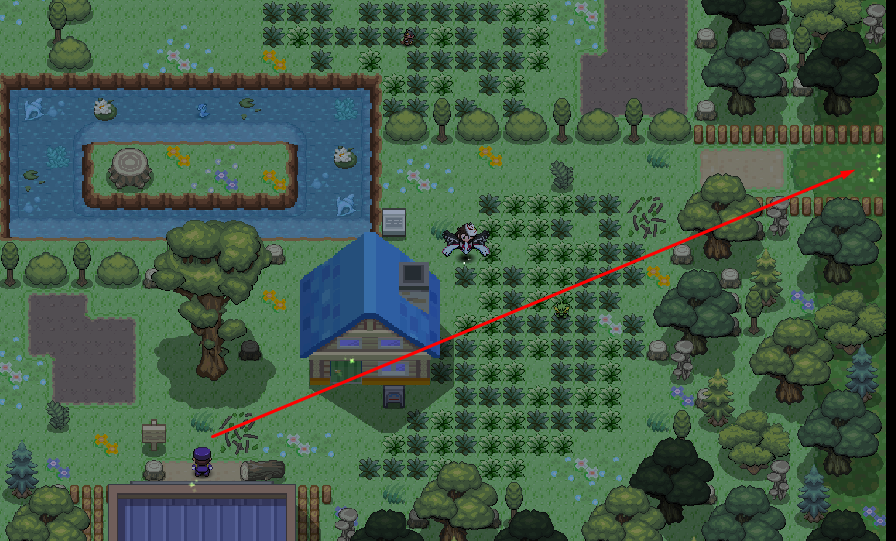
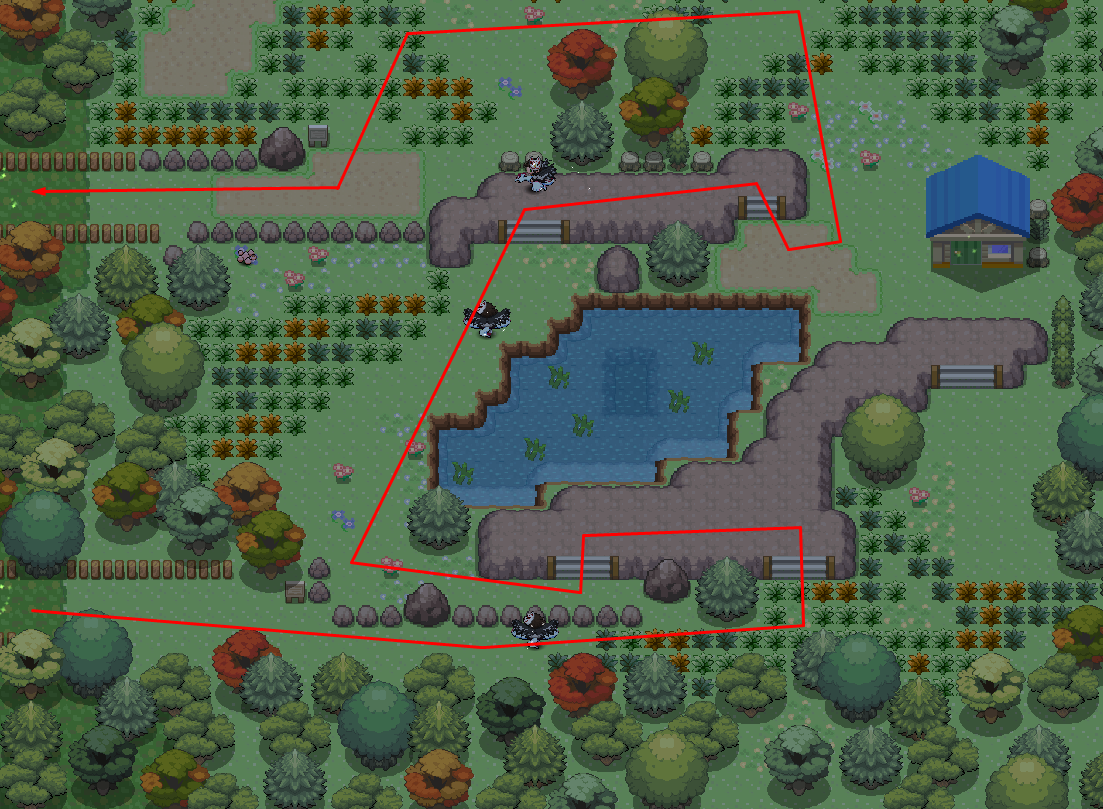
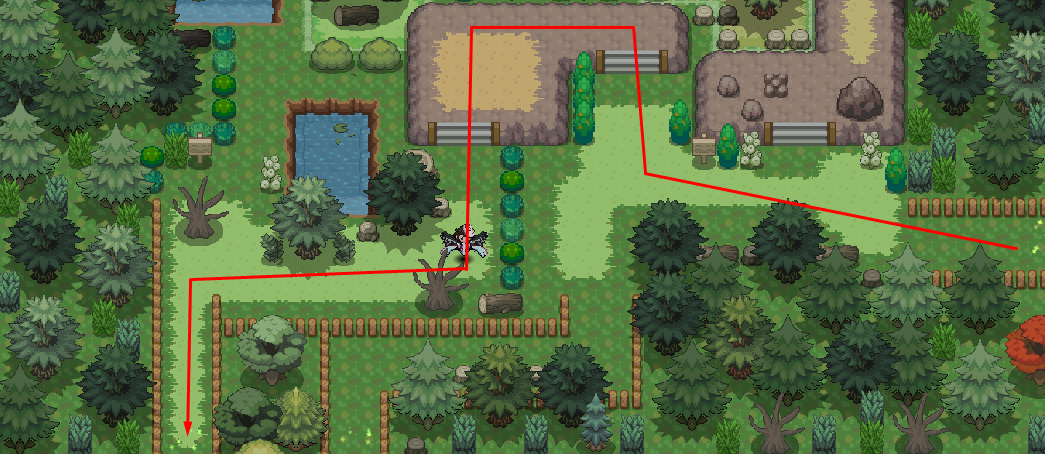

-
I'm sorry I couldn't answer earlier as I was busy. I'll lock this as resolved. Have a nice day!
-
I'll lock this as thread as we had talked ingame and it's been solved.
-
Hi there! I'm sorry for the inconvenience. You aren't required anymore to verify your email when you create your account. Kind regards, Exotyc
-
Hi there! I'm sorry for the inconvenience. It seems like you lost most of your money through losing in battles. (over 900k) Surrendering in a battle means you will also lost 5% of your money which is capped at 50k PokeDollars. Kind regards, Exotyc
-
Your Pokemon has been restored. In the future, please use the Restore Megathread.
-
Hey there! I'm sorry for the inconvenience. Please follow the procedure to evolve the Pokemon: 1. Faint the Pokemon 2. Restart the client 3. Heal the Pokemon 4. Level up or use a mysterious candy Kind regards, Exotyc
-
The rework was 1 year ago. It's weird that your different account played at the same time got different behaviour. Unfortunately, there's nothing we can do as it would be a lot of work to disable every trainer's LOS one by one. You won't be occuring the same issue anymore though after you battled once.
-
Hey there! I'm sorry for the inconvenience. Please follow the procedure to evolve the Pokemon: 1. Faint the Pokemon 2. Restart the client 3. Heal the Pokemon 4. Level up or use a mysterious candy Kind regards, Exotyc
-
I will lock this as resolved. Have a nice day!
-
Yes. Either way, you can evolve it as well with a mysterious candy when it hits level 100.
-
I'll lock this as resolved. Have a nice day!
-
Hi there! I'm sorry for the inconvenience and late reply. A lot of NPCs didn't lose their line of sight before the rework of the regions but they do now. Since the change isn't retroactive, you will need to win against the NPC again. Furthermore if there are any NPC that still have its line of sight despite winning against it, then please report it. Kind regards, Exotyc
-
I'll lock this as resolved. Have a nice day!
-
I'll lock this as resolved. Have a nice day!
-
I'll lock this as resolved. Have a nice day!
-
Hi there! I'm sorry for the inconvenience and the late reply. Are you still having the issue? Kind regards, Exotyc
-
Hi there! I'm sorry for the inconvenience and the late reply. Are you guys still having the issue? Kind regards, Exotyc
-
I'll lock this as resolved. Have a nice day!
-
Hey there! I'm sorry for the inconvenience. Please follow the procedure to evolve the Pokemon: 1. Faint the Pokemon 2. Restart the client 3. Heal the Pokemon 4. Level up or use a mysterious candy Kind regards, Exotyc
