




New Trade Zone
Trade Zone is now live
Use the new Trade Zone for auctions and instant-price trades so Pokemon and item offers are easy to find.

Ratedbeast
Registered User
-
Joined
-
Last visited
Everything posted by Ratedbeast
-
Yes, you should return. Different new things have been added. Before crashes were troubling but now mods have fixed it. Random battles are also added which is a great source of fun these days. Different new mounts and other stuff have been added along with some new pokemons. I think you should return and take a look. Hopefully you will enjoy a lot.
-
Welcome back!
-
Compared to few others similar games i play, i have noticed PRO staff more hard working and honest. All those who are talking about mutes and other stuff like late response, it's not mods who broke the game rules, its you. Its game, we all fun, joke, troll with each other but we need to make sure that it don't hurt others. If you really don't want to get into any sort of trouble, stay respectful with each other and obey the game rules. Whenever someone makes mistakes, they should be punished. It's good for community. I don't have any problem with PRO staff team.
-
Welcome! Hopefully you will enjoy your stay a lot and have a fruitful time.
-
+1 If it will be applied, it will be really helpful for players during pvp matches. Surfing smogon and other sites to check mega stats is quite annoying between the match. I think this is one of the good suggestions. Hope mods will take a look after it and will work on it soon.
-
+1 It's a great idea. Hopefully it will be taken into consideration.
-
Welcome! Hope you will enjoy your stay a lot.
-
Bump!!!
-
Bump!!!
-
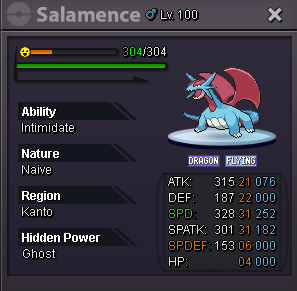
Starting price: 300k Minimum raise: 100k Insta: 2m Duration of auction: 24 hours (Nepal time zone: GMT+5:45) Accept coin capsule ( 380k ) // reroll ticket ( 750k ) // pokedollars only. Good luck !!!
-
-1
-
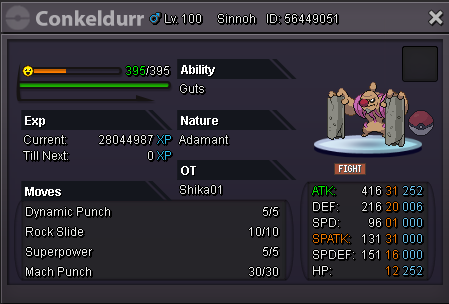
Starting price: 200k Minimum bid: 50k Instant price: 900k Duration: 24 hours from first bid // Nepal time zone (GMT+5;45) Accept coin capsule (400k) // reroll (750k) // pokedollars only Good luck!!!
-
Hello i want to buy an epic skarmory. Required nature: Impish Required IVs: 28+ in def and hp // 20+ in spDef . Other ivs dont matter much Budget: 750k maximum
-
Welcome to PRO, hope you will have a wonderful time exploring the game. :)
-
-
Hey, Since we already know that the duration for Safari EV is 20 minutes. The thing I have noticed is that each time we go in safari EV to farm pokemons evs some evs gets left. And training them in other places is kind of time consuming and boring. Thus, what i would like to suggest is add 5 more minutes and make it as 25 minutes per safari EV entry. This will help us to farm the evs in a easy and more efficient manner. Thank You!
-
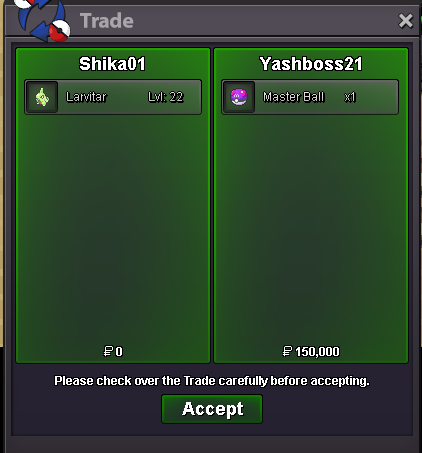
Since the time is already over, the winner of the auction is Yashboss21.
-
+1
-
+1 Good suggestion.
-
Auction started by Yashboss21 at 11:30 am (GMT+5:45) Nepal time zone. Good luck!
-
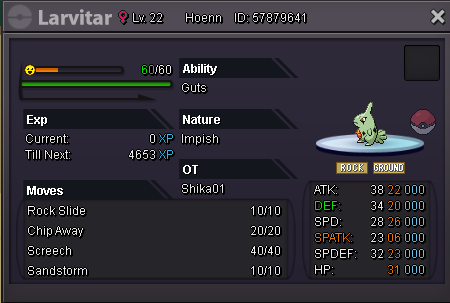
Starting price: 200k Minimum raise: 100k Instant price: 1m Duration: 24 hours after the first bid Accept pokedollars // coin capsule (400k) // reroll ticket (750k) // masterball (50k) only.
-
Whats the hp of volcarona?
-
@Glaciate Thanks for your attention. I will be re-opening the auction soon.
-
+1 Good way to catch and kill bug.
-
winner of the auction : Braxton3211. Please meet me in the game to claim your pokemon. screenshot will be provided soon.
