Leaderboard




Popular Content
Showing content with the highest reputation on 01/28/26 in all areas
-
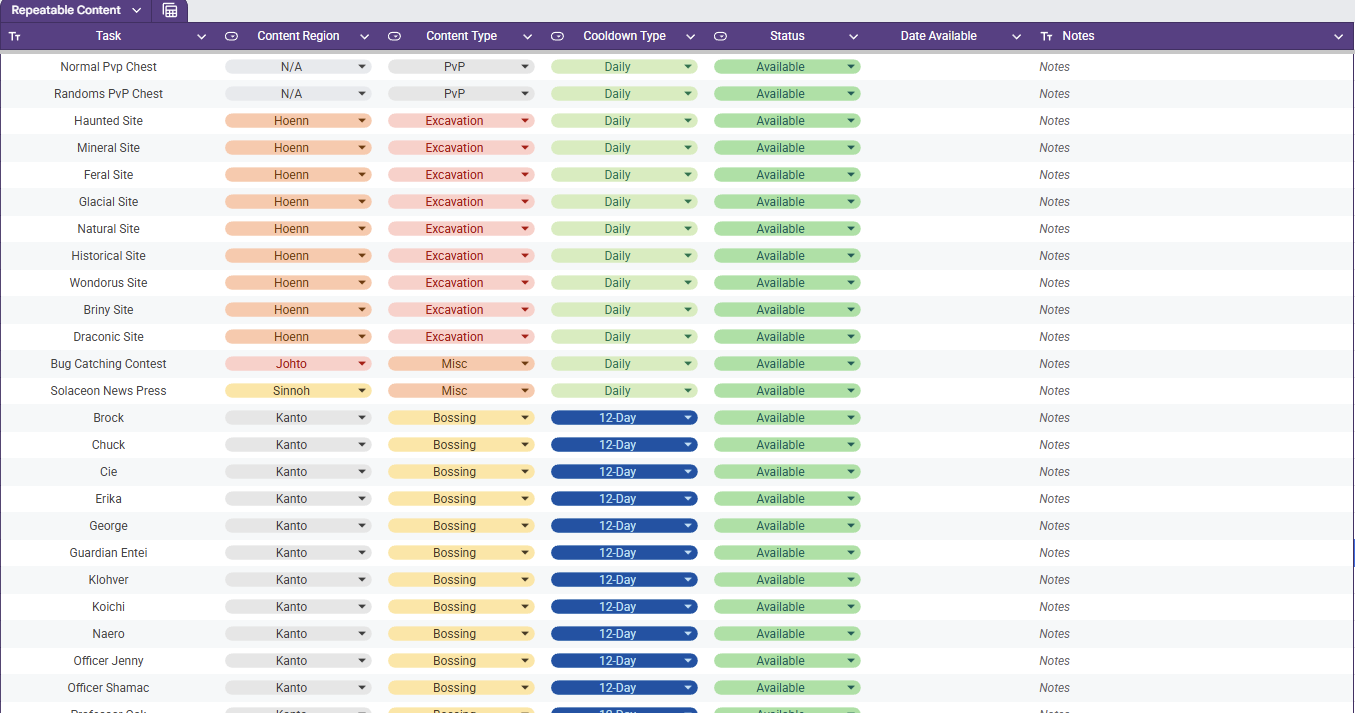
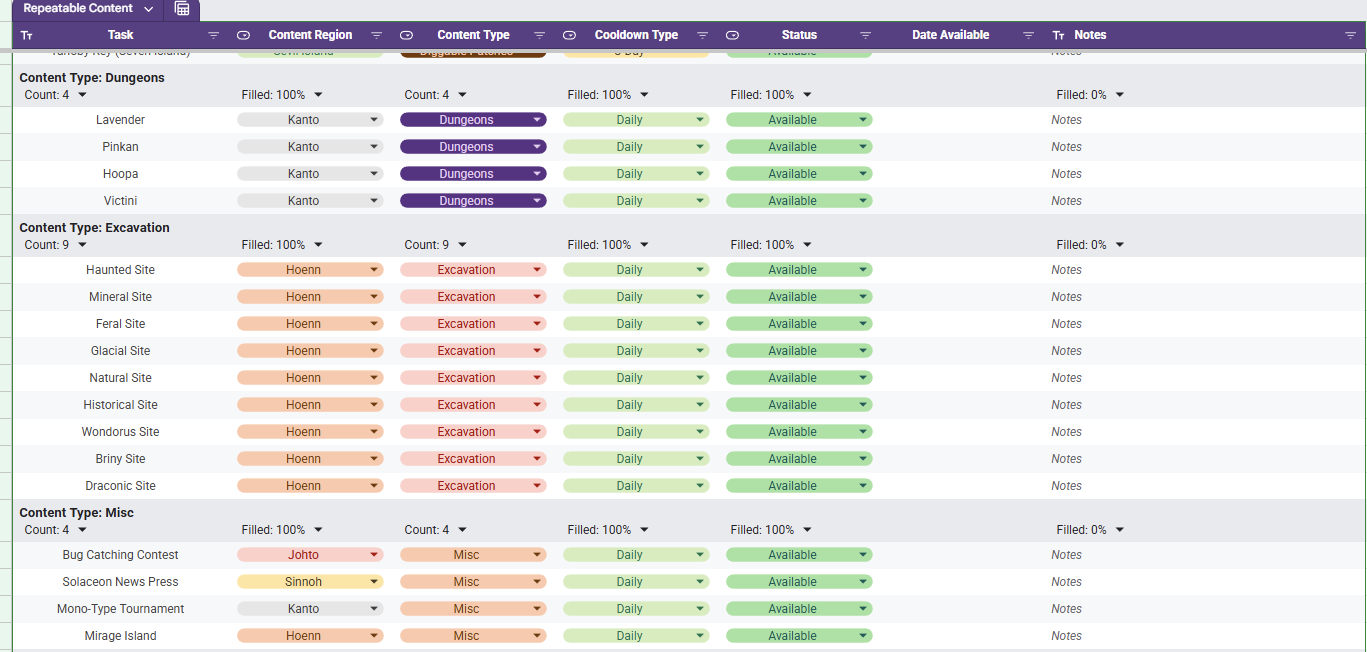
Repeatable Content Cooldown Tracker Tired of having to try to remember if your repeatable content is off cooldown or wasting your time making your way to dome content to realize it's unavailable cause you already did it? I know I was as well, so I made a spreadsheet (those who know me know I love my spreadsheets). Specifically, this spreadsheet lists out repeatable content (Dailies, weeklies, etc) and gives your the ability to mark it as on cooldown or available. While it sounds simple, there is a bit more luxury in this tracking tool. Once you set something as on cooldown the corresponding cell in the Date Available column will auto populate the day that it is to come off cooldown (In the case of Excavation sites, it calculates it with date and time and checks for exactly 20 hours). How to Acquire The first thing you need to do is acquire the spreadsheet with the following steps. - Access the Google Sheets link here. - At this point you are a Viewer and will need to make a copy by clicking File and then Make A Copy - Once you have a copy made, you are ready to track your Repeatable Content. How to Use When the file is first acquired, you will see all of the listed repeatable content in a single table as seen below and the columns are broken down as follows. Column A - Task The daily repeatable task name. Column B - Content Region The region (loosely) in which the content is located. Column C - Content Type The group in which the content is associated with. Column D - Cooldown Type The associated cooldown of the task. Column E - Status The indicator whether your repeatable task is available or not Column F - Date Available If on cooldown, the date which is will become available Column G - Notes A section for the user to leave personal notes associated with the task Although it is preference, a much cleaner view is through using a pre-saved data view "Group by Content Type". You can access this by selecting the Data tab and then Change View followed by Group by Content Type. This view will have all of the content separated neatly by the type of content it is identified as and an snippet of this view is shown below. As you go complete repeatable activities, you will want to mark them as "On Cooldown". Once you select this, the corresponding cell in the Date Available column will populate with a cooldown associated with the value in the Cooldown Type column. For example, if you complete the the Diggable Patches on Route 3 on 01/28/2026 then they will be available on 01/31/2026 (as seen below). When the current date is the same as the Date Available, the "On Cooldown" in the Status will automatically flip back to "Available". If you want to add or remove content that you don't do, that is no problem. Simply remove the row from the sheet and refresh. Be advised, if you were to remove a column, it runs the risk of breaking the scripts and references and you may have to acquire a new copy. Adding a new cooldown type is not as simple and requires script modifications. The current version of the spreadsheet covered as much ground as I could think regarding repeatable content and its associated cooldown. The current cooldown options are 1, 3, 12, and 14 days as well as 20 hours. I am excited to share this with you all and, while I do not know of any bugs that currently exist with it, if you run into any issues please let me know and I will do my best to sort it out. Updates - 1/28/25: Fixed the download link and added Sinnoh Underground and Celadon Daily - 1/29/25 Updated Non-Excavation Date Available to put the local representation of 12:00 GMT+0 (so that it properly resets with game daily reset) - 1/29/25: Fixed bug where Petalburg Woods timer would only update a 1 day instead of 14 days.
 2 points
 -
S.O 10m Min raise 500k No insta Ends 24 hours after starting bid
2 points
-
Start Offer: 4M Min bid: 200K Insta: 7M 48 Hours after first bid.
1 point
-
1 point
-
start1 point
-
you won @Locuraa i am online atm1 point
-
abra 800k1 point
-
abra 7001 point
-
start goomy1 point
-
abra 600k1 point
-
1 point
-
5M will transfer if i win1 point
-
1 point
-
300k sir1 point
-
Hello @Leonardosenpai I have force the trade of the Magneton 500k have been deducted from @Shiringa's account 500k have been added to @Leonardosenpai's account Magneton has been transfered to @Shiringa's account Kinda Regards Glitterwing1 point
-
Sry I forgot to edit it it's sold1 point
-
Hello and welcome to this auction. s.o 1.5m min raise 250k No insta. accept Cash/cc(550k)/rriv(750€) 48hrs After First bid. Gl&happy bidding.
1 point
-
1 point
-
4.2m gold will transfer if won1 point
-
start (from silver will transfer if i win)1 point
-
1 point
-
+1, also for eject pack, red card, ...1 point
-
1 point
-
Hi @Westers I have edited your post to be more clear around the statement you made. I have pasted the rule in replace of what was written, which is defined in our Auction Rules. The extension does not have a 20 min duration and when it is in the last 20 minutes of the auction, it is a 15 minute duration and during the last 15 minutes of the auction. I would advise you to have a read over the auction rules that i linked above.1 point
-
Ikik, in case you're there for any other purpose, hit me up.1 point
-
Yes alhambhai i guess you bid after the auction ends1 point
-
wtb full regions + tele subway for 4 acc1 point
-
start1 point
-
Hello all, The winner of this auction is @Artiga24 with a 650k bid. @Gun01 Please make sure to trade with the rightful winner, and provide evidence of the trade here. Kindly, K-Mew1 point
-
Ty and please let me check the time for last bid if alhambhai placed bid after auction ends I will pm you in game...1 point
-
1 point
-
1 point
-
Hello, Auction is still ongoing, please read your own auction rules auction ends in 6 hours 13 minutes from now. Very Respectfully, Larfleeze1 point
-
Hello, i wan to buy services: Hoopa unbound, Reshiram, anda Victini. Thanks before IGN: Garuk1 point
-
Hello sir, i want to buy Hoopa Unbound and Victiny services.1 point
-
5.5m1 point
-
Hello, Your end point has been reverted back to the original end point. Please keep it this way for ease of looking vs the detailed one you put which causes confusion. Very Respectfully, Larfleeze1 point
-
Closed - Ended Auction @Perobento you won the auction, still wanna do the trade ?, add me in game to let me know please ;)) Name : Yoojinsoo1 point
-
1 point
-
start1 point
-
Absolute cinema Btw I hope you get something better on return instead someday. JUSTICE FOR DIAB10 AND HIS PINK PICHU. He was so close, yet so far.1 point
-
Hello everyone, The trade have been forced: 3.25M deducted from @Sayainji's account. 3.25M added to @Hoyk's account. Clefable transfered to @Sayainji's account. Best regards, Hizukii1 point
-
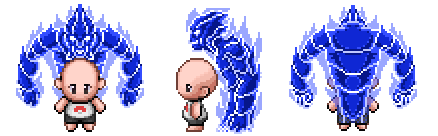
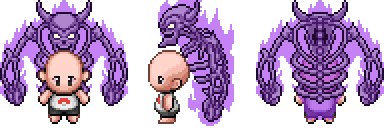
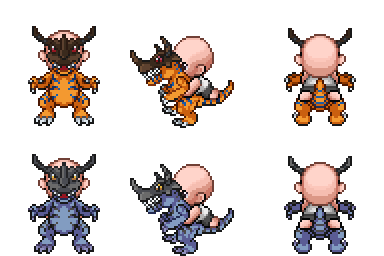
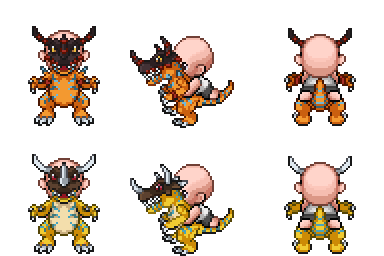
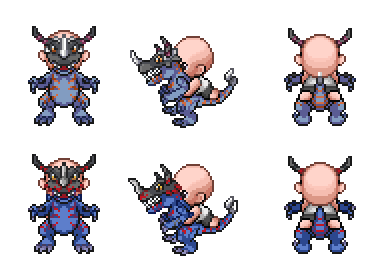
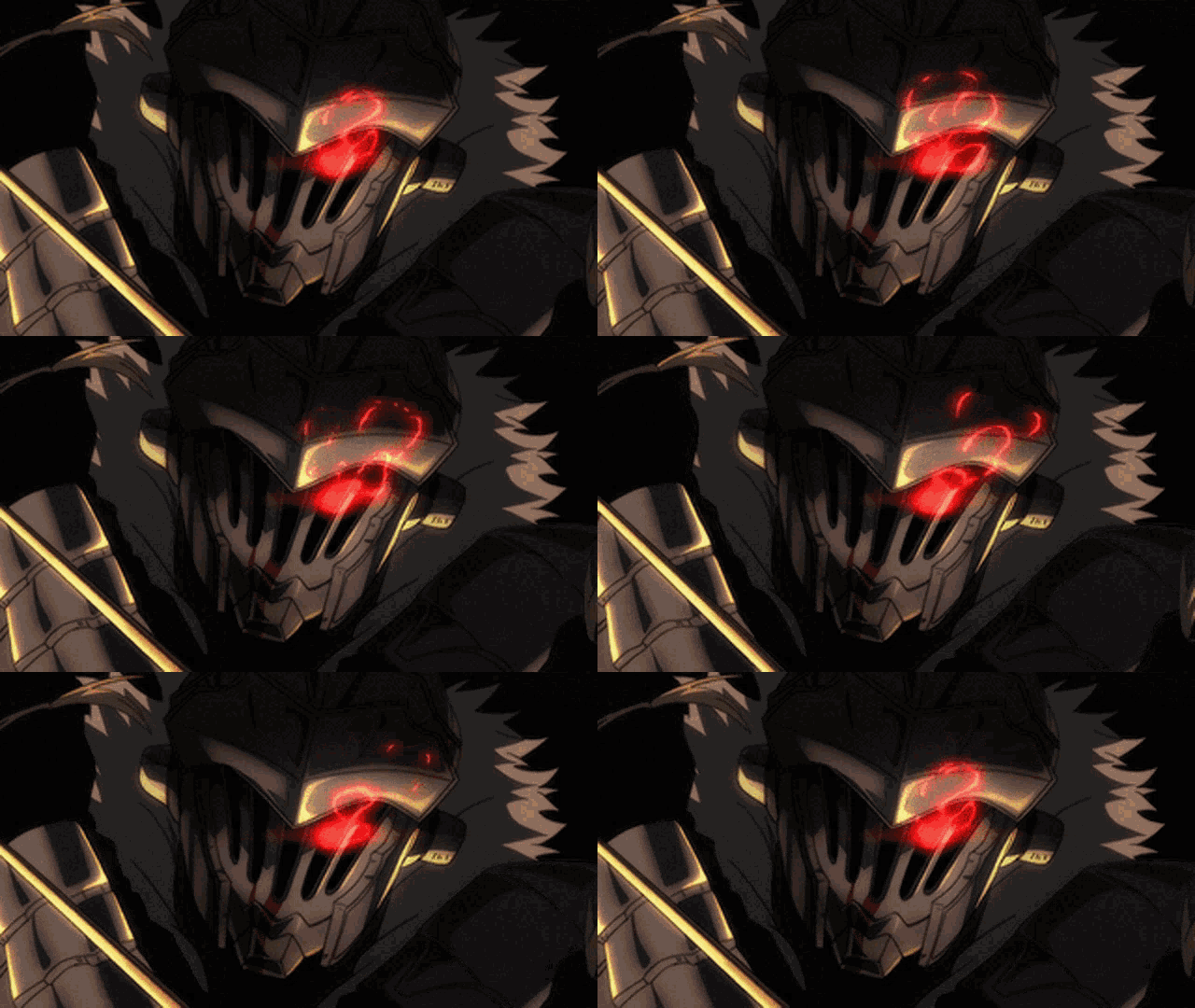
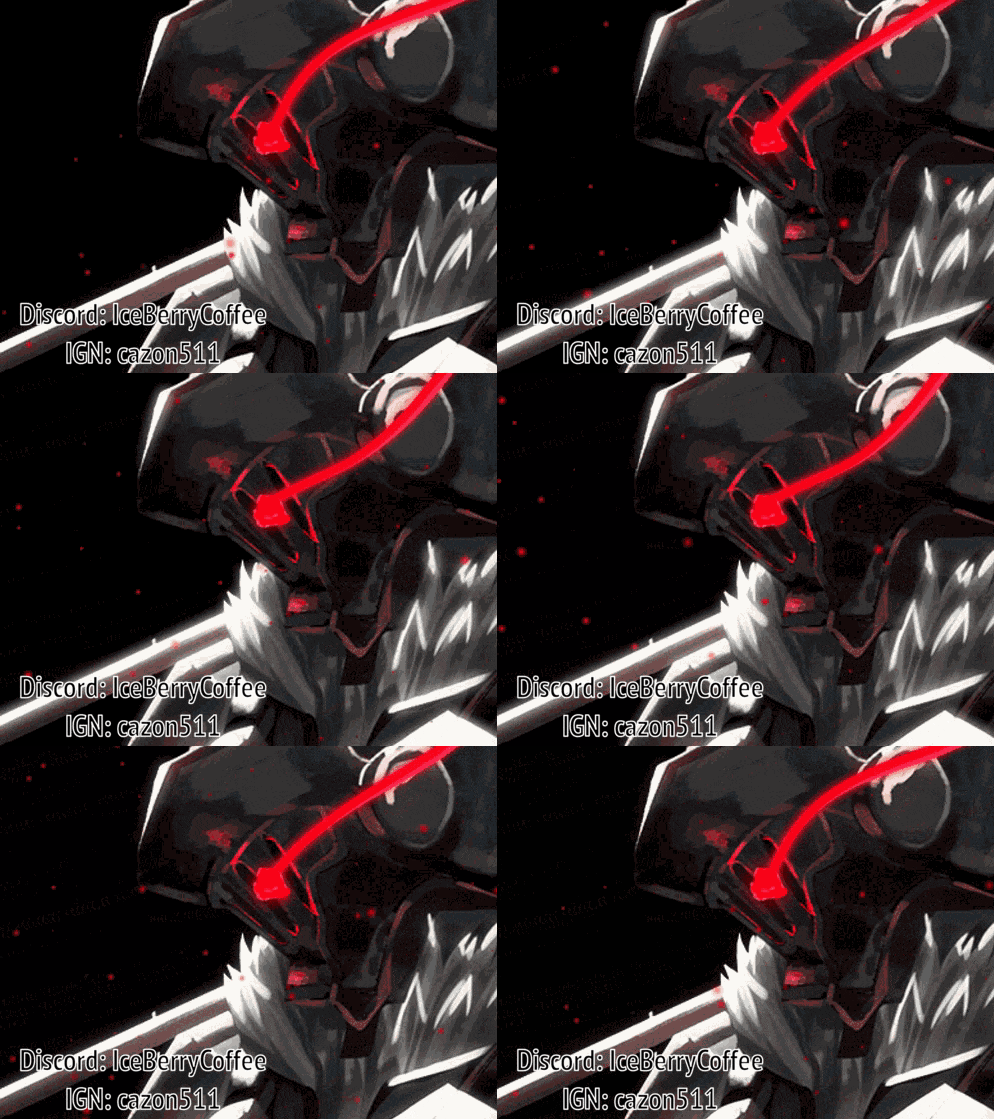
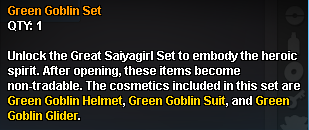
.Keitaimg { margin-left: -5px; } Prepare to elevate your player-versus-player experience with PvP Chests—mysterious chests brimming with rare cosmetics, unique mounts, and handy consumables. Designed exclusively for Ranked PvP, these chests reward both your daily activity and dedicated ladder climbing. First Win of the Day Start strong by claiming 1× PvP Chest with your first win in both Normal Ranked and Random Ranked PvP each day. Additional Wins In Normal Ranked, earn 1× PvP Chest for every two additional wins after your first. In Random Ranked, earn 1× PvP Chest for every four additional wins after your first. Top 25 Ladder Rewards At 12 AM and 12 PM GMT+0 each day, the Top 25 players on the Normal Ranked PvP ladder receive enhanced-chance chests: 1st Place: 5× PvP Chests 2nd–3rd Place: 4× PvP Chests 4th–10th Place: 3× PvP Chests 11th–19th Place: 2× PvP Chests 20th–25th Place: 1× PvP Chests Very Rare Mounts Slifer the Sky Dragon Obelisk the Tormentor The Winged Dragon of Ra Exodia Mount Dark Exodia Mount Blue-Eyes White Dragon Chaos Emperor Dragon Shenlong Mount Hoverpod Kaido Mount Karoo Mount Spyro Mount Kaisel Mount S Kaisel Mount S Walking Wake Mount S Gouging Fire Mount S Raging Bolt Mount S Koraidon Mount S Miraidon Mount S Poipole Mount S Naganadel Mount S Buzzwole Mount S Guzzlord Mount S Nihilego Mount S Celesteela Mount S Flutter Mane Mount Ultra Necrozma Mount S Ultra Necrozma Mount Ursaluna Mount Changes its appearance to Ursaluna Bloodmoon at night. Its form counterparts can be found during the respective events. Accessories Susanno (Blue) Susanoo (Purple) Susanoo (Orange) Susanoo (Green) Kyubi Amidamaru Venom Demon Mode Cosmetic Sets Great Saiyaman (Helmet, Clothes, Cape) Great Saiyagirl (Helmet, Clothes, Cape) Vegeta (Wig, Eyes, Armor, Tail) Boruto (Wig, Scar, Clothes) Baryon Mode (Eyes, Clothes, Tails) KCM 2 Mode (Wig, Clothes) Madara (Wig, Eyes, Armor) Cursed Seal (Wig, Eyes, Clothes, Wings) Zero (Helmet, Clothes, Cape) Captain (Clothes, Daiguren Hyorinmaru) Ulquiorra (Horns, Eyes, Clothes) Goblin Slayer (Helmet, Armor) Solaire of Astora (Helmet, Armor) Dark Magician (Helmet, Armor, Magic Circle) Armarouge Set (Helmet, Armor) Armarouge Set 2 (Helmet, Armor) Ceruledge Set (Helmet, Armor) Ceruledge Set 2 (Helmet, Armor) Astral Knight Set (Armor, Helmet, Cape) Dr. Doom Set (Clothes, Hood, Mask, Cape) Green Goblin Set (Helmet, Suit, Glider) Mordekaiser Set (Helmet, Armor, Cape) Consumables Soul-Bound IV-Locked Reroll Ticket to lock a single IV Soul-Bound IV-Locked Reroll Ticket to lock two IVs Soul-Bound Ticket to swap two IVs of a legendary Pokémon in a targeted way Rare Mounts Walking Wake Mount Gouging Fire Mount Raging Bolt Mount Koraidon Mount Miraidon Mount Poipole Mount Naganadel Mount Buzzwole Mount Guzzlord Mount Nihilego Mount Celesteela Mount Flutter Mane Mount Going Merry Mini Merry II Flying Dutchman Hybrid mount with unique poison gas particle effect. Minecraft Boat Raft Greymon Cosmetic Sets Ogerpon Teal (Mask, Clothes, Veil) Ogerpon Wellspring (Mask, Clothes, Veil) Ogerpon Hearthflame (Mask, Clothes, Veil) Ogerpon Cornerstone (Mask, Clothes, Veil) Tapu Koko (Wig, Eyes, Clothes) Tapu Lele (Hat, Eyes, Clothes) Tapu Bulu (Hat, Eyes, Clothes) Tapu Fini (Hat, Eyes, Clothes) Dragon Knight (Helmet, Clothes, Spear) L (Wig, Eyes, Clothes) Consumables Soul-Bound Reroll Ticket Soul-Bound Ticket to randomly reorder the IVs of a Legendary Pokémon Soul-Bound Ticket to reduce an IV of a Legendary Pokémon by 1 Scarce Heavy-Duty Boots Uncommon Consumables TM097 – Fire Punch TM188 – Draining Kiss TM199 – Ice Spinner TM220 – Knock Off TM230 – Flip Turn TM231 – Dual Wingbeat TM239 – Temper Flare TM254 – Alluring Voice TM280 – Power Whip TM292 – Body Press TM294 – Toxic Spikes TM308 – Encore TM319 – Hurricane Common Consumables TM168 – Charm TM169 – Fake Tears TM170 – Scary Face TM171 – Fire Fang TM172 – Thunder Fang TM173 – Ice Fang TM174 – Acid Spray TM175 – Struggle Bug TM176 – Psybeam TM177 – Confuse Ray TM178 – Disarming Voice TM180 – Pounce TM181 – Chilling Water TM185 – Metal Claw TM192 – Snowscape TM194 – Rock Blast TM196 – Imprison TM198 – Tailwind TM217 – Sand Tomb TM223 – Vacuum Wave TM241 – Supercell Slam TM248 – Skitter Smack TM276 – Superpower TM286 – Stored Power TM303 – Liquidation TM306 – Heat Wave TM309 – Play Rough TM317 – Outrage TM328 – Future Sight Bonus Drops PvP Chest (10% Chance) Gain an extra PvP Chest within your current chest. PvP Tokens (100% Guaranteed) Every PvP Chest includes PvP Tokens, which you can collect and spend on various PvP-focused rewards and cosmetics. Soul-Bound Reroll Ticket for a specific Legendary (3% Chance) Every PvP Chest has chance to drop a Legendary-specific Reroll Ticket (e. g. Heatran Reroll Ticket). Item Details Cosmetic Sets Dropped as one tradable item (e. g. Vegeta Set). Once you opened a cosmetic set to claim the cosmetics, those items become untradeable. Mounts & Accessories Typically tradable unless noted otherwise. Some mounts change forms or have special effects during certain conditions or events.
1 point
-
* { font-family: "Inter", sans-serif; } .keita-margin { margin-block-end: -0.8rem; } .keita-codeb { background-color: rgba(27, 28, 30, 1); padding: 0px 2px 0px 2px; color: #ebe7e3c4; border-radius: 4px; border: 1px solid rgba(128, 128, 128, 0.48); font-family: "Roboto Mono", monospace; font-size: 90% !important; } .keita-colored-code { color: #15f5ba; font-size: 100% !important; } Combining Search Terms Easily find the exact Pokemon you need by combining search terms. Search Example for a Specific Pokemon: lvl=30 shiny Rattata Finds all shiny Rattata's at level 30. Search for High-Level Pokemon: lvl>70 Charizard Finds all Charizards above level 70. Search for Pokemon by Type and Region: type=Water region=Hoenn Finds all Water-type Pokemon caught in the Hoenn region. Search for Specific Stats: ATK>=28 SPD>=28 Garchomp Finds all Garchomp's with both Attack and Speed IV stats at or above 28. Replace the Pokemon name and edit the level to suit your search needs. Supported Comparers Equality and Inequality: = or ==: Finds exact matches (e.g., lvl=30 finds Pokemon exactly at level 30). != or <>:Finds all that do not match (e.g., lvl<>30 finds Pokemon not at level 30). Greater and Lesser: >: Greater than (e.g., lvl>30 finds Pokemon above level 30). <:Lesser than (e.g., lvl<30 finds Pokemon below level 30). >=: Greater than or equal to (e.g., lvl>=30 finds Pokemon at level 30 and above). <=:Lesser than or equal to (e.g., lvl<=30 finds Pokemon at level 30 and below). Combining & Excluding Combining: space or , or &: Used as AND to combine different conditions (e.g., shiny,g=f lvl>=50 Gardevoir finds shiny female Gardevoir's at level 50 or higher). |: Used as OR to match multiple filter sets (e.g., type=fire | type=electric finds all Fire or Electric type Pokemon). Excluding: !: Put ! in front of a term to exclude it (e.g., !shiny finds all non-shiny Pokemon). Works with booleans (shiny, form, legendary, item and with bare names (!Golduck). Multi-words You cannot type raw spaces inside a value (e.g., m=String Shot). Spaces are parsed as AND. In this example, it would search for m=String and then treat Shot as a separate string to look for Pokémon names. You have to use quotes ("") or underscores (_) to search for the exact names (e.g., m="String Shot", m=String_Shot). In most cases, you can just search for part of the name to get the results you are looking for. Detailed Filter Options Below are the filter options you can use to narrow your search results, along with their aliases and how to use them: Filters Usable Without a Comparer shiny (shiny, s) - Filter for shiny Pokemon. form (form, f) - Filter for themed Pokemon. Legendary (legendary, l) - Filter for Legendary Pokemon. Pokemon Name (name, pokemon, poke) - Filter by the name of the Pokemon. Pokedex ID (dex, d)- Filter by the Pokedex identification number. Borrower Name (borrower, b) - Filter by the name of the Borrower. Selected (sel, select, selected) - Filter for selected Pokemon. item (item, i) - Filter for Pokemon with held items. Tag (tag) - Filter for Pokemon that have at least one custom tag created and assigned by the user. Basic Filters UID (uid, u) - Unique identifier of a Pokemon. Example: uid=53256 OT - Name of the person who caught the Pokemon. Example: OT=Username Level (level, lvl, lv) - The level of the Pokemon. Example: lvl=100 Ability (ability, a) - The ability of the Pokemon. Example: a=Protean Nature (nature, n) - The nature of the Pokemon. Example: n=Timid Item (item, i) - The held item of the Pokemon. Examples: i=focus_sash, i=smoke_ball Gender (gender, g, sex) - The gender of the Pokemon. Examples: g=m, g=f, g=none Type (type, t) - Type of the Pokemon, such as Fire or Water. Example: t=Fire Region (region, r) - The region where the Pokemon was caught. Example: r=Kanto Hidden Power (hiddenpower, hi) - The hidden power type the Pokemon has. Example: hi=Ground Move (move, m, skill) - The move of the Pokemon. Example: m=Tackle Form (form, f) - The form of a Pokemon. Examples: f=halloween, f=smr, f=valentine, f=shadow, f=pnk, f=chroma Generation (generation, gen) - The generation in which the Pokemon was first released. Examples: gen=1, gen=kanto, gen=paldea, gen=6, gen=alola CaughtBall (caught_ball, caughtball, ball) - The ball the Pokemon was caught with. Examples: ball=Pokeball, ball=Master_Ball Tag (tag) - Custom tags created and assigned by the user. Examples: tag=favorite, tag=to_level, tag=to_ev Stats Filters ATK (atk, attack) - ATK IV of the Pokemon. Example: ATK>=28 DEF (def, defense, defence) - DEF IV of the Pokemon. Example: DEF>19 SPD (spd, speed) - SPD IV of the Pokemon. Example SPD=31 SPATK (spatk, specialattack) - SPATK IV of the Pokemon. Example: SPATK>=28 SPDEF (spdef, specialdefense, specialdefence) - SPDEF IV of the Pokemon. Example: SPDEF>=20 HP (hp, hitpoints) - HP IV of the Pokemon. Example: HP=31 IVs (all, alliv, allivs, ivs) - Every IV of the Pokemon. Example: ivs>20, all>=10 ATKEV (atkev, attackev) - ATK EV of the Pokemon. Example: ATKEV=252 DEFEV (defev, defenseev, defenceev) - DEF EV of the Pokemon. Example: DEFEV=0 SPDEV (spdev, speedev) - SPD EV of the Pokemon. Example SPDEV=252 SPATKEV (spatkev, specialattackev) - SPATK EV of the Pokemon. Example: SPATKEV>=140 SPDEFEV (spdefev, specialdefenseev, specialdefenceev) - SPDEF EV of the Pokemon. Example: SPDEFEV>=100 HPEV (hpev, hitpointsev) - HP EV of the Pokemon. Example: HPEV=6 Expiration Time for Borrowed Pokemon Expiration (expiration, expires, expire, e) - Remaining time before a borrowed Pokemon will automatically return. Units: days (d), hours (h), minutes (m), and seconds (s). Examples: e<1d1h1m1s, e<1d3h, e>40s1 point
-
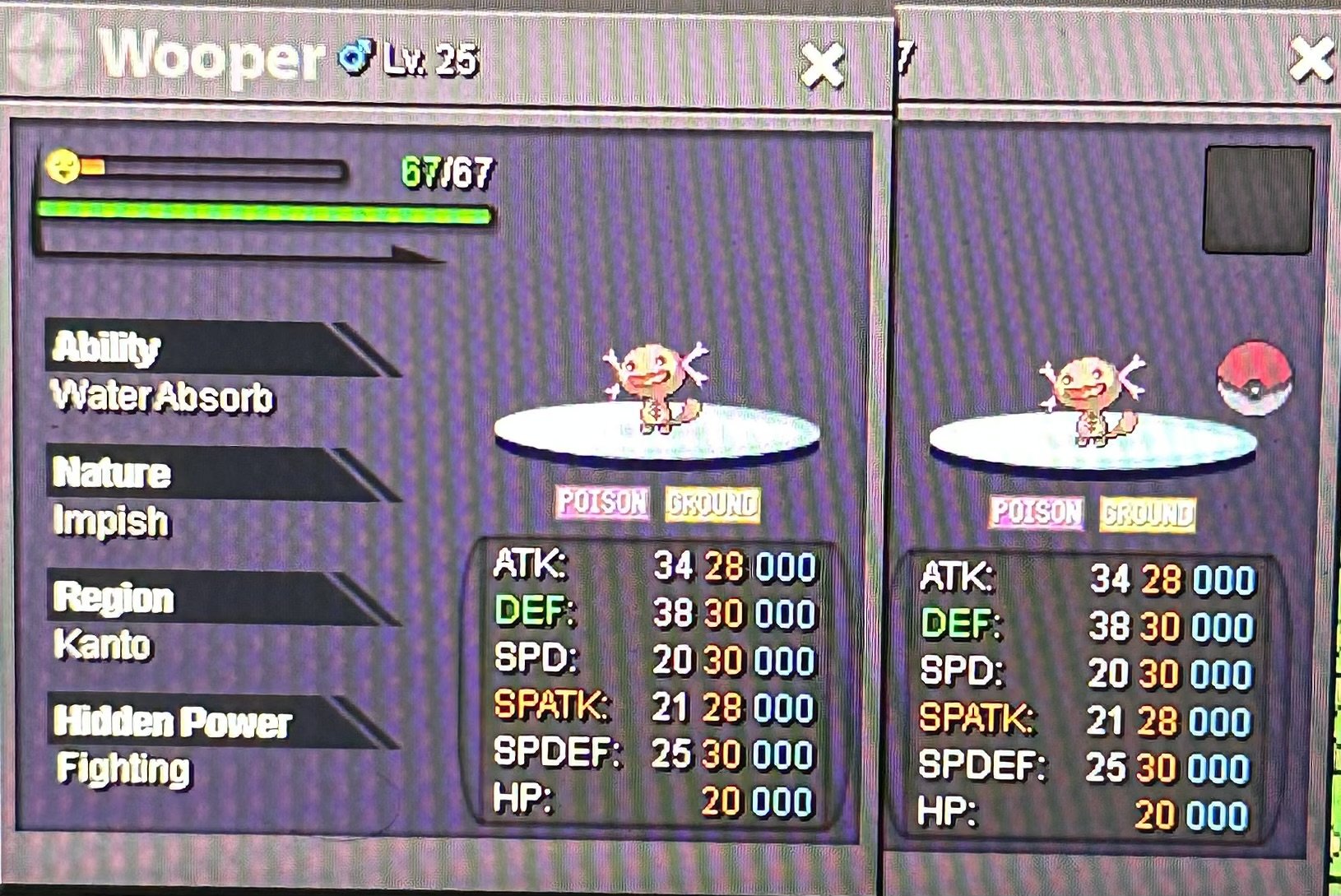
Start wooper0 points
-
0 points
-
4.6m0 points





(1).thumb.png.cc601e8b7ac8ea3a34e8aac1770e0b24.png)






.png.d0f09d54b005b8d12ff5fe776b0d3fc6.png)






.thumb.jpeg.897363d93fa0048040250ea94208ecc3.jpeg)









.thumb.png.0444cf3c35fe6b52a07d1437c08474aa.png)