New Trade Zone
Trade Zone is now live
Use the new Trade Zone for auctions and instant-price trades so Pokemon and item offers are easy to find.
Leaderboard
-
370kibiryani
Suspended11Points2840Posts -
Grabarz23
Registered User6Points2807Posts -
Phucs
Registered User5Points121Posts -
Gianni345
Registered User5Points243Posts




Popular Content
Showing content with the highest reputation on 11/15/22 in all areas
-
3 points
-
3 points
-
2 points
-
2 points
-
2 points
-
1 point
-
Start : 1m Min bid : 1m No insta End in 48 hrs after start Accept cc 340 k each
 1 point
 -
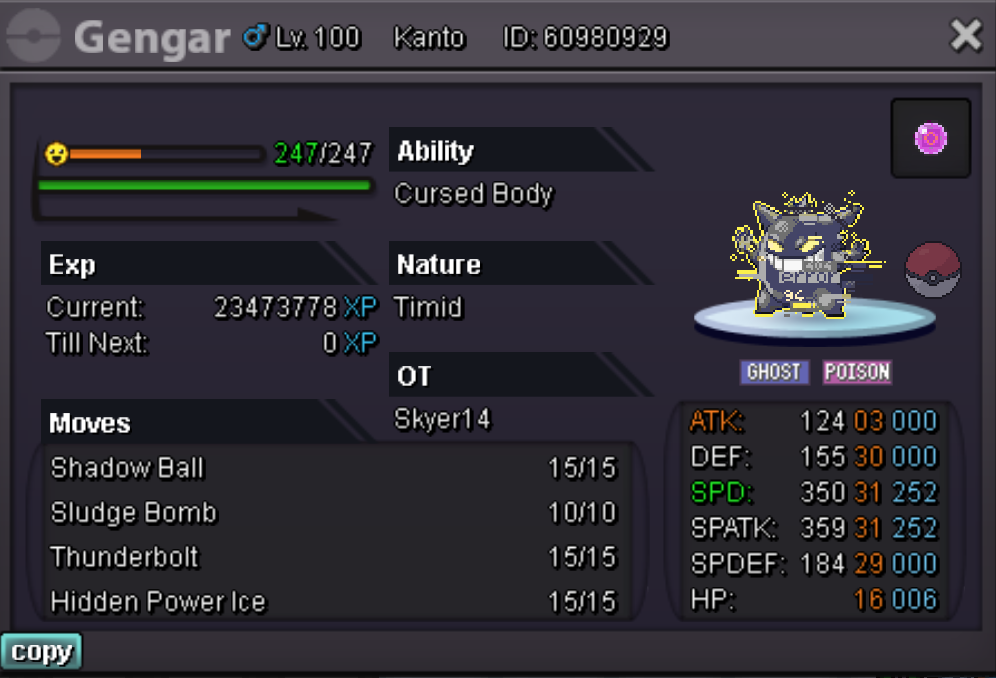
Hello Guys, im selling my Halloween Gengar with 31/31 IV´s in Speed and Special Attack, 30 in Defence, 29 in Special Defence and 16 in HP. The starting offer is 10 million Pokedollars and there is no instant price. The minimum raise per bet is 250k. This auction starts at the 15th of November at 4:20am CET (the Time where im making this post lmao) and goes on for 48 hrs till the 17th of November at 4:20 am CET. thank you to everyone who reads this or even places a bet in advance. Skyer14
 1 point
 -
gato666 is the winner but i have to go i will be back in about 4-5 hrs. got called into work1 point
-
1 point
-
1 point
-
1 point
-
1 point
-
1 point
-
1 point
-
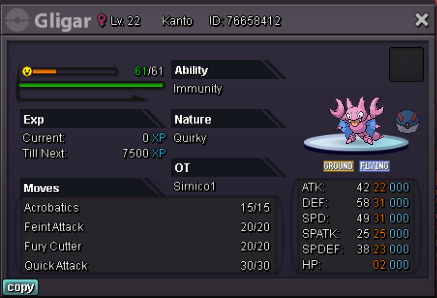
SO - 200k Min Raise - 20k End of Auction - in 24hs Insta buy: 3m
 1 point
 -
1 point
-
1 point
-
1 point
-
1 point
-
1 point
-
1 pointT B O P G A L L E R Y W E L C O M E - sentences - R U L E S - SENTENCES - G A L L A R I E S
.png.fa268bf7f747e4933a83792589683c08.png)

 1 point
 -
1 point
-
Hello there, I'd like to buy the Adamant Dragonite for 240k1 point
-
1 point
-
1 point
-
1 point
-
1 point
-
1 point
-
1 point
-
1 point
-
Traded them 16 mons to complete, had them done very fast. Would recommend.1 point
-
1 point
-
Hello, @Blixz Please avoid next time to post Auction information on title. Always post the information ONLY on the thread itself! Neverthless, I have forced this auction, as the seller is stuck doing story. Please confirm if the trade was successful. Best Regards, Zoruami1 point
-
Hi, I reported our problem as we discussed. Lets just wait until a staff forces the trade. 🙂1 point
-
1 point
-
1 point
-
1 point
-
1 point
-
1 point
-
1 point
-
Bro, I think it's November already😶1 point
-
1 pointBeginner Mode 1.) Catch a Pokemon with over 100 total Individual Values 2.) Encounter a Pokemon by fishing 3.) Get a bike 4.) Catch 50 different species of Pokemon 5.) Get the maximum of 510 Effort Values on one Pokemon 6.) Get one Pokemon to maximum Happiness 7.) Complete all Officer Jenny Tasks 8.) Get the Arcanine Mount 9.) Defeat the Kanto Elite 4 10.) Unlock the Subway =============================================== Easy Mode 1.) Catch a shiny Pokemon (Hoenn entry reward does not count) 2.) Defeat the Johto Elite 4 3.) Beat an Easy Mode Boss 4.) Get one Pokemon to Level 100 5.) Reach 350 Seen in Pokedex 6.) Unlock and visit Love Island 7.) Complete one Seasonal Event quest 8.) Catch a legendary Pokemon 9.) Win a Ranked PvP match, Normal or Random mode 10.) Catch a Pokemon during an Outbreak =============================================== Intermediate Mode 1.) Visit Birth Island 2.) Score 250+ Points in Bug Catching Contest 3.) Unlock the Doctor skill 4.) Unlock the Excavation skill 5.) Get top 25 in the Fishing Contest 6.) Complete the Teleporter quest 7.) Defeat a Hard Mode boss 8.) Defeat the Battle Zone Battle Tower 9.) Catch a Pink Pokemon 10.) Catch a Rare Pokemon with its Seasonal Event Form ============================================== Hard Mode 1.) Catch a Pokemon with all IV’s 30+ 2.) Pokedex - 350+ Evolutions 3.) Pokedex - Caught Data 750+ 4.) Reach the Specialist Doctor rank 5.) Get 10,000 Excavation Discovery Points 6.) Defeat all 40 levels of Suspicious Bot 7.) Contribute 3%+ towards a World Quest 8.) Top 25 in one of the Ranked PvP Queues 9.) Activate Double Rerolls and use all 10 IV Rerolls 10.) Complete all seasonal event quests ============================================== Hardcore Mode 1.) Catch at least 35 Legendary Pokemon 2.) Collect at least 40 Mega Stones 3.) Reach $100,000,000 currency 4.) Top 3 in Ranked PvP 5.) Top 3 in Random Ranked PvP 6.) Catch a shiny rare 7.) Come Top 3 in Fishing Contest 8.) Catch one of every available event form 9.) Catch one of every pink Pokemon 10.) 100% OT 20+ Pokedex 40/50 not bad i suppose1 point
-
1 point
-
1 point
-
1 pointShiny Ball - effective against shiny pokemon Eggscellent (Gold)


 1 point
 -
1 point
-
1 point1 point1 point+ increases the chances of catching Halloween pokemons Gold : MaitrePoulpe1 point