New Trade Zone
Trade Zone is now live
Use the new Trade Zone for auctions and instant-price trades so Pokemon and item offers are easy to find.
Leaderboard
-

Serkaninc
Registered User9Points372Posts -
Scrubdoodle
Registered User9Points927Posts -
Yauga
Registered User6Points1191Posts -
Ahmedsaied7
Registered User6Points144Posts




Popular Content
Showing content with the highest reputation on 09/05/23 in all areas
-
4 points
-
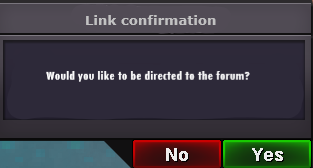
3 points2 pointsChange "of your maximum experience" to of your Pokémon's max HP As far as I experimented, once you enter a floor, leaving it will deny you from coming back into the said floor, so the red highlighted part shouldn't be possible. So the best thing to do in that situation is to enter the lowest floor you can and beat all 10 Trainers. With a full team it won't deny you a floor if your levels aren't messed up, and allows your Sweeper to gain a few extra levels for the next tougher floors. I must have been drunk nvm lol ! Btw it's cool to see this guide of yours and Leeluckya's one ! It changes from the crybabies that spit on the August 1st EXP Update DAY 1 without exploring these new Trainer Towers offered to us, which turn out to be really Pog.2 points2 points2 points2 points2 pointsWelcome to PRO! Hello, hope you have a wonderful journey, meet new people and more importantly just have as a blast!2 points1 point1 pointHey everyone, my suggestion regarding the ingame links to forum auctions would be to add an additional confirmation window before you are directed to the forums. For me personally it happens a lot that I unintentionally click on forum links in the trade chat which can be a bit annoying and sometimes leads to a crash. This particularly happens when I play on my phone since clicks are less precise there. the suggested confirmation window could look like this: Furthermore it would be nice if there would be a possibility to decrease the size of forum links. This would avoid unintentionally clicking on them and would lessen the spam in trade chat. I don't know if that is technically possible. For example: https://pokemonrevolution.net/forum/forum/4-suggestions/ -> forums or link I would be interested in what you guys think about it! Let me know! 🙂 Sincerely, Saruron
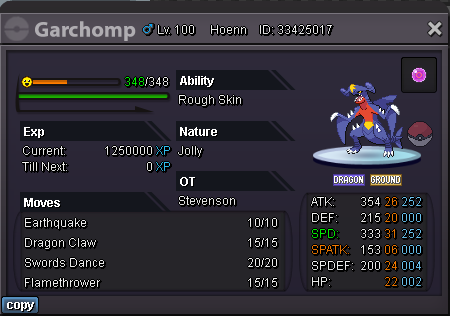
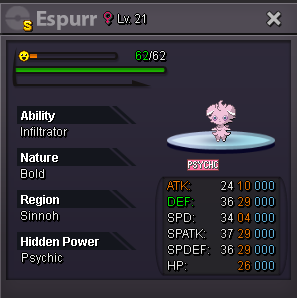
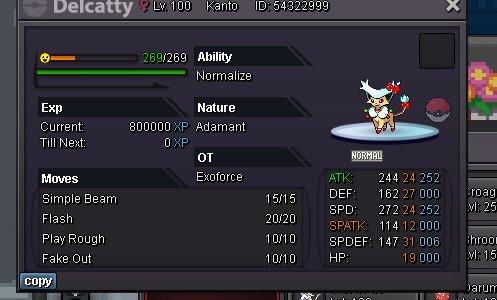
 1 pointAccepted CC 380k, iv rr 500k Discord : Esdeath4401#7603 3m 1.5m 1,2m 500k 2.5m 2m 1.2m Sold 13m 6.5m


.jpg.41cb927a18d1eb9eefacf7362c522883.jpg)
.jpg.8156c49af183053391ba02167b986147.jpg) 1 pointTired of being followed by your dead sync? Wouldn't it be better to have your favorite Pokémon follow you around in the overworld as you traverse the regions; questing, hunting, bossing, etc? This would make it so you could choose any Pokémon from your party, regardless of it's party slot to follow you around. How would it work? (To keep things short & sweet): Old: Pokémon in your 1st party slot will follow you in the overworld. New: Drag & drop a Pokémon from your party anywhere on screen to have it follow you in the overworld, regardless of it's position in your party. React with a heart ♥️ to this post to urge the developers to make this change, so that we can roam and explore with our favorite Pokémon buddy. 😊1 point1 point1 point1 point1 point1 point1 point1 point1 point1 point1 point1 point1 point1 point1 point1 point1 point1 point1 point1 point1 point1 point1 point1 point1 point1 point1 point1 point1 point1 point1 point1 point1 point1 point1 point1 point1 point1 pointIt has already been denied in the past because of the amount of delays and leaks it would cause and the manpower that would be needed.1 point1 point
1 pointTired of being followed by your dead sync? Wouldn't it be better to have your favorite Pokémon follow you around in the overworld as you traverse the regions; questing, hunting, bossing, etc? This would make it so you could choose any Pokémon from your party, regardless of it's party slot to follow you around. How would it work? (To keep things short & sweet): Old: Pokémon in your 1st party slot will follow you in the overworld. New: Drag & drop a Pokémon from your party anywhere on screen to have it follow you in the overworld, regardless of it's position in your party. React with a heart ♥️ to this post to urge the developers to make this change, so that we can roam and explore with our favorite Pokémon buddy. 😊1 point1 point1 point1 point1 point1 point1 point1 point1 point1 point1 point1 point1 point1 point1 point1 point1 point1 point1 point1 point1 point1 point1 point1 point1 point1 point1 point1 point1 point1 point1 point1 point1 point1 point1 point1 point1 point1 pointIt has already been denied in the past because of the amount of delays and leaks it would cause and the manpower that would be needed.1 point1 point