New Trade Zone
Trade Zone is now live
Use the new Trade Zone for auctions and instant-price trades so Pokemon and item offers are easy to find.


Epithet
Community Coordinator
-
Joined
-
Last visited
Everything posted by Epithet
-
Hello @Mimqy. You can transfer servers from the dashboard. You are given one free transfer every 30 days; each transfer within the 30 day cooldown will cost you 100 coins. To transfer, log into the dashboard, select the "Server Transfer" option on the left side of your screen, and then select "Transfer for free". The transfer will take a few minutes. If you have more questions or an issue arises, please let me know.
-
Hello @OkGoogle. Apologies for the inconvenience. Can you try speaking with Ayva in Nido Isle now?
-
Hello @BriorianFanboy. Apologies for the inconvenience. Can you try speaking to Ayva in Nido Isle now?
-
Locked as resolved.
-
Glad to hear that. I will now lock this thread. If you have further questions or another issue, don't hesitate to make another thread.
-
Glad to see your issue was resolved. I will now close this thread. If you have further questions or another issue, don't hesitate to make another thread.
-
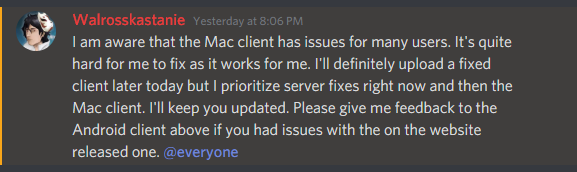
Hello @Marvitsu. Apologies for the delay. Here is a statement from one of our developers regarding the MAC client. This is the link to the video example provided in the image. If you have more questions or if the problem persists, please let me know.

-
Hello @Garurumonx. Apologies for the inconvenience. Thank you for reporting this. It has been forwarded to the responsible parties. Hopefully there will be a fix soon.
-
Hello @obeloke. Apologies for the inconvenience. Here is a statement from one of our developers regarding the MAC client. This is the link to the video example provided in the image. If you have more questions or if the problem persists, please let me know.
-
Locked as resolved.
-
Hello @Muneb. Apologies for the inconvenience. Could you provide us with more details and/or pictures surrounding your issue? We need as much information as possible to fully understand the issue and properly address it.
-
Hello @B4vett. Apologies for the delay. Here is a statement from one of our developers regarding the MAC client. This is the link to the video example provided in the image. If you have more questions or if the problem persists, please let me know.
-
Hello @rongliang28. Apologies for the inconvenience. Could you provide us with more details and/or pictures surrounding your issue? We need as much information as possible to fully understand the issue and properly address it.
-
Hello @LusamineSG. Apologies for the inconvenience. Could you provide us with more details and/or pictures surrounding your issue? We need as much information as possible to fully understand the issue and properly address it.
-
Hello @HolyCatRascal. My apologies for the extreme delay in responding. Are you still having this issue?
-
Hello @Thunderblackofi. Can you try deleting all your PRO files and redownload them?
-
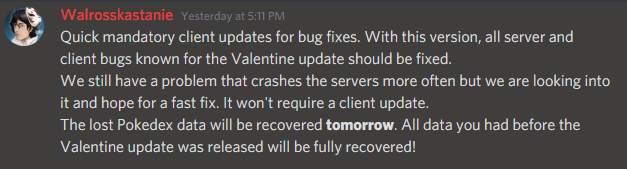
Hello @Stylishrock. Apologies for the inconvenience. This bug should now be fixed. Your data will be recovered soon. If you have further questions or if the problem persists, please let me know.
-
Hello @Alerte4rth. Apologies for the inconvenience. This bug should be fixed now. Your data will be recovered soon. If you have further questions or if the problem persists, please let me know.

-
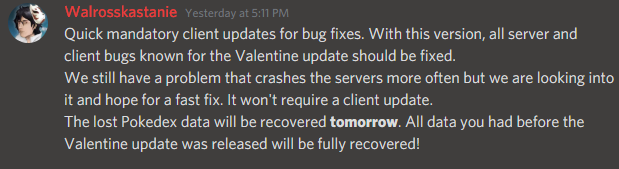
Hello @balzani. Apologies for the delay. The bug should now be fixed. Your data will be restored soon. If you have any questions or if the problem persists, please let me know.
-
Hello @Himyra. Apologies for the delay. The bug should now be fixed. Your data will be restored soon. If you have any questions or if the problem persists, please let me know.
-
-
Locked as resolved.
-
This issue should now be fixed. If you are still having this issue, please let me know.

-
Hello @Thunderblackofi. Apologies for the late reply. Are you still having this issue?
-
Hello @Marvitsu. Apologies for the inconvenience. This issue is already known by the Devs and a solution is being worked on. We will update you when there is a fix. While the fix is being worked on, we ask for your patience.